What a headcount plan is
Think of it as a costed hiring schedule. Every role you intend to open over the planning period gets a line: what the role is, when you want the person to start, and what the business will actually pay to employ them. Those lines roll up into a month-by-month cost curve, and that curve gets laid against the budget or the cash you hold. The output is not a headcount number — it's an answer to can we afford this, and when does it break.
That framing is what makes it a planning document rather than a wish list. A list of roles is free to write. A headcount plan is the version where each role carries its price and its date, so adding a sixth engineer visibly moves the month you run short.
What a headcount plan is not
- Not an org chart. An org chart shows who reports to whom today. A headcount plan is about roles that don't exist yet, and it says nothing about reporting lines.
- Not a hiring pipeline. A pipeline (or an applicant tracker) follows candidates in flight against reqs that are already open. The headcount plan is upstream of that: it decides which reqs get opened at all, and when.
- Not strategic workforce planning. Workforce planning in the broad sense asks what capabilities the organization will need years out. A headcount plan is the near-term, budgeted slice of that — this year's roles, with dollars and dates attached.
What a headcount plan contains
One row per planned hire, and the columns that make the row costable:
- Role and level. The title plus the seniority, because the level is what drives the salary and the loaded cost.
- Department. So the plan rolls up the way the budget does.
- Employment type and FTE. Full-time, part-time, or contract — and the fraction of a full-time equivalent the role represents. A 0.5 FTE role is half a headcount and roughly half the cost.
- Target start date. Not the quarter — the date. Everything about the cash timing hangs off it.
- Priority. Which roles you'd protect and which you'd drop if the year comes in tight. Decide it while you're calm, not in the meeting where you have to cut.
- Confidence. How likely this hire is to actually happen on this date. A plan where every line is treated as certain over-commits the budget.
- Fully-loaded annual cost. The salary plus everything the employer pays on top of it.
- Year-1 cost. The part of that annual cost that actually falls inside this fiscal year, given the start date — which for a late-year hire is a small fraction of the annual number.
Fully-loaded cost, and why a flat multiplier misleads
The salary is not the cost. On top of it a US employer pays payroll taxes, its share of health cover and other benefits, and the per-employee fees for payroll and HR administration — plus, in the first year, recruiting, equipment, and onboarding. The sum of all of it divided by the salary is the loaded multiplier, and the widely used practitioner rule of thumb puts it somewhere around 1.25 to 1.4 times salary.
That rule of thumb is a single number standing in for a range, and it's worth understanding why the range exists — because it means the multiplier is genuinely different for every hire on your plan.
First, several employer taxes stop at a wage base. Social Security tax applies only up to an annual wage cap. Federal unemployment tax (FUTA) applies only to the first $7,000 of each employee's wages. State unemployment tax applies only up to whatever wage base that state sets, at a rate assigned to the individual employer — usually a standard new-employer rate at first, then a rate based on the employer's own claims experience. The effect on the plan is structural: once a salary clears the caps, the extra salary carries less tax with it, so the tax share of salary falls as pay rises.
Those caps and rates are set annually — and, for state unemployment, per state and per employer — so look them up rather than carrying last year's numbers forward. The IRS states the current Social Security wage base limit in Topic no. 751, Social Security and Medicare withholding rates, and the FUTA wage base in Topic no. 759, Form 940 and federal unemployment tax; the Social Security Administration publishes the same cap each year. Your state unemployment wage base and your own assigned rate come from the rate notice your state workforce agency sends you.
Second — and this is the larger effect — many costs are flat dollars, not percentages. The employer's share of a health plan, the other benefits, the payroll and HR admin fees: those are close to the same money whether the person earns $45,000 or $190,000. As a share of salary, they weigh far more heavily on a junior hire than a senior one.
Put both together and the loaded multiplier is highest for your lowest-paid roles and lowest for your highest-paid ones. Apply one flat multiplier across a plan and you systematically understate what the junior hires cost and overstate the senior ones — in a plan weighted toward entry-level roles, that error runs in the direction that hurts. The fix is not a better single number; it's costing each role from itemized rates and letting the multiplier come out different per line.
Why timing matters as much as headcount
A plan costed in whole years hides two things that decide whether you make it through the year.
A hire starting mid-month costs a part month. Someone starting on the 20th costs roughly a third of a month's salary in that month, not a full one — and in a calendar fiscal year, someone starting in October costs about a quarter of their annual number. Round every hire to a full year and the plan looks unaffordable; round them all to January and it looks cheap. Neither is your actual cash.
One-time costs land once, in the month the person starts. The recruiting fee or job-board spend, the laptop and desk, the onboarding and training time — those hit in the start month, not spread evenly across the year. A month with three starts in it is a genuinely expensive month, and an annual view will never show you that. Sequencing start dates a few weeks apart is often the cheapest change available to a plan that doesn't quite fit.
What questions should a headcount plan answer?
- Can we afford this? The full-year cost of every planned hire, loaded, against the budget you have.
- Which month do we go over? Not whether the year totals out — the specific month the cumulative spend crosses the line.
- What do we drop if we can't? Which roles come out, or which start dates move, and what that does to the shortfall.
- How long does the cash last? Months of runway under the plan as written, and under a leaner version of it.
If a plan can't answer those four in a minute, it's a list of roles wearing a spreadsheet. The free Quarterly Headcount Planner answers a single quarter's worth of them in one tab, if you want to see the shape of the output.
Backfill: the hires a growth plan forgets
A headcount plan that only counts new roles understates the year. People leave, and replacing them costs real money you have to hire against: recruiting spend to find the replacement, plus the output lost while the seat sits empty and while the new person ramps. Those replacement hires compete for the same budget and the same recruiting capacity as your growth hires — a quarter that plans four new roles and quietly absorbs three departures is running seven searches.
The honest treatment is a backfill reserve: apply an expected attrition rate to your existing team, cost the replacements the same way you cost new hires, and carry that as a line in the plan. See the cost of turnover for how that replacement cost is built up.
Who builds a headcount plan, and when?
At a small company it's often the founder or the finance lead; as the company grows it commonly moves to HR or finance, with department heads submitting their asks. The trigger is usually one of four moments:
- Annual or quarterly planning. The standing cycle where next year's roles get proposed, costed, and approved.
- A fundraise or a loan application. Investors and lenders ask what the money buys, and "hiring" is not an answer — the headcount plan is.
- A board or bank conversation. Where you have to defend the number, line by line, against someone who will ask what a hire costs.
- A hiring freeze decision. Deciding what to stop is much easier when every role already carries a priority and a monthly cost.
Common headcount planning mistakes
- Planning against salary alone. The employer load is real money — on the 1.25 to 1.4 rule of thumb, a quarter or more on top — and leaving it out doesn't make it go away.
- One flat multiplier for every role. It's wrong in opposite directions at the two ends of your pay range, and most wrong on the junior hires you probably have the most of.
- Costing in whole years. Start dates are the whole cash story; a hire is a part-month in month one and a one-time bill besides.
- Ignoring attrition. A growth-only plan is a plan for a company nobody leaves.
- No priority order. If every role is essential, the cut gets made under pressure by whoever is loudest in the room.
- Never re-running it. One slipped start date changes every month downstream — the plan is only useful if it's cheap to redo.
Where should you build a headcount plan?
Costing a year of hiring doesn't require a platform billed per employee per month. Between a blank spreadsheet you'd build the whole cost engine into yourself and headcount-planning software billed per employee per month sits an owned workbook that already does the itemized loading, the start-date phasing, and the budget comparison.
Free, to try the idea: the Quarterly Headcount Planner is a single ungated tab — list a quarter's hires with their start months and pay, and it returns the quarter's cost and what each hire costs through month 12 of the plan year. It applies the flat 1.3x rule of thumb rather than an itemized build-up, and the one-page guide that comes with it explains exactly where that shortcut misleads. No signup, no email.
$24.95, one payment: the Headcount & Hiring-Plan Budget Workbook computes each hire's multiplier from your own employer tax rates and wage bases, phases 18 months of cash from real start dates, prices the backfill reserve, names the first month the plan goes over budget, and gives you months of runway under three scenarios — for Excel and Google Sheets, yours to keep.
Weighing that against a subscription? Hiring-plan template vs workforce-planning software is an even-handed read on what the per-employee bill actually buys and when it's worth paying.
Related reading: total compensation covers what a package is worth from the employee's side of the same arithmetic; capacity planning asks whether the people you have can cover the work before you conclude you need more; seasonal staffing is the temporary-crew version of the same sizing problem; and a skills matrix is often what tells you whether the next gap is a hire or a training plan. The tools for HR & people teams hub has the rest of the set.
Templates that implement this
Templates for planning and costing hires
3 templates
Workbooks for sizing and costing hires. The headcount plan template costs each planned hire from your own employer tax rates and wage bases, phases the spend from real start dates, and finds the first month the plan goes over; the capacity planner asks whether the team you already have can cover the work; the seasonal workbook does the same sizing job for a temporary peak-season crew. Each is one file you own, not a per-employee subscription.
- $24.95 Spreadsheet
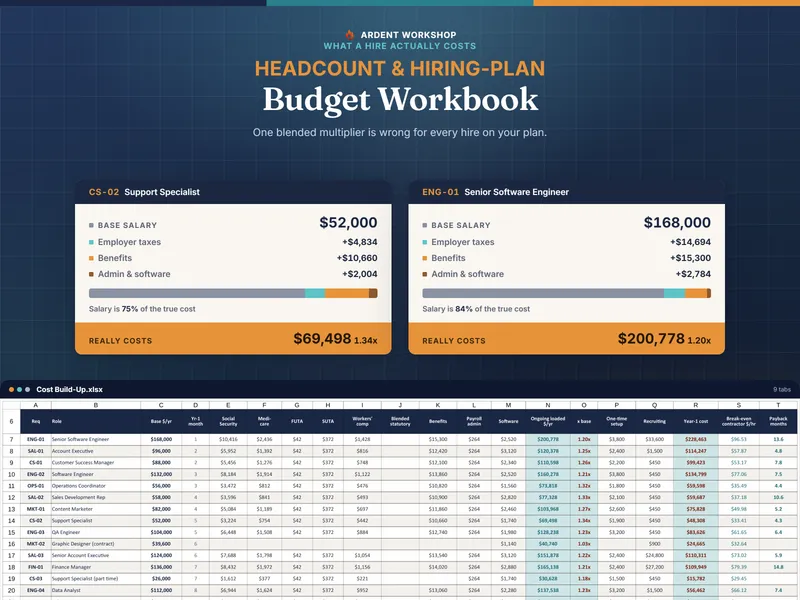
Headcount & Hiring-Plan Budget Workbook — Fully-Loaded Cost Planner for Excel and Google Sheets
Cost every planned hire from your own employer tax rates and wage bases, phase the spend month by month, and find out which month breaks the budget.
Team & TalentView details - $24.95 Spreadsheet

Team Capacity & Utilization Planner — Resource Planning for Excel & Google Sheets
A team capacity and utilization planner for Excel & Google Sheets: book people onto projects and see who's over-allocated and who has room, by month.
Team & TalentView details - $24.95 Spreadsheet

Seasonal & Peak-Season Hiring Workbook — Temp Staffing Plan for Excel & Google Sheets
Staff up for a peak without over- or under-hiring: a workbook that sizes seasonal headcount from your forecast, times the hiring ramp, and costs the season.
Team & TalentView details