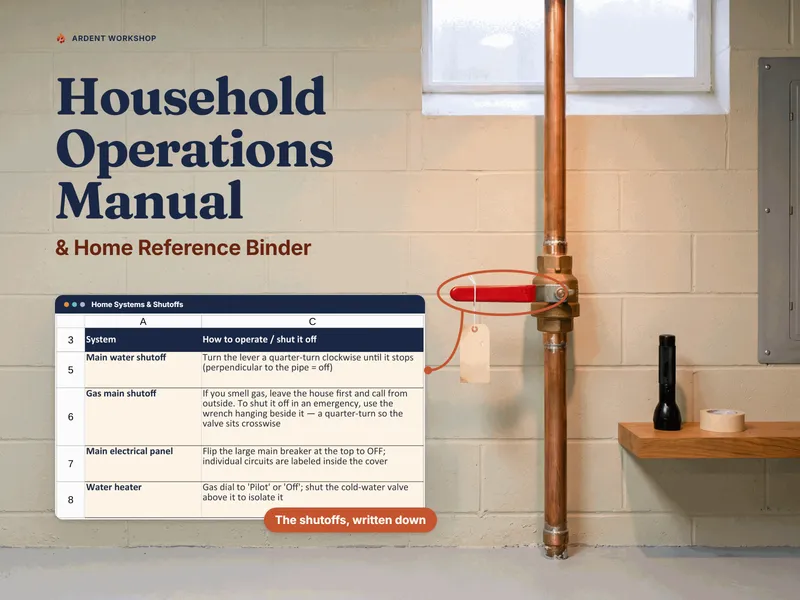
The honest framing is "own it, don't rent it." A home-management app can be genuinely useful for the active side of running a home — nudging you when a filter is due, sharing a chore list across the household. But the reference at the center of it all — where the water shutoff is, who to call when the furnace quits, how a sitter keeps the house going — is something you want to own, not lease.
The positioning: sticky notes → household binder → home-management app
Most homes start with scattered facts — a shutoff nobody but one person can find, a plumber's number in someone's phone, trash day in someone's head. The two ways to get organized from there sit at opposite ends. A household operations manual is the structured middle ground: real organization, on a file you keep. A home-management app is the heavier, often-rented option: more automation, but usually on someone else's server and frequently behind a recurring bill.
Household binder vs home-management app, side by side
| Consideration | Household binder (owned) | Home-management app (hosted) |
|---|---|---|
| You own it | Yes — a file on your own drive or a printed binder | Usually no — access often depends on an active account or subscription |
| Cost | One-time purchase, keep forever | Often a recurring fee (some are free, ad-supported, or freemium) |
| If the service ends or you stop paying | You still have the file | Access can be lost |
| Where your home's details live | Your drive, your Google account, or paper | Usually the company's servers |
| Works offline / on paper | Yes — print the if-I'm-away sheet for a sitter or the fridge | Usually no — needs the app and a connection |
| Reminders & notifications | On open, not pushed — the maintenance schedule works out each next-due date and flags what's overdue when you open the file | Often richer — push reminders and shared task lists |
| The core home reference | The whole point — shutoffs, utilities, contacts, the handoff | Varies by app; often built around task lists, not reference |
| Vendor lock-in | None — a standard spreadsheet you can open anywhere | Common — data in a proprietary format; export varies by app |
When a home-management app makes sense
If your main challenge is keeping up with tasks — you want push reminders when a filter's due, a shared chore list the whole household ticks off, notifications that nag until something's done — an app's automation can be worth the subscription. Some households run an app for the reminders and a household operations manual for the reference. The two aren't mutually exclusive; just don't let the app be the only place the information that matters most is written down.
When a binder is the better fit
For most homes the binder is the safer foundation. It holds the information a house-sitter or a panicked family member asks for first, it costs nothing to keep, it prints to a page you can hand someone, it works when the Wi-Fi is out, and it can't be taken away. If you only build one thing, build the owned reference — then add an app later if you want the reminders.
The privacy angle
There's a quieter reason to own the file: your home's details are sensitive. Where you live, when you're away, how to get in, what you own — that's not information most people want sitting on a third-party server tied to a login. A household operations manual is built around one rule that limits the exposure either way: record where things live and how the home runs, never the passwords, alarm or gate codes, or full account numbers. On a file you own, you also decide where it's stored and who it's shared with, rather than trusting a platform's policy.
If you'd rather it were paper than a file
A binder doesn't have to be a workbook. Plenty of households want the highest-stakes pages literally on the fridge and in a sitter's hand, and nothing to open at all — which is what the Home Emergency & "If I'm Away" Printables Pack is: eight print-and-fill pages, each shown already filled in, plus a shutoff map and cut-out wallet and fridge cards. It's the paper-first companion to the workbook rather than a replacement — the pack covers the emergency-and-handoff half, the manual covers the routine half.
Where to start with a household binder
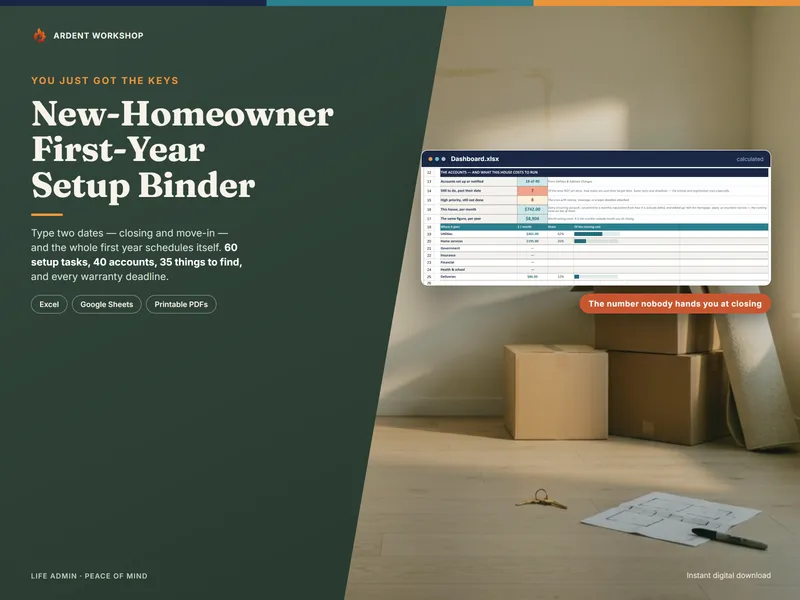
Try the free "If I'm Away" house-sitter sheet to see the single most useful page, or the free home shutoff & breaker location map if you'd rather start with the one nobody has done — then organize the rest — utilities, shutoffs, maintenance, contacts — in a binder you own. If you have only just closed, start instead with the free New-Home Move-In Checklist and the New-Homeowner Move-In & First-Year Setup Binder, which runs the deadlines of a first year off your closing and move-in dates; see also the templates for new homeowners hub. This is a record-organizing approach — not legal, insurance, or safety advice, and no substitute for a licensed plumber, electrician, or your utility's emergency line. Not affiliated with or endorsed by any home-management app service.
Frequently asked questions
- Is a household binder or a home-management app better for running a home?
- They lean opposite ways. A home-management app is good at active coordination — reminders, shared task lists, notifications when a chore is due. A household operations binder is the owned reference for how the home actually runs: where the shutoffs are, which utilities you have and who to call, the maintenance history, and an if-I'm-away handoff, in a file your family keeps. Many households use both, but the binder is the one that still works when a subscription lapses, the app shuts down, or the Wi-Fi is out during the emergency you built it for.
- Is a household binder or a home-management app better for the first year in a house you just bought?
- The first year is the case where the owned file wins most clearly, because it is mostly deadlines rather than chores. A home-management app is built around recurring tasks and reminders; the first year is a one-time sequence hanging off two fixed dates — your closing and your move-in — with account transfers on different lead times, warranty and registration windows that expire quietly, and a set of things about the house that only the seller knows and only for a few weeks. A binder that computes those dates from the two you type is doing arithmetic an app's reminder list does not attempt. Once the house is settled and the work becomes recurring upkeep, the balance shifts back toward whatever you will actually open each week.
- What happens to my home's information if a home-management app shuts down or I stop paying?
- That's the core risk of renting. A subscription app holds your home's details on the company's servers; if the service shuts down, raises its price, changes its terms, or you simply stop paying, your access can go with it — and you may not get a clean export. A household binder is a file you own — an .xlsx, a Google Sheet, or a printed page that lives on your own drive or in a drawer. No one can lock it behind a lapsed payment.
- Is it safe to keep my home's details in a spreadsheet?
- It's safe when the record follows one rule: record where things live and how the home runs, never the passwords, alarm or gate codes, or full account numbers. A household operations manual deliberately holds none of those, so there's far less to expose than an app account tied to your logins — and you decide where the file lives and who can see it. Keep the real codes and credentials in a dedicated password manager; the binder just notes that they exist and who has access.
- Can a household binder be shared with a house-sitter or family like an app can?
- Yes — that's what it's built for. As a Google Sheet you can share it with a partner or family and revoke access later; as a printed page you can hand a house-sitter the if-I'm-away sheet and leave it on the counter. The difference is that you control the sharing, on a file you own, and the sitter doesn't need to install anything or create an account to read it.