Skip Navigation

Spreadsheet

Estate & Life-Admin Binder — Important Documents, Accounts, Insurance & Final Wishes Organizer (Excel + Google Sheets)

An estate & life-admin binder for Excel & Google Sheets — organize important documents, accounts, insurance, and final wishes in one file you own.

Click to enlarge the image / Click × or press ESC to close

What you'll love

  • A finishable Start Here Checklist — every area with a status you set and a done-count, so getting your affairs in order feels finite, not endless
  • A Document Index — every important document and exactly where it's kept, so "it's in here somewhere" becomes "row 4, the fireproof box"
  • An Accounts & Access tab — each bank, card, loan, and utility, with where it's accessed and who to call — and, by design, no password column
  • One safety rule throughout — it records WHERE things live and WHO to call, never your passwords, PINs, or full account numbers (a map, not a vault)
  • Insurance, Contacts, Medical Notes, Final Wishes, and Household Reference tabs — everything a household needs when someone has to step in
  • Final Wishes that point to your will and advance directive (it's a record-organizer, not a will or a substitute for legal advice)
  • Four PDF guides — a Start Here guide, a What-to-Gather checklist, a Keeping-It-Safe-&-Current guide, and print-and-fill Printable Binder Pages
  • A 9-tab workbook (works in Excel AND Google Sheets) + 4 PDF guides · evergreen · instant download · a file you own

“Get my affairs in order” is the task that never has a good day to start. It feels enormous and a little grim, so it slides to next month, and next month — until a hospital visit or a loss turns it into a frantic search through filing cabinets. The Estate / Life-Admin Binder exists to make the task finite: one organized workbook that gathers everything that matters into a place the people you trust can actually find.

Everything that matters, in one place — before anyone needs it. Your important documents (and where they’re kept), your accounts and insurance, the people to call, medical notes, your final wishes, and the household reference that keeps a home running — all in one file you own.

The one rule that keeps it safe to keep

This binder is built on a single principle that runs through every tab: it records WHERE things live and WHO to call — never your passwords, PINs, or full account numbers. Your binder is a map, not a vault. The Accounts tab has a “where it’s accessed” column and, by design, no password column — your real logins stay in your password manager, and the binder simply records that one exists and who has emergency access. That’s what makes it safe to keep on a shelf or in a file.

What’s inside

  • A Start Here Checklist — the master list of every area, each with a status you set and a live done-count, so getting organized feels finishable, a few minutes at a time.
  • A Document Index — every important document, what kind it is, and exactly where it’s kept. “It’s in here somewhere” becomes “row 4, the fireproof box.”
  • An Accounts & Access tab — each bank, card, loan, utility, and subscription, with where it’s accessed and who to contact. The page that can save a family weeks of detective work.
  • Insurance, Contacts & Medical Notes — every policy on one page; the key people to call; and a record of allergies, conditions, and medications a caregiver or ER shouldn’t have to guess at.
  • Final Wishes — where your will and advance directive are, your service preferences, and who to notify. It points to your legal documents; it isn’t one, and it says so.
  • Household Reference — shut-offs, utilities, services, routines, and pets, so the house keeps running if you’re not there to run it.
  • Four PDF guides + printable binder pages — a Start Here guide, a what-to-gather checklist, a keep-it-safe-and-current guide, and print-and-fill pages if you’d rather keep a physical binder.

Own it, don’t rent it

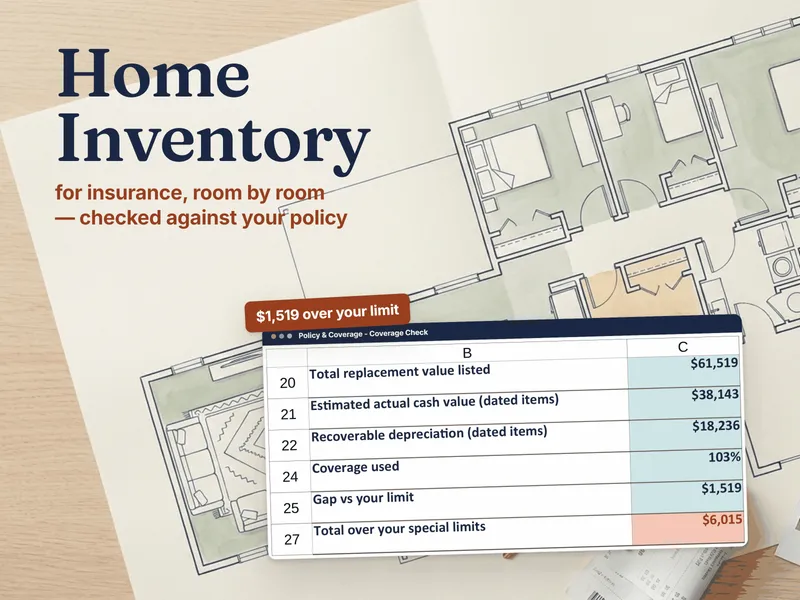
For something this personal, the file should be yours. Unlike a subscription app holding your most sensitive records on someone else’s server, this workbook can’t be locked behind a lapsed payment and won’t vanish if a service shuts down. You decide where it’s stored and who can see it — today and in ten years. Pair it with the Home Inventory workbook for the full picture of what you own.

Who it’s for

Household organizers, caregivers helping an aging parent get their affairs in order, couples who want either partner to find everything that matters, executors-to-be, and anyone who’d rather hand the people they love a map than a mystery to solve in their worst week.

An honest note

This is a record-organizing workbook — it is not legal, medical, financial, or tax advice, and not a will, trust, or advance directive. It points to the documents and the professionals that make your wishes official; it doesn’t replace them. The workbook ships pre-filled with a clearly fictional example you overwrite with your own, and it never asks you to store a password or a full account number. Not affiliated with or endorsed by any bank, insurer, or law firm.

Prefer to start free? Try the What Documents Do I Need? checklist — a self-scoring list of what to gather, free to download.

See it in action

Play

Built to last

  • Intuitive and straightforward design
  • Employs software best practices
  • Delivered as one spreadsheet that works in Microsoft Excel, Google Sheets, and LibreOffice Calc
  • Free updates — send us a message to be notified of updates when they are available
  • Completely customizable — add rows and columns, rename headings (unlock with provided password)

In the download

This digital product is delivered as a zip file containing the following items:

  • 01 — The Estate / Life-Admin Binder (.xlsx, 9 tabs): Read Me, Start Here Checklist, Document Index, Accounts & Access, Insurance, Contacts, Medical Notes, Final Wishes, Household Reference — pre-filled with a clearly fictional example; opens in Excel or Google Sheets
  • 00 — Start Here Guide (PDF): why a binder, the one rule that keeps it safe, and how to fill it without overwhelm
  • 02 — What to Gather Guide (PDF): the master checklist by category
  • 03 — Keeping It Safe & Current Guide (PDF): where to store it, what never to write down, and the yearly review
  • 04 — Printable Binder Pages (PDF): an emergency front sheet, a document index, an accounts page, contacts, and a final-wishes form
  • READ-ME-FIRST.txt

Compatibility & terms

Unless otherwise specified, this digital product is delivered as a spreadsheet (an .xlsx file) designed to work in Microsoft Excel, Google Sheets, and LibreOffice Calc . It is not guaranteed to work in any other application.

This digital product is copyrighted. It is intended for personal use only. It is strictly prohibited to reproduce, resell or share this product, in part or in full, with or without modifications. No refunds, exchanges, or cancellations. Given this is a digital product, no physical product will be delivered.

Why a workbook

Most tools force a choice between a blank spreadsheet you build from scratch and a monthly app that's overkill. Ardent Workshop is the rung in between — structure you own.

  1. Blank spreadsheet

    Free, but you build and maintain every formula, tab and layout yourself.

    • Free
    • Infinite setup
    • No structure
  2. You are here

    Ardent Workshop

    Owned, structured, connected workbooks — a one-time price, yours to keep.

    • One-time price
    • Structured & connected
    • Yours to own
  3. Generic SaaS app

    Powerful, but overkill, rented and locked-in — built for someone bigger than you.

    • Monthly rent
    • Overkill
    • Lock-in

Ready to start

Instant download · Free lifetime updates · Personal use license

$29.95 USD
Buy now

Pairs well with

From the blog

Hand-picked reading on how to actually use a tool like this.