Your volunteer list looks healthy. Sixty-odd names, most of them people who genuinely show up. When somebody asks whether you have enough volunteers, you say yes — and you mean it.
Then the person who runs the sound board texts at 9:40 on a Saturday night to say they have the flu, and you find out the honest answer was never yes. It was yes, for most things, probably, as long as it is not that one.
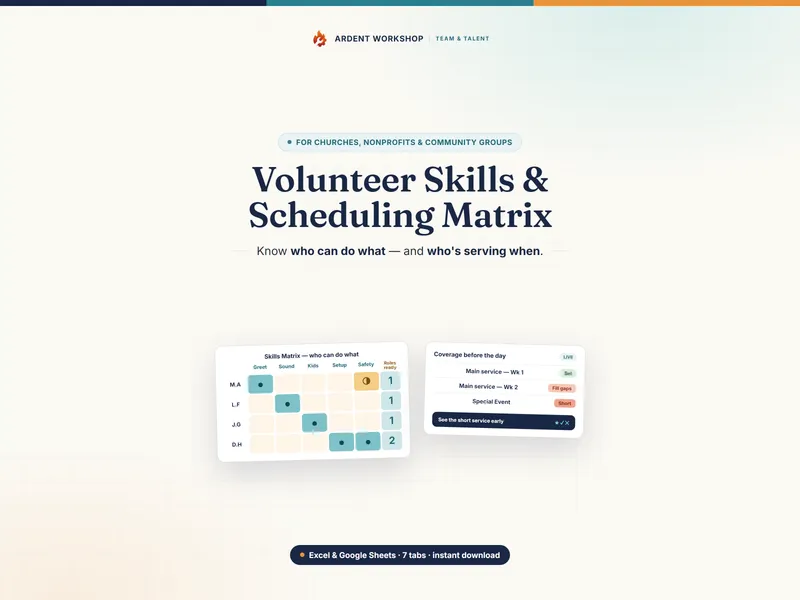
Here is the hard truth a roster hides: a list of volunteers tells you who is willing. It does not tell you who is able. Those are different questions, and only one of them gets you through the day. The tool that answers the second one is a volunteer skills matrix — and if you have ever made the 9:41pm phone calls, it is one of the highest-value hours of admin in your year. The Volunteer Skills & Scheduling Matrix is the version we build, but the method is what matters, so here is the whole thing either way.
A volunteer skills matrix is how you find out that the role you thought had five people behind it has one. Volunteers down the rows, roles across the top, a readiness level in every cell — and then, for each role, a count of how many people can run it without help. That count is the entire point, and it is the number a sign-up sheet has never once told you.
Reading a volunteer skills matrix: the column is the point
Most people build the grid and then read it the wrong way round. They read across a row — what can Marcus do? — because that is how a volunteer list trains you to think. The row is the least useful direction.
Read down a single column instead, and the number of people rated able to run that role alone is exactly how exposed you are on it today. That is the reading the whole structure exists to support. A volunteer list read top to bottom tells you how many people you have. A matrix read across the bottom tells you how many of your roles are one text message away from being uncovered — and those two numbers have almost nothing to do with each other.
Our glossary entry on what a volunteer skills matrix is has the formal definition and the shape of the grid. The rest of this post is about filling it in and acting on what it says.
A volunteer list tells you who is willing. A skills matrix tells you who is able. Only one of those gets you through Sunday.
The four readiness levels, and the line that matters
The mistake almost everyone makes on their first attempt is a tick-box grid. Can Marcus do check-in? Tick. And then Marcus turns up and needs somebody to stand next to him for the first twenty minutes, because “can do check-in” was quietly covering three very different situations.
A readiness level fixes that. Four levels is the right number — enough to capture the difference between help and no help, few enough that you can rate a few hundred cells without agonizing:
| Level | What it means | Can you roster them alone? |
|---|---|---|
| Shadowing | Learning the role by watching someone experienced do it | No |
| Can assist | Can do the role with an experienced person alongside | No |
| Can serve solo | Can run the role start to finish with nobody helping | Yes |
| Lead / Trainer | Can run the role and train somebody else into it | Yes — and they are how the bench grows |
The line that matters is between Can assist and Can serve solo. Everything above it is coverage. Everything below it is potential. When you count how covered a role is, you count only the cells at Can serve solo or above — which is where a lot of coordinators discover that a role they thought had five people behind it has none.
The top level earns its place separately. Lead / Trainer is the only level that creates more of itself. A role with two solo-capable volunteers and no trainer stays at two forever; a role with one trainer can be at four by the end of the year. When you are deciding where to spend limited training energy, spend it on moving somebody to the top level in your thinnest role, not on adding a fifth name to your strongest one.
How to build your volunteer skills matrix in an hour
Budget about an hour for the first build if you have thirty to sixty volunteers. It is a one-sitting job, and it is never this slow again — every later update is a few cells.
-
List the roles you actually schedule. Write down every role you have to fill on a given day, at the level of detail you actually assign. If you schedule sound and lighting as two separate jobs, they are two columns. If one person always does both, they are still two columns — because one of them is the one nobody else can cover, and merging them hides exactly the fact you are trying to see.
-
List the volunteers you actually have. One row per person, including the people who serve once a quarter. A volunteer who serves rarely but can run a role solo is one of the most valuable rows on the grid, because they are the person you call when somebody drops out. Leaving them off because they are “not really regular” is how a real option becomes invisible.
-
Rate every person on every role, honestly. Go cell by cell and record a readiness level for each person on each role, leaving the cell blank where they have never done it. Rate what the person can do today without help — not what they could probably figure out, and not how much you like them. This step takes the longest and it is the only one that determines whether the grid is worth anything.
-
Give every constraint its own column. Anything that can make a capable volunteer unrosterable belongs in a column of its own, not squeezed into the readiness cell. Background-check or clearance status is the important one — it answers a different question from readiness, and you will need to filter on it — alongside the weeks a person is away, roles they have asked not to do, and any pairing rule your organization follows, such as a two-adult requirement for work with children.
-
Count the coverage and act on the thin roles. For each role, count how many people are rated Can serve solo or above and are clear of any constraint that would stop you rostering them. Two of those is survival; three is comfort. A count of one or zero is your work list — and the fix is always specific: move one named person up one level on one role.
What it looks like when it is done
Here is an illustrative seven-person grid — invented names and ratings, but the shape is the point.
| Volunteer | Check-in | Sound | Kitchen | Setup | Childcare | Cleared for childcare |
|---|---|---|---|---|---|---|
| Dana R. | Lead / Trainer | — | Can assist | Lead / Trainer | Can serve solo | Yes |
| Marcus B. | Can serve solo | Shadowing | Can assist | Can serve solo | — | — |
| Priya N. | Can serve solo | — | Can assist | Can assist | — | — |
| Tom W. | — | Can serve solo | — | Can serve solo | — | — |
| Aisha K. | Can assist | — | Can assist | — | Can serve solo | No |
| Jonah L. | Shadowing | — | Can assist | Can serve solo | — | — |
| Ruth O. | Can assist | — | — | — | — | — |
| Rosterable solo | 3 | 1 | 0 | 4 | 1 |
Three numbers on that bottom row should stop you.
Sound has exactly one person. Tom is the entire sound department, and he is the one who gets the flu.
Kitchen has zero. Five volunteers have worked in the kitchen and not one of them has ever run it without somebody alongside. That column looks like your deepest and is in fact your emptiest.
Childcare shows one, not two. Aisha is rated Can serve solo and is not cleared, so she cannot be rostered — a completely different problem from Sound’s, with a completely different fix. This is exactly why clearance gets its own column: collapse it into the readiness cell and the distinction disappears.
Setup has four and Check-in has three, which makes them the two roles you can stop worrying about.
How to read the grid: four patterns and what to do about each
A finished matrix is not a report. It is a diagnosis, and there are four patterns worth knowing by sight. All four are visible in the grid above.
1. The single-point role
What it looks like: a column with exactly one rosterable-solo cell — Sound, in the grid above.
This is the pattern that produces the Saturday-night phone call, and it is what the bus factor measures: how many people would have to be lost before the work stops. When that number is one, the role is not staffed — it is borrowed from one person’s continued good health and goodwill.
The move: pick one person already at Can assist and book a date for them to run it with the solo-capable volunteer standing behind them. Not “we should train someone” — a date, a name, a role. Untaken good intentions are the reason this pattern persists for years.
2. The paper bench
What it looks like: a column with five or six filled cells, none of them above Can assist — Kitchen, in the grid above.
This one is genuinely dangerous, because it looks like your healthiest column. Five names in the kitchen feels like depth right up to the moment you need somebody to run it without supervision and discover that every one of those five has only ever worked alongside somebody more experienced.
The move: promote depth over breadth. Take the two most frequent assistants and move them to solo on their next shift, with the experienced volunteer present but deliberately not helping. Cross-training only counts once somebody has actually done the job unaided.
3. The over-rostered star
What it looks like: one row carrying solo-or-above ratings across three or more columns — Dana’s row, above, with two of them at Lead / Trainer.
Most rosters have a Dana. She is capable nearly everywhere, which means she is on the roster nearly everywhere, which means the schedule quietly optimizes toward the person least likely to say no. Two things break here: the roster develops a dependency on one human, and the human burns out — often without ever complaining, which is why you find out late.
The move: cap how many roles any single volunteer covers in a month, and treat both of Dana’s Lead / Trainer cells as an instruction rather than a compliment. Her value is not doing four roles; it is turning other people into people who can. That is also the most reliable way to retain the volunteers you have — capable people stay where they are being grown rather than merely used.
4. The untapped volunteer
What it looks like: a row that is almost entirely blank, belonging to somebody who keeps showing up — Ruth’s row, above.
A blank row is not a verdict on a person. It is usually a record of the fact that nobody ever asked them, and in the grid above it sits four columns away from Sound, where you are one deep. On a grid those two facts are on the same screen; on a sign-up sheet they never meet.
The move: match the blank rows to the thin columns and make a specific ask. “We need a second person on sound and I thought of you” lands better than a general appeal for help, because it offers a role rather than an obligation.
Turning coverage counts into a request your board can act on
“We need more volunteers” is unanswerable, and it is often the wrong request. A short-staffed feeling is frequently a training gap rather than a headcount gap, and the grid is what tells you which one you have. “We are one deep on sound, we have nobody who can run the kitchen alone, and here are the four people already part-way there” is something a board or a leadership team can actually decide about.
It also puts a real cost on a gap. Independent Sector and the Do Good Institute estimate the value of a volunteer hour at $36.14 in 2025 (opens in new tab), a 3.9% increase over 2024. That is a national average — the state figures run from about $18 to about $55 — but it makes the arithmetic concrete: a three-hour role that goes unfilled twice a month is 72 hours a year, or roughly $2,600 of donated capacity at that rate that your organization planned on and did not get.
And the scale underneath all of this is not small. In the year to September 2023, 75.7 million people — 28.3% of the U.S. population age 16 and up — formally volunteered through an organization, contributing 4.99 billion hours of service worth an estimated $167.2 billion, according to U.S. Census Bureau and AmeriCorps research on civic engagement and volunteering (opens in new tab). Almost all of that work is scheduled by somebody with a list, a group chat, and a bad feeling about one particular role.
The mistakes that make a skills matrix useless
- Rating willingness instead of ability. These are the two things people most reliably collapse into one. Somebody eager who has never done the role is Shadowing, not Can serve solo, however much you want the column to look better.
- Being kind in the cells. A generous rating is a promise you are making on that volunteer’s behalf, and they are the one who has to keep it, alone, on a day when it goes wrong. Rate accurately and be kind in person.
- Building it once. A matrix that is never updated goes stale fast — assume a couple of quarters before it is actively misleading rather than merely incomplete, because it keeps counting people who have moved away. Fifteen minutes a quarter, plus a cell change every time somebody is trained, keeps it true.
- Including roles you do not schedule. If it never appears on a roster, it does not need a column. Aspirational columns dilute the coverage counts and make the grid feel like homework.
- Collapsing clearance into the readiness cell. For any role involving children or vulnerable adults, capability and eligibility are separate questions and belong in separate columns. Follow whatever screening policy your organization and jurisdiction require, and never let a readiness rating stand in for a clearance you have not actually confirmed.
- Keeping it in your head. The most common version of this system is one long-serving coordinator who knows all of it and none of it is written down. That is a single-point role too — and it is the one nobody thinks to put on the grid.
From grid to roster: making it a system you own
The grid is worth something the day you build it and worth much more when it feeds the roster directly. Once each person carries a readiness level per role, building a schedule stops being recall and starts being a filter: show me everyone at Can serve solo or above on sound, who is cleared, who is not away, who has not already served twice this month. That is a query, not a memory test — and it takes minutes.
Wire it to the two records that sit either side of it and you have a whole operating picture: the matrix says who can serve, the schedule says who is serving, and a serve log says who actually did. That last one is also what you need when you track volunteer hours for a grant report or an annual return, and it is far easier to keep when it falls out of the roster you were already building.
This is deliberately a spreadsheet rather than a subscription. Volunteer management platforms do this well, and several of them price monthly per volunteer — which is a strange way to charge for a list of people who are donating their time. What you can take with you when you stop paying depends entirely on the vendor’s export, and that is worth checking before you commit a year of roster history to one. We set out a volunteer scheduling spreadsheet against volunteer management software properly elsewhere.
A file you own opens in Excel, in Google Sheets, and in ten years. Our Volunteer Skills & Scheduling Matrix is that file, built around the four levels above:
- Per-role coverage counts that flag the single-point roles for you
- Clearance flags in their own column, so an uncleared volunteer never lands on a roster by mistake
- A schedule tab that marks each date Set, Fill gaps, or Short before the day arrives
- A serve-and-review log, so the hours are already recorded when somebody asks for them
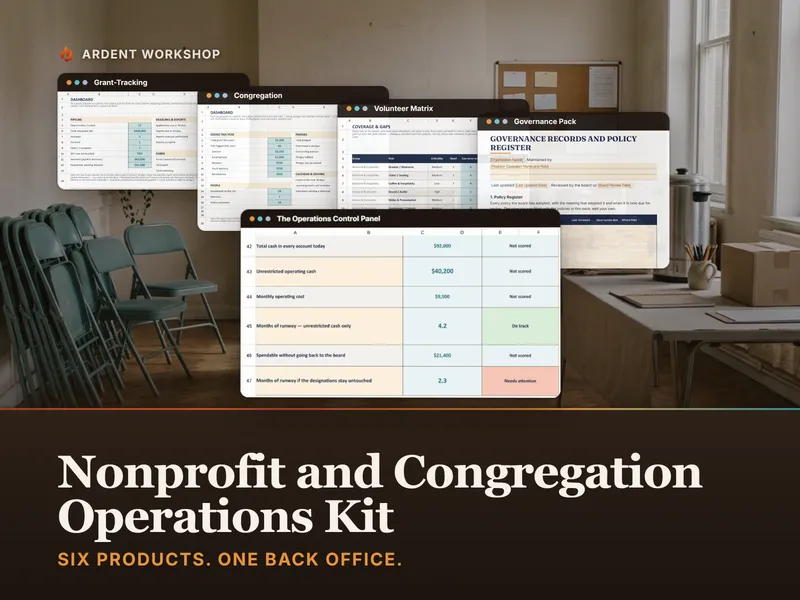
If the roster is one of several things you are holding together, the Nonprofit & Congregation Operations Kit wraps it into the wider set of records an organization runs on.
Common Questions About Volunteer Skills Matrices
How is a volunteer skills matrix different from a sign-up sheet?
A sign-up sheet records willingness for one specific date. A skills matrix records capability across all dates. The sheet tells you that eleven people said yes to Saturday; the matrix tells you whether any of those eleven can run the thing that actually has to happen on Saturday. You need both, but only one of them survives somebody cancelling.
How many volunteers should be able to cover each role?
Two is survival and three is comfort. Two people rated Can serve solo means the role does not collapse when one is sick, but it does collapse when one is sick and the other is away — and absences cluster rather than spread out, because school holidays and long weekends pull people out of the rota in the same few weeks. Three is the point at which a role stops being a thing you worry about.
How often should I update the matrix?
Once a quarter, plus every time somebody is trained or leaves. The quarterly pass is a fifteen-minute review of the cells that changed, not a rebuild. The rest is event-driven: the moment a volunteer finishes shadowing a role, that cell moves up a level, and the moment a volunteer steps away, their row comes out of the coverage count.
Is a skills matrix worth building for a small team?
It matters more on a small team, not less. Ten volunteers and six roles is exactly the size where one person quietly holds two irreplaceable jobs and nobody notices until they move away. The grid takes twenty minutes to build at that scale, and it is the only thing that will tell you which two roles those are.
Should the matrix be visible to the volunteers themselves?
Share the roles and the readiness levels openly; keep the individual ratings between the people who build the roster. The levels are the useful part to publish, because a volunteer who can see that Lead / Trainer is a real rung has something to aim at. A published grid of who is rated below whom turns a scheduling tool into a scoreboard.
The takeaway
A volunteer skills matrix takes about an hour to build and it answers a question your roster cannot: not who is willing, but who is able — and how many of them there are, role by role. The number that matters is the count of people who could run each role alone today, and any column showing one is not a staffed role, it is a hope.
You will not fix every thin column this quarter. You do not need to. Name the one that would hurt most, find the one person already halfway there, and put a date on the calendar for them to run it with somebody standing behind them. That is one cell moving up one level — and it is the difference between the next flu text being a crisis and being a phone call you already know how to make.