How many months can you keep going on money you are actually allowed to spend?
Not what is in the bank. That number is easy, and it is the wrong one.
A grant for the food program, a capital gift for the roof, a bequest designated for next year and last week’s general collection all land in the same checking account. The balance adds them up. Nobody may spend most of it. Restricted money sitting in a general account is the error this kit is built to prevent — it is spent by accident, discovered at the audit, and explained to a funder afterwards.
The files that hold the pieces of that answer already exist. The grant tracker knows the restricted balances. The congregation workbook knows what came in by fund. Neither of them knows the other, and neither can subtract one from the total cash and divide by a monthly cost.
This kit is six finished products that between them run the office side of a nonprofit or a place of worship — plus one new workbook that does that subtraction and one other piece of arithmetic no single file can reach.
What’s in the kit: the six products
Each of these is a complete Ardent Workshop product, sold on its own, and you get all of them — delivered as five numbered .zip files that all extract into one shared folder, not five piles.
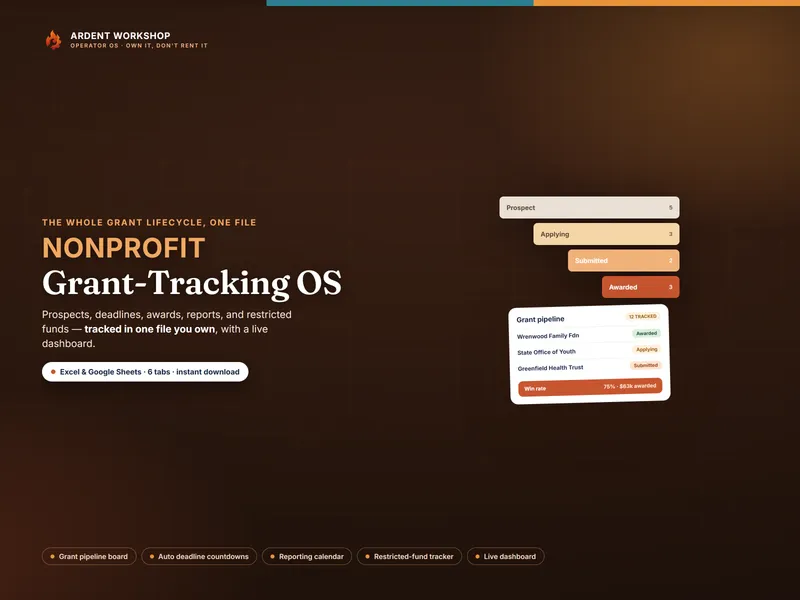
- Nonprofit Grant-Tracking OS — a six-tab workbook that carries a grant from prospect to close-out: a pipeline of asks in progress, a reporting calendar of funder due dates, and a Restricted Funds tab that keeps every award’s remaining balance apart from unrestricted money, rolled up on a Dashboard with funds tracked, spent, remaining, reports due and win rate.
- Place-of-Worship / Small-Congregation Operations Workbook — an eight-tab workbook for the week to week: a household roster, a donations log broken out by fund, pledges measured against giving to date, year-end giving statements, an events and facility calendar, and a volunteer roster with clearance status.
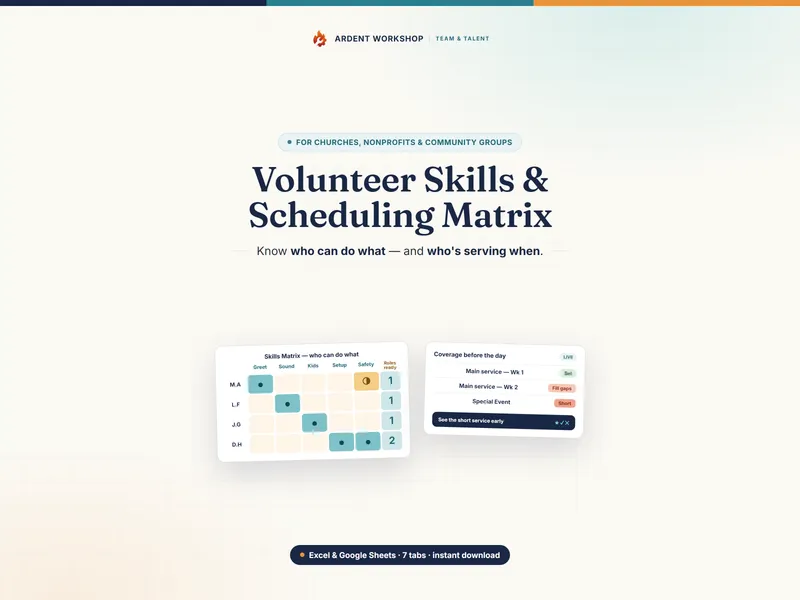
- Volunteer Skills & Scheduling Matrix — a seven-tab workbook that rates every volunteer’s readiness for every role, schedules them against the coverage a service actually needs, and flags each gap on a single Coverage & Gaps view.
- Charitable-Giving & Zakat/Tithing Records Workbook — the donor side, deliberately. An eight-tab household workbook that logs cash and non-cash giving across the year, with zakat and tithe reference worksheets, and a year-end summary a member keeps for their own records. It is what someone reconciles the organization’s giving statement against — never an organizational fund ledger.
- Nonprofit Board & Volunteer Policy Template Pack — sixteen governance documents, each shipped as a fillable PDF and an editable Word file: conflict of interest and its annual disclosure, document retention, gift acceptance, whistleblower protection, board commitments, agendas, minutes and the board resolution — plus the volunteer application, agreement, role description, confidentiality acknowledgment and incident report.
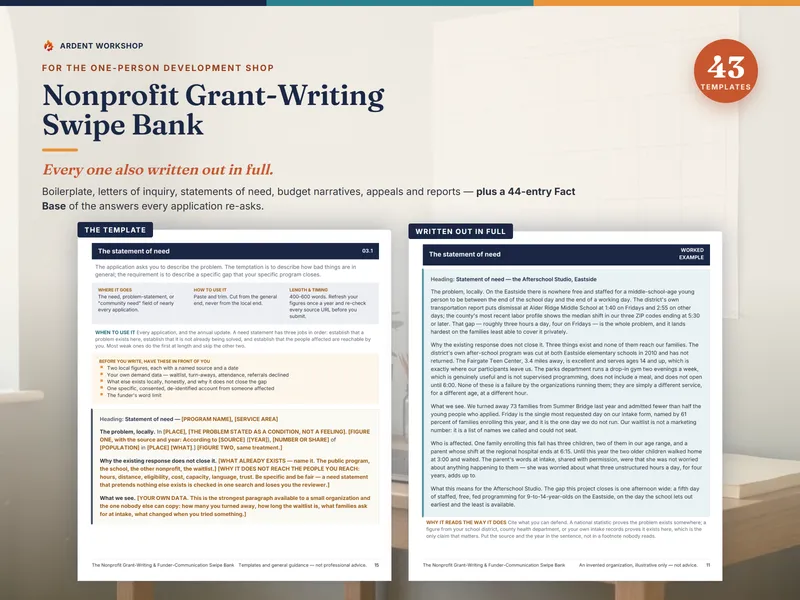
- Nonprofit Grant-Writing & Funder-Communication Swipe Bank — a swipe library of ready-made language, worked examples, 43 plain-text templates, before-you-write worksheets, and a 44-row Fact Base of the questions funders keep asking, indexed on a small Template Index workbook.
And the Operations Control Panel, which only exists because you own all six
6 products. 10 tabs. 38 setup steps. 41 routed jobs. 16 handoffs that have to agree.
Native Google Sheets, not a conversion. The Control Panel ships as a spreadsheet file and as a native Google Sheet — not a converted copy — and so does every component workbook that has one. Each has its own one-click “Make a copy” link, so the whole set opens in Excel, Google Sheets or LibreOffice with the same formulas, dropdowns and conditional formatting. The panel uses no dynamic-array or Office-365-only function anywhere; a build gate scans all 488 formula cells and refuses to pass if it finds one.
Three of its tabs do work no single file in the set can do, because the numbers they need live in three or four different files at once. Nothing is imported automatically — you type a short list of figures across from the component files, and the Number Flow tab names every one of them.
Fund Reconciliation & Runway — the number the board has been guessing at
Fund by fund: the restricted balance carried in from the grant tracker, the designated giving received from the congregation workbook, what has been spent, and what is committed but not yet paid. From those it computes what is available now, what is genuinely unspent once commitments are honored, and a flag — Within, Watch or Over-committed — for any fund with more promised out of it than is left in it.
Then the organization-level answer. Total cash, less every restricted balance — identified by a lookup against the Fund Map rather than by anyone remembering which fund is which — gives unrestricted operating cash. Divided by your monthly operating cost, that is months of runway on unrestricted cash only, scored against a target you set. It computes the same figure again with the board-designated reserves taken out, because the gap between the two is the conversation the board actually needs to have.
Outstanding pledges sit alongside as a memo, deliberately in none of the figures above them. Promised is not the same as in hand, for the same reason restricted is not the same as spendable.
Try that arithmetic before you buy anything. The Nonprofit Operating-Reserve Check is a free, ungated, one-tab version of this block — no email, no signup — and it opens on the same worked example, so you can see what naming your own funds does to the balance on your bank statement. What it cannot do is trace each of those balances back to the file it came from, flag the funds with more promised out of them than is left in them, or go on to what a program costs.
Program Cost & Indirect Rate — the figure every grant budget asks you to already know
Enter your programs once: direct spend from the grant tracker, volunteer hours worked out from the volunteer matrix, facility and event hours worked out from the congregation workbook’s calendar, and unduplicated beneficiaries. Set four rates — the in-kind value of a volunteer hour, the annual facility cost, the facility hours available, and the shared cost pool.
The panel then computes total program cost, cost per beneficiary in cash and again including volunteer time, the in-kind value of volunteer labor, and an indirect-cost rate with its basis written out in a labeled cell in plain language — because “that is what we always use” is not a basis, and you will be asked to defend it.
It ends by naming where each answer goes: the Fact Base row in the swipe bank that asks for exactly that figure, the indirect-cost line of the grant budget itself, the match line, and the board resolution that adopts the rate.
Coverage & Clearance — who you can actually roster next week
The volunteer matrix knows who is trained. The congregation workbook knows whose clearance is current, pending or lapsed. Neither holds a renewal date, so neither can tell you the nursery is fully staffed by people whose background check expired twelve days ago.
This tab joins them, on the volunteer matrix’s own role board, and adds the expiry column that closes the gap: clearances already lapsed, clearances expiring inside a window you set, single-point-of-failure roles, roles where everyone can serve and nobody can lead or train, and a Covered / At risk / Uncovered verdict per role.
What else does the Control Panel do, and which guides come with it?
The three tabs above are the ones only a kit can compute. The panel’s other seven hold the system together — 10 in all:
- Start Here lays out the operations loop the six files form — ask for it, receive it and run it, staff it, record the giving, fund it, govern it — with a key marking every cell as either something you type or something the panel computes.
- Setup Sequence carries all 38 setup steps across the six products and the panel itself, in dependency order rather than the order the files are numbered, because nothing should ask you for a figure you have not worked out yet.
- Fund Map is where every fund is named once: its restriction class, its source, what it may be spent on, and which file its balance lives in. This is the interfaith-neutral part, and it is structural rather than cosmetic — the fund labels are yours, so a mosque, a synagogue, a temple or a church adapts the kit without renaming anything inside a formula.
- Job Router points 41 real jobs at the exact file and tab.
- Board & Funder Report is the one-page monthly packet, computed: what is due inside a window you set, what is overdue, fund balances with their flags, the runway, the grant asks still awaiting a decision, giving against budget, program cost, the indirect rate and volunteer coverage — each read live off the tab that computes it, each carrying a verdict rather than a bare number.
- Number Flow maps the 16 numbers that have to be carried between files by hand, with the direction, the reason it has to match, and a tick box for each.
- What’s Included names the six products and what each one is for, with a cell for what you paid so the panel works out the saving from your own figure rather than quoting one at you.
Five guide PDFs come with it — 61 pages in total: a 21-page Start Here guide on the operations loop, a printable setup checklist, a printable router reference, a component index, and Restricted vs Unrestricted on One Page, which walks the five questions that decide, in order, whether the organization may spend the money sitting in its account.
Own it, don’t rent it: files you keep, not software you rent
Congregation and donor software is rented rather than bought: you subscribe for as long as you use it, and your records generally live in the vendor’s system rather than on your own machine. A blank spreadsheet is free and holds nothing. This sits between them: structure you own outright, downloaded once, with no subscription, nothing to renew, and no downloaded file that stops working. Every file stays exactly as useful the day you stop paying attention to Ardent Workshop as it was the day you bought it.
Nothing in the set reaches across your Drive and edits another file, and that is deliberate — it is why nothing changes underneath you. The trade is the Number Flow list, and it is short.
When a file-based system stops being enough
Files will run a small organization for years. When the same program exists in four of them and you are the integration between them, that is the honest ceiling of any file-based system. Ardent Seller (opens in new tab) is where it graduates to: what you buy becomes tracked inventory that draws down as you use it, your suppliers and the people you buy from become real records, and your true cost per unit of work is computed for you. There is a free plan to start — and everything in this kit stays yours either way.
What this is, and what it is not
An operating framework, not accounting, tax, legal or compliance advice, and not a substitute for your own IRS, state charitable-registration or safeguarding obligations. The worked examples that ship in the Control Panel are illustrative — every fund, program, volunteer and figure in them is invented — and the thresholds behind the verdicts are ones you set yourself, not published standards. Replace them with your own. The governance documents in the policy pack are starting points; have anything the board intends to adopt reviewed for your own situation and jurisdiction. Nothing here decides a question of religious law: the zakat and tithe worksheets are record-keeping aids, and the rules that govern them are for you and your own community to settle.