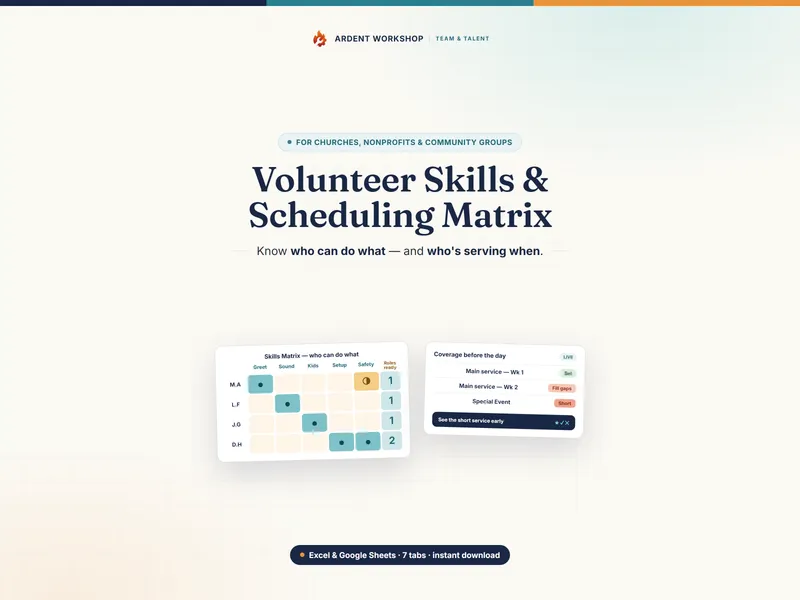
For most small teams, a volunteer scheduling spreadsheet is enough; volunteer-management software earns its monthly cost only once you run self-service sign-up at scale. This isn't really spreadsheet-versus-platform: a skills board and a roster are features a volunteer-management platform happens to include. The mistake is buying the whole per-volunteer system when the part you'll actually use — who's trained, who's serving, and where you're short — is something you can own outright.
What each one is for
- A volunteer scheduling spreadsheet is a capability-and-coverage tool. Record each volunteer's readiness on every role, build the roster for upcoming services, and read coverage gaps before the day. It answers “who can do what, and are we covered?”
- Volunteer-management software is a platform. Self-service sign-up portals, volunteer profiles, automated SMS and email reminders, hours tracking, background-check integrations, and reporting — with scheduling usually one module inside it. It answers “administer our whole volunteer program,” at a price to match.
A full explanation of the building block is in the glossary: what a volunteer skills matrix is.
When a volunteer scheduling spreadsheet is exactly right
- You're coordinating a handful of services, events, or shifts — not a public self-service program.
- You're a volunteer coordinator, program lead, or small-org organizer — not a dedicated volunteer-program team.
- You want to know who's actually trained for each role, not just who signed up.
- You build the roster yourself and want to spot the short shift early.
- You'd rather own the file than rent a system per volunteer.
At this stage a spreadsheet beats a platform outright for the capability-and-coverage question. The free volunteer roster starter is a no-signup taste. If the clearance side matters as much as the roster — who is cleared, whose check has lapsed, which roles only one person can cover — the Nonprofit & Congregation Operations Kit joins those together. The templates for nonprofits hub collects the rest.
The signals you may want a full platform
- You run public self-service sign-up. Hundreds of volunteers picking their own slots through a portal.
- You need automated reminders at scale. SMS and email nudges going out to every volunteer before every shift.
- You track serve-hours and integrations. Logged hours, background-check vendors, and donor or member systems wired together.
- You have a program coordinator to run it. A platform needs an owner; a spreadsheet needs a coordinator and an afternoon.
Even then, the roster underneath is still who's trained and who's serving — the platform just automates the portal and the reminders around it. The spreadsheet is the board; the platform is the administration.
Side by side
| What matters | Scheduling spreadsheet (owned) | Volunteer-management software |
|---|---|---|
| What it is | A focused capability-and-coverage tool | A broad volunteer-program platform |
| Cost | One-time, low — you own the file | Ongoing subscription, often per volunteer or by tier |
| Who's trained & coverage | The whole point — readiness, counts, gap flags | One module among many, if included |
| Self-service sign-up portal | Not its job — you build the roster | Usually a core feature |
| Automated reminders & hours | Not its job — you bring the calendar | Typically automated SMS/email and hours tracking |
| Setup | Open it and list your roles — an afternoon | Implementation, config, volunteer import |
| Data ownership | The file is yours — on your device, or your own Drive | Hosted in the vendor's platform |
| Best for | A coordinator building a roster for a few services | A large self-service volunteer program |
The honest middle ground
Plenty of organizations grow into a volunteer-management platform eventually, and that's the right move when a public self-service portal and automated reminders across hundreds of volunteers become the job. The mistake is the reverse: buying a per-volunteer suite to roster a handful of services, when an owned spreadsheet does that part better and costs once.
Build your roster either way
Whichever stack you end up on, the board underneath is who's trained and who's serving. The Volunteer Skills & Scheduling Matrix tracks each volunteer's readiness on every role, builds the roster for your upcoming services, and flags coverage gaps before the day — one owned file for Excel, Google Sheets, and LibreOffice. Own the board; add a platform only when running a self-service program at scale becomes the job.
Frequently asked questions
- What's the difference between a volunteer scheduling spreadsheet and volunteer-management software?
- A volunteer scheduling spreadsheet is the artifact: a workbook where you record who's trained for each role, build the roster for upcoming services, and see which ones are short. Volunteer-management software is a platform that may include scheduling alongside volunteer profiles, self-service sign-up portals, automated reminders, hours tracking, background-check integrations, and reporting — usually sold as a monthly or per-seat subscription. One is a focused tool you own; the other is a broad system you rent. For most small teams, knowing who's trained and building a roster that holds are the parts they actually use, and a spreadsheet delivers them without the platform.
- Can a spreadsheet replace volunteer-management software?
- For the job most coordinators actually do — tracking who's trained for each role, building the roster for the next few services, and spotting the gaps before the day — an owned spreadsheet does it completely. What a spreadsheet doesn't do is run a public self-service sign-up portal, send automated SMS reminders to hundreds of volunteers, or integrate background-check vendors. If you're a large organization coordinating hundreds of volunteers with self-service scheduling, a platform earns its keep; if you're a coordinator or team lead building a roster for a handful of services, the spreadsheet is the right size of tool.
- How much does a volunteer scheduling spreadsheet cost vs volunteer software?
- An owned volunteer scheduling spreadsheet is a single low one-time cost — you keep the file and pay nothing monthly. Volunteer-management software is typically a recurring subscription, often priced per volunteer or by tier. The subscription pays off when you need the portal, the automated reminders, and the integrations; paying every month just to know who's trained and build a roster is renting far more system than the job needs.
- Is volunteers' data safe in a spreadsheet?
- A spreadsheet you own is as private as the file controls you put around it — and the file is yours, not locked inside a volunteer-management vendor's platform. If keeping volunteers' data off any hosted service matters, use the Excel or LibreOffice version on your own device; the optional Google Sheets copy lives in your own Drive. Either way, volunteers' names and availability are personal data, so keep the file to those who genuinely need it and handle it the way your privacy policy and local law require. And remember a workbook is a record-keeping and scheduling tool, not a safeguarding policy: it can flag which roles need a background check, but what a check must cover and who needs one are set by your own policy and the law where you operate.