Accrual vs. an annual allowance
The two common ways to grant paid time off are worth telling apart, because they change how the balance moves through the year:
- Accrual. Time off is earned as you go — a fixed amount each pay period, month, or per hour worked. A new hire starts near zero and builds up; the balance reflects what's been earned so far, minus what's been taken.
- Annual allowance (lump grant). The full year's balance lands on day one (or on a work anniversary). Simpler to reason about — the balance is just allowance plus any carryover, minus what's taken — which is why many small teams prefer it.
Neither is "correct"; they're policy choices. Accrual limits how much a brand new employee can take before they've earned it; an annual allowance is simpler to run by hand. The tracking need is identical either way: a live picture of earned, taken, and remaining for every person.
How PTO accrual works
An accrual model is built from a few numbers:
- Accrual rate. How fast time is earned — e.g. 1.25 days a month (15 days a year), or an hourly rate like 0.0385 hours of PTO per hour worked (roughly two weeks a year for full-time).
- Frequency. When it's added — each pay period, monthly, or per hour on the clock.
- Carryover (rollover). How much unused balance rolls into the next year — often capped, sometimes "use it or lose it."
- Accrual cap. A ceiling on the running balance, so it stops growing once someone has banked a lot without taking any.
- Waiting period. Some plans hold new hires from using accrued time for their first weeks.
The exact rules — rates, caps, carryover, and how they interact with local law — are yours to set to your policy; a tracker records against them, it doesn't decide them.
Why tracking the balance is the hard part
- Balances drift when leave lives in scattered places. An email here, a text there, a note on a whiteboard — and by mid-year nobody's sure who has how many days left.
- Pending requests hide the true number. Someone with three trips booked but none taken can look fully stocked. A balance that holds back pending requests stops you from double-booking a year.
- Overlaps become coverage problems. The day two people are off at once and a shift runs short isn't a balance question — it's a coverage question, and it's easy to miss until it lands.
A workbook that logs each absence once and keeps the balance — allowance or accrued, minus taken and pending — turns "I think she has a few days left" into a number you can act on.
How to track PTO by hand
- Set each person's starting point. An annual allowance (plus carryover), or an accrual rate if you earn as you go.
- Log every absence in one place — person, leave type, dates — so nothing lives only in an inbox.
- Separate what draws down PTO from what doesn't. Vacation and personal days come out of the balance; sick, unpaid, and holidays are recorded but not deducted.
- Read the remaining balance — available minus taken minus pending — before you approve the next request.
- Watch coverage, not just balances. A day-by-day calendar shows when too many people are off at once, so you catch the clash early.
Related templates and concepts
Tracking PTO sits right next to the other things a small team keeps by hand:
- Try it free. The PTO / Absence Tracker Starter is an ungated, no-signup tool that logs a month of your team's leave.
- Track the whole year. The PTO / Absence & Coverage Tracker keeps each person's balance and a team calendar that flags coverage clashes.
- Compare the options. See how an owned tracker stacks up against HR leave software.
- See the rest of the toolset. The templates for HR & team leads hub collects the skills matrices, coverage planners, and more.
Templates that implement this
Templates that track PTO and coverage
3 templates
Log every absence once and see each person's balance — available, approved, pending, and remaining — plus a team calendar that flags coverage clashes. One owned spreadsheet.
- $19.95 Spreadsheet
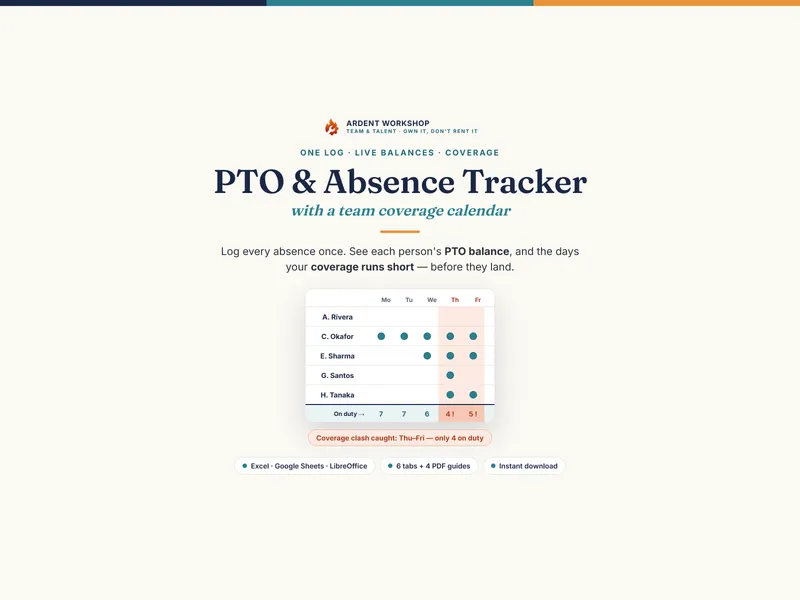
PTO / Absence & Coverage Tracker — Employee Leave & Vacation Tracker with a Team Coverage Calendar (Excel + Google Sheets)
A PTO and absence tracker for Excel & Google Sheets — log leave once, see each person's balance, and a team calendar that flags coverage clashes.
Team & TalentView details - $24.95 Spreadsheet

Cross-Training & Coverage Planner — Skills Coverage & Cross-Training Matrix (Excel + Google Sheets)
A cross-training and coverage planner for Excel & Google Sheets — set a coverage target per task, see the gaps, and get the pairings to close them.
Team & TalentView details - $24.95 Spreadsheet

Skills Matrix Template - Team Skills Gap Analysis & Key-Person Risk (Excel & Google Sheets)
A 9-tab skills matrix for Excel & Google Sheets: score your team 0-5, find the skills gaps, and flag single points of failure before someone resigns.
Team & TalentView details