This isn't template-versus-platform, exactly. They solve the same problem at different scales. The mistake is subscribing to a per-seat leave platform to answer a question a small team can answer in a spreadsheet it owns — who has days left, and is anyone else off that day.
What each one is for
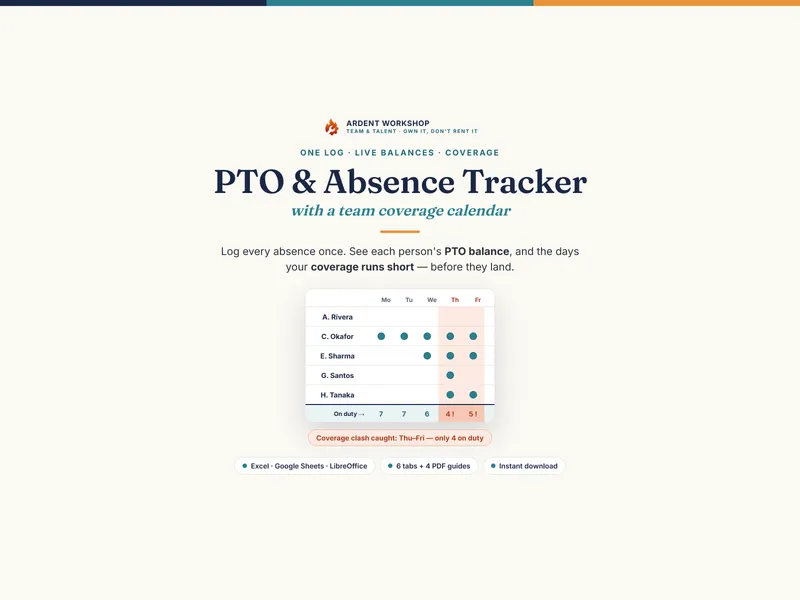
- A PTO tracker template keeps the record. One log of every absence, a live balance per person, and a day-by-day calendar that flags when coverage runs short. You own the file and edit it offline.
- HR leave software runs the workflow. Employees request time off, managers approve in-app, and the system handles accrual rules, reminders, and often payroll and HR-record integration.
Seeing a balance and running an approval workflow are different jobs — which is why both can be about "PTO" and still not replace each other. The glossary explains PTO accrual if that's the part you're weighing.
When a PTO tracker template is exactly right
- You have a small team and need to see balances and coverage, not run a company-wide approval system.
- You'd rather own the file — and keep your team's leave data — than rent a platform per seat.
- You want a one-time cost, not a subscription that scales with headcount.
- You (and maybe a couple of other leads) manage leave directly, by hand.
- Coverage matters as much as balances — you need to see the days too many people are off at once.
At this size a template beats a platform outright for the balances-and-coverage question. The free PTO / Absence Tracker Starter is a no-signup taste that logs a month, and the templates for HR & team leads hub collects the rest.
The signals you also want HR leave software
- Requests and approvals are the daily grind. Many people, constant requests, and chasing approvals is eating a manager's week.
- Employees expect self-service. People book time off and check their balance from their phones, without asking you.
- Accrual is genuinely complex. Tiered rates, caps, and carryover rules that are painful to compute by hand.
- You need it wired to payroll and HR records. Time off that flows straight into pay and the employee file.
Even then, the platform runs the workflow while the coverage view decides whether a day works — so a small team often grows into software without ever regretting the years it spent on an owned tracker.
Side by side
| What matters | PTO tracker template | HR leave software |
|---|---|---|
| Answers | Balances and coverage for a small team | Requests and approvals across a company |
| Cost | One-time, low — you own the file | Ongoing subscription, usually per user |
| Balances | Live — available, approved, pending, remaining | Live, and automates accrual rules |
| Coverage calendar | Built in — flags days below your minimum | Varies — some show a team calendar, few flag coverage |
| Self-service requests | None — you log absences yourself | Full — employees request and check in-app |
| Approvals workflow | You decide and set the status | Routed and tracked automatically |
| Payroll integration | None | Often built in |
| Data ownership | The file is yours, offline | Hosted in the vendor's platform |
| Best for | Small teams tracking leave by hand | Larger headcounts running a request workflow |
The honest order of operations
Start with the record, add the workflow when the workflow is the problem. A small team's real question — who has days left, and is anyone else off that day — is answered by a tracker you own. Subscribing to a per-seat platform before requests and approvals are actually eating your week means paying every month for automation you don't yet need.
Track the balances and coverage first
Whatever you eventually use to run requests, you first need a fast, honest way to see who has days left and where coverage runs short. The PTO / Absence & Coverage Tracker logs every absence once, keeps each person's balance, and draws a team calendar that flags coverage clashes — one owned file for Excel, Google Sheets, and LibreOffice. Get the record right; add a leave platform only when running the request workflow becomes the job.
Frequently asked questions
- What's the difference between a PTO tracker template and HR leave software?
- A PTO tracker template is a spreadsheet you own that records absences, keeps each person's balance, and shows a team calendar — you edit it offline and pay once. HR leave software is a hosted platform where employees request time off, managers approve it in an app, and the system handles accrual, notifications, and (often) payroll integration. One is a record you keep; the other is a workflow the vendor runs. For a small team that just needs to see balances and coverage, the template does the job; the platform earns its keep when self-service requests and approvals across many people become the daily grind.
- Can a spreadsheet replace HR leave software?
- For the core questions — how many days does each person have left, and is anyone else already off that day — yes, and a spreadsheet you own does it without a monthly bill. What a spreadsheet doesn't do is let employees self-serve requests from their phones, route approvals automatically, calculate complex accrual rules, or sync to payroll. If your pain is "I can't see who has how many days left," the template is the fix. If it's "managing everyone's requests and approvals is eating my week," that's when software starts to pay.
- Is a PTO tracker template good for a small team?
- It's usually the better fit. Per-seat HR platforms are priced and built for headcounts where self-service and automated approvals save real time; for a handful of people, you're renting far more platform than the question needs, and paying every month to do what a well-built spreadsheet does once. An owned tracker gives a small team the balances and coverage view without the subscription — and you keep your team's leave data in a file you control, not on a vendor's server.
- How much does a PTO tracker cost vs HR leave software?
- An owned PTO tracker workbook is a single low one-time cost — you keep the file and pay nothing monthly. HR leave software is typically a recurring per-seat subscription that scales with headcount. The subscription is worth it when the workflow (requests, approvals, accrual automation, payroll sync) is the daily job; for simply seeing balances and coverage on a small team, it's a lot of ongoing cost for a question a spreadsheet answers.