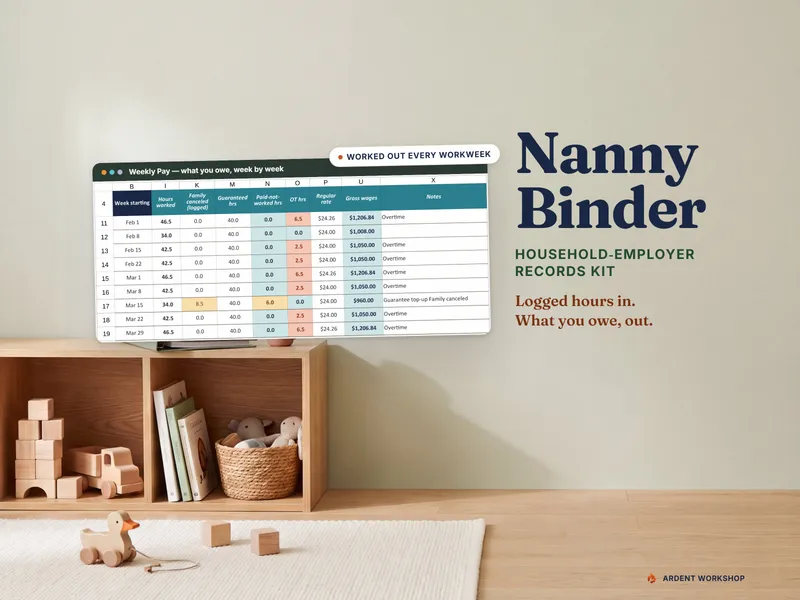
The honest framing is "own it, don't rent it," with one big exception. A payroll service does something a spreadsheet cannot: it files and pays. That is a real service worth paying for if you want it. What a service does not do is hand you a record that is yours. The hours, the guarantee you promised, the sick days and the mileage live in its system, under its terms, and only as accurate as what you typed in. The Nanny Binder & Household-Employer Records Kit is built for the other half.
The positioning: a blank spreadsheet → an owned records kit → a payroll service
A common starting point is a blank spreadsheet or a notes app: free and flexible, but with no guarantee logic, no overtime math and no idea when you crossed a threshold. A payroll service is the heavy end: it runs payroll and files for you, and you pay for it every month. An owned records kit sits between them. It does the arithmetic of what you owe each week and keeps every record in one file you control, but it stops short of paying or filing anything. It can feed a service or a preparer, or stand on its own if you file yourself.
What each one actually does
A nanny payroll service is better at
- Filing and paying the taxes. Withholding, deposits and the household-employer filings are the service's job, not yours.
- Meeting the deadlines. The calendar of what is due and when is built into the service.
- Taking tax arithmetic off you. The kit deliberately computes no tax; a service does.
- Peace of mind about compliance. If an error in filing is what worries you, paying a specialist is a reasonable answer.
An owned records kit is better at
- Guaranteed hours. A common nanny-agreement term is that the family pays a set number of weekly hours even when it cancels. The kit shows actual, guaranteed and paid-not-worked hours side by side, and flags a week with no days logged for an employee with guaranteed hours, instead of silently paying $0.
- Overtime that follows the rules you set. Live-out employees are generally owed one and a half times their regular rate for hours over 40 in a workweek under federal law, and when two rates are worked in one week the regular rate is the weighted average (29 CFR 778.115). The kit works that out. State law can require more, so check your state labor department.
- Leave and reimbursements kept apart from wages. Paid leave, and dated mileage and receipts, stay out of the wage total instead of being buried in it.
- Quarter totals against thresholds you enter. Every employee rolls into quarter-by-quarter cash-wage totals, flagged against the figures in the Setup tab, which you verify against the current Pub 926.
- A year-end packet. The wage totals and pay records are ready to hand to a preparer or a service, and keep-until years follow the Pub 926 and Form I-9 rules. The I-9 itself stays with you.
- Being yours. One file, no subscription, and a history that stays when you change providers.
The part families underestimate: the records come first
A payroll service can only pay what it is told. The number of hours, the canceled-day top-up, the week the nanny worked two different rates and the reimbursement that is not wages all start as records, and if they are wrong or missing, the filings built on them are wrong too. Pub 926 also puts record-keeping on you: keep employment tax records at least 4 years after the due date of the return or the date the tax was paid, whichever is later. Form I-9 has its own rule, set by USCIS: 3 years after hire or 1 year after employment ends, whichever is later.
If you hire someone to care for your children in your home and you control how the work is done, Pub 926 generally treats you as a household employer. For 2026 it says you generally must withhold and pay Social Security and Medicare taxes once you pay a household employee $3,000 or more in cash wages. See what a household employer is and what the nanny tax is for the plain version, and check the current publication for your own year.
Which should you use?
Use a payroll service if you want filing and payment taken off your plate and you are comfortable paying for that every month. Use the owned records kit if you file yourself or with a preparer, if you want to see every hour and every top-up in a file you keep, or if you want a year-end packet ready before anyone asks. Use both if you want the service to file and pay while you keep the master record: log the days in the kit, hand over the weekly or quarterly totals, and check the service's year-end figures against yours. The log is useful whichever way the tax gets filed. If you want both, start with the records kit, and see the household-employer page for how the pieces fit together.
One privacy note either way: do not store Social Security numbers in a spreadsheet, and remember that sharing a workbook shares every tab. Give the caregiver the printed binder pages instead. Keep the Form I-9, any copies of identity documents and anything showing a Social Security number in a locked or encrypted place few people can open, and shred or delete them once their keep-until year has passed.
Try the free half first: the Nanny Daily Log & Emergency Info Sheet is a printable two-pager with the daily log and the emergency-contacts page. Then read what to put in a nanny binder and how to organize your records when you employ a nanny. For the caregiver's side, see the caregivers page and what a caregiver authorization is.
Frequently asked questions
- Is a spreadsheet or a nanny payroll service better for a household employer?
- They do different jobs, and only one of them files your taxes. A nanny payroll service runs payroll for you: it handles withholding and deposits and prepares the household-employer filings, for a recurring fee. A records workbook does none of that. It keeps the underlying record: the hours actually worked, the guaranteed hours you owe when the family cancels, overtime, paid leave, reimbursements kept separate from wages, running quarter totals and a year-end packet. If you want someone else to file and pay, use a service. If you want to own the records, or you file with a preparer, use the workbook. Many families use both.
- Does the Nanny Binder kit run payroll or file taxes?
- No. The Nanny Binder & Household-Employer Records Kit does not run payroll, withhold or pay taxes, file anything, or give tax advice. It works out what you owe each workweek from the days you log (guaranteed-hours top-ups, overtime past 40 for live-out employees at a weighted regular rate, paid leave) and keeps reimbursements out of wages. It rolls each employee into quarter-by-quarter cash-wage totals flagged against thresholds you enter. The taxes themselves are for you, a payroll service or a preparer to handle.
- Can I use a payroll service and a spreadsheet together?
- Yes, and it is a sensible split. A payroll service is good at the filing and deposits. It is only as accurate as the hours and amounts you give it, and its records live in its system. The workbook is where the hours, the guarantee, the overtime, the leave and the reimbursements are written down first, in a file you keep. You then enter or hand over the totals, and at year-end you can check the service's figures against your own log. Whichever service you use, your history stays in a file of your own.
- Do I have to treat my nanny as an employee?
- Often, yes. IRS Publication 926 says that if you hire someone to care for your children in your home and you can control not only what work is done but how it is done, you are generally treated as a household employer. Pub 926 lists exceptions, such as certain family members and some employees under 18. See what a household employer is, then confirm your own situation with the IRS publication, a payroll service or a tax professional.
- What records do I need to keep for a household employee?
- Pub 926 says to keep employment tax records for at least 4 years after the due date of the return or the date the tax was paid, whichever is later. For Form I-9, USCIS says to keep it for 3 years after hire or 1 year after employment ends, whichever is later. The kit's year-end packet shows keep-until years that follow those two rules. A payroll service may hold copies of some of this, but the obligation to keep records stays with you.
- What can a payroll service do that a spreadsheet can't?
- The big things: it withholds and deposits taxes, prepares the filings and forms, and takes the arithmetic and the deadlines off you. A spreadsheet can flag when cash wages cross a threshold you entered (the Pub 926 figure for 2026 is $3,000 for Social Security and Medicare, and you should verify it against the current publication). It cannot pay or file anything. If getting it filed correctly worries you more than keeping records, a service is the right tool.