What are household-employer records?
Household-employer records are the documents that show what you agreed to pay a person who works in your home, what you actually paid, and when. They matter because a household employer can be you even if you never thought of yourself as one. IRS Publication 926 generally treats you as a household employer if you hire someone to care for your children in your home and you control not only what work is done but how it is done.
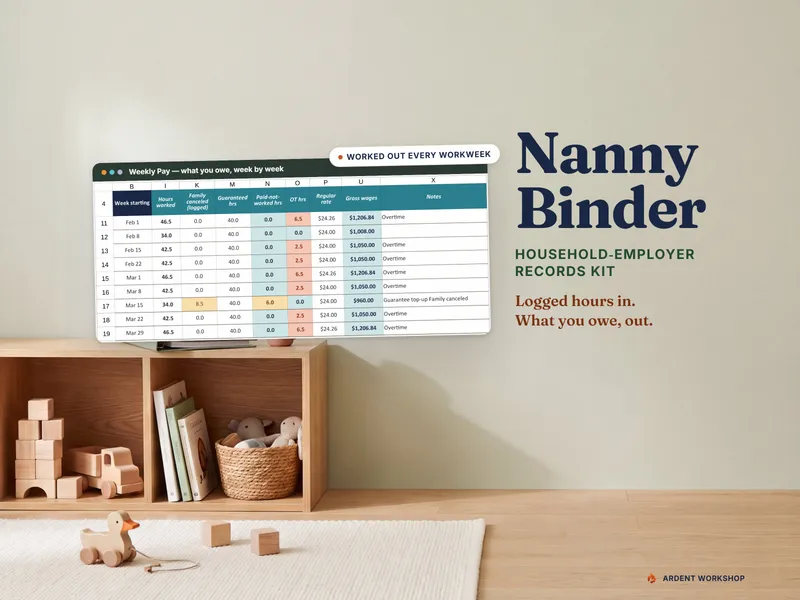
You can build the whole set in a plain spreadsheet. The Nanny Binder & Household-Employer Records Kit is the version that already has the weekly pay, leave, quarter totals, and year-end packet wired together, with a printable caregiver binder alongside it. If you want to start with the caregiver-facing half for free, the Nanny Daily Log & Emergency Info Sheet is a printable two-pager. Either way, the order below is the same.
The kit keeps records. It does not run payroll, file anything, or compute tax. If you later want a service to do that, these are the records it will ask you for, and the spreadsheet vs. a nanny payroll service comparison covers when that handoff makes sense.
Why not just track it in a text thread?
A thread records a conversation, not a pay period. It will not tell you how many hours were guaranteed in a week, which week had a canceled day, or what the quarter total was. The questions that arrive in January and at tax time are all questions about totals, and totals only come from rows kept the same way every week.
Step 1: What belongs in the work agreement?
Write down:
- the hourly rate, and a second rate if some work is paid differently (a common case is a higher rate for extra children or for driving);
- the guaranteed hours per week, a common nanny-agreement term where the family pays a set weekly figure even when it cancels;
- whether the job is live-in or live-out, because that decides how overtime works;
- the start date, and the end date when there is one;
- the paid-leave policy;
- how mileage and receipts are reimbursed, and at what rate.
A common reference for mileage is the IRS business standard mileage rate, which is 72.5 cents a mile from January 1, 2026 and 76 cents from July 1, 2026 (IRS Announcement 2026-11; see the IRS standard mileage rates (opens in new tab) page). Families choose their own reimbursement rate, so write down the rate you picked and the date it applies from.
Do not put a Social Security number in the spreadsheet. A shared workbook shares every tab, so give the caregiver the printed binder pages and keep identity numbers off the file you pass around. Keep the I-9 and any copies of identity documents in a locked or encrypted place few people can open. The what to put in a nanny binder tutorial covers the caregiver-facing pages.
Step 2: How should you log hours, including canceled days?
Keep one row per scheduled day: date, scheduled hours, hours worked, and a note. The part families skip is the canceled day. If you tell the nanny on Tuesday night that you do not need her Wednesday, the row stays, with worked hours at zero and the reason written in. That row is the only evidence of why a week’s pay was higher than the hours worked.
For an employee with guaranteed hours, also watch for any week with no entries at all. A week with nothing logged should be flagged, not silently paid $0, because an empty week is far more often a forgotten log than a real zero.
Step 3: How do you calculate weekly pay with the guarantee and overtime?
For each workweek, put three figures side by side: actual hours, guaranteed hours, and paid-not-worked hours. Paid-not-worked hours are the guarantee, minus any hours the employee was unavailable, minus hours worked, minus paid leave hours, never below zero. Showing them separately makes a canceled day visible instead of hiding it inside a total.
Overtime for live-out employees. Under federal law, live-out domestic workers are owed one and a half times their regular rate for hours over 40 in a workweek. Live-in domestic service workers are exempt from the federal overtime requirement but not from the minimum wage, according to the Department of Labor’s Fact Sheet 79B (opens in new tab). A third-party employer, such as a home care agency, cannot claim that exemption. State and local law can require more, so check your state labor department.
Two rates in one week. The regular rate for overtime is the weighted average of the rates worked (29 CFR 778.115 (opens in new tab)), and the overtime premium is half that rate times the overtime hours, added on top of the straight-time pay already counted.
Suppose a week has 42.5 hours at $24 and 4 hours at $27.
- Straight-time pay: 42.5 × $24 + 4 × $27 = $1,020 + $108 = $1,128 for 46.5 hours.
- Regular rate: $1,128 ÷ 46.5 = about $24.26.
- Overtime hours: 46.5 − 40 = 6.5.
- Overtime premium: 6.5 × $24.26 × 0.5 = about $78.84.
The week’s pay is the $1,128 plus the premium of about $78.84. Doing that by hand every week is where errors creep in, which is the reason the kit computes it from the logged days.
Step 4: How do you track paid time off?
Log each day of leave as it is taken, against the policy in the agreement, and keep a running balance. Paid leave is a pay record, so it belongs beside the hours, not in a separate note. When the balance is visible, a conversation about unused days at year end is a number rather than an argument.
Step 5: Why keep reimbursements apart from wages?
Mileage, a museum ticket you asked her to buy, a tank of gas for the school run: these repay costs the caregiver covered. They are not pay for work. Keep them in a dated ledger of their own and never add them to a pay line. Put them in the wage total and you overstate what you paid in cash wages, which is the figure the thresholds in the next step are measured against. How reimbursements are treated for tax is for your payroll service or preparer to decide; the record’s job is to keep the two apart.
Step 6: How do you total wages by quarter?
Add the weekly cash wages into calendar quarters, then into a year. Then set the totals against the thresholds. IRS Publication 926 (opens in new tab) says that for 2026 you generally must withhold and pay Social Security and Medicare taxes if you pay a household employee $3,000 or more in cash wages in the year (the figure was $2,800 for 2025). It says federal unemployment tax (FUTA) is generally owed if you paid cash wages of $1,000 or more in any calendar quarter of 2025 or 2026. There are exceptions, such as certain family members and some employees under 18, so read the publication for your situation, and see what is the nanny tax for the plain-language version.
Type the threshold into your sheet from the current publication each year instead of burying it inside a formula. When the number changes, you change one cell. Household employers generally report these taxes on Schedule H and give the employee a W-2; a tax preparer or payroll service handles that part.
Step 7: What goes in a year-end packet?
One folder, assembled once: total cash wages for the year, the four quarter totals, the weekly pay records, the reimbursement ledger, the signed work agreement, and a note of each record’s keep-until year. The Form I-9 stays in its own secured file, since a preparer does not need it. A preparer who gets the packet in one handoff does not have to ask you for anything in March. It is the same set a payroll service would ask for if you moved to one.
Step 8: How long do you keep nanny employment records?
Pub 926 says to keep employment tax records at least four years after the due date of the return or the date the tax was paid, whichever is later, so 2026 records are kept through 2031 under that rule. For the Form I-9, USCIS (opens in new tab) says to keep it three years after the hire date or one year after employment ends, whichever is later. Write the keep-until year on each record when you file it, and you never have to work it out later. Once that year has passed, shred or securely delete identity documents and anything showing a Social Security number rather than leaving them in a drawer.
Where to go from here
Start with the agreement and the daily log, because everything else is built from them. The free Nanny Daily Log & Emergency Info Sheet gives the caregiver a sheet to fill in and gives you a source for the hours. If you would rather not build the weekly pay, leave, and quarter-total tabs yourself, the Nanny Binder & Household-Employer Records Kit has them ready. It is a file you own, not a subscription, and the guide for household employers lays out how the pieces fit together.