Every project hits the moment when a problem nobody flagged finally lands, and the risks turn out to have been living in three different inboxes. This excel risk register template gives project managers and risk owners one place to log threats, score them, and assign mitigation. Open the file, type the risk, watch the heat map update. No formulas to fix, no plugins to install.
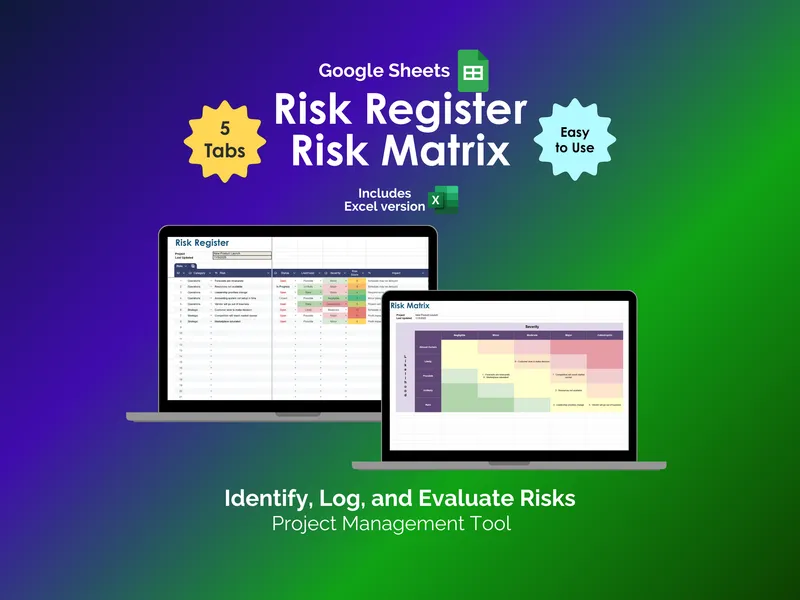
Built around the Risk Register tab, the workbook captures Category, Risk, Status, Likelihood, Severity, Risk Score, Impact, Mitigation, and Owner for every entry. The risk matrix spreadsheet calculates Risk Score from the likelihood and severity values you choose, so prioritization happens as you type. Project and Last Updated fields sit at the top so the register doubles as a status artifact for steering committee reviews. The structure aligns with the PMBOK guidance from the Project Management Institute on maintaining a centralized risk repository.
The Risk Matrix tab is the visual payoff. A five-by-five grid plots Likelihood (Almost Certain, Likely, Possible, Unlikely, Rare) against Severity (Insignificant, Minor, Moderate, Major, Catastrophic), and your register entries drop into the right cells automatically. Green, yellow, and red zones make hot risks obvious in a glance, which keeps the conversation focused on the threats that actually move the project. This is the kind of view that works equally well for ISO 31000 style reviews and informal sprint risk checks.
The Configuration tab controls the drop-down lists for Risk Category (Financial, Compliance, Legal, Operations, Reputation, Security, Strategic, Other) and Team Member assignments. Edit the lists once and every register row, matrix cell, and dashboard chart respects your taxonomy. The Dashboard tab then summarizes everything with five auto-updating charts: Risk Status, Risk Likelihood, Risk Severity, Risk Count by Category, and Risk Count by Owner. Share that one screen instead of building slides.
What separates this excel risk register template is the bundle. You get the Excel file and a parallel Google Sheets version in the same purchase, so the tool follows your team whether they live in Microsoft 365 or Google Workspace. Five tabs, no macros, no subscription, and you keep the file forever. Download it, drop in your first risk, and stop chasing threats across notebooks.