Product facts
- Best suited to: renters comparing several communities or apartments and organizing tours before choosing a home.
- Software: Microsoft Excel. This listing specifies the Excel format.
- Download: an eight-tab Excel workbook covering your search sources, communities, apartment details, reviews, tours, and final decision.
- Inputs: listing details, review ratings, tour dates, and your own priorities and ratings for each finalist.
- Purchase: one-time digital download that you can use offline. The workbook calculates from the records you enter.
Apartment hunting rarely falls apart because there aren’t enough listings. They fall apart because by week three, every place starts to blur together and you can’t remember whether the one with the rooftop deck was $1,750 or $1,950. This Excel apartment search tool is for renters who want to make the decision with a clear head, not a screenshot folder.
You scroll the same six listing sites every night and lose track of which ones you’ve actually combed through this week. The Search tab fixes that with a logged source list — Apartments.com, Realtor.com, Zillow, Apartment Guide, Apartment Finder, Redfin and any others you add — plus columns for URL, Last Checked date, Days Since Checked, Profile Completed, and Notes. Set a Threshold to Warn (in days) and overdue sources get flagged so your apartment hunting spreadsheet keeps you honest about coverage.
Comparing communities in your head is where most renters quietly give up. The Communities tab lines them up in a single grid: Community, Source, Interest Level, Type, fitness, pool, outdoor space, playground, grill, laundry, parking (including controlled parking and garage), maintenance, and Walk/Transit/Bike scores. Two pie charts — Interest Level and Community Type — show you at a glance which kinds of places you actually keep liking, so you stop chasing your own tail.
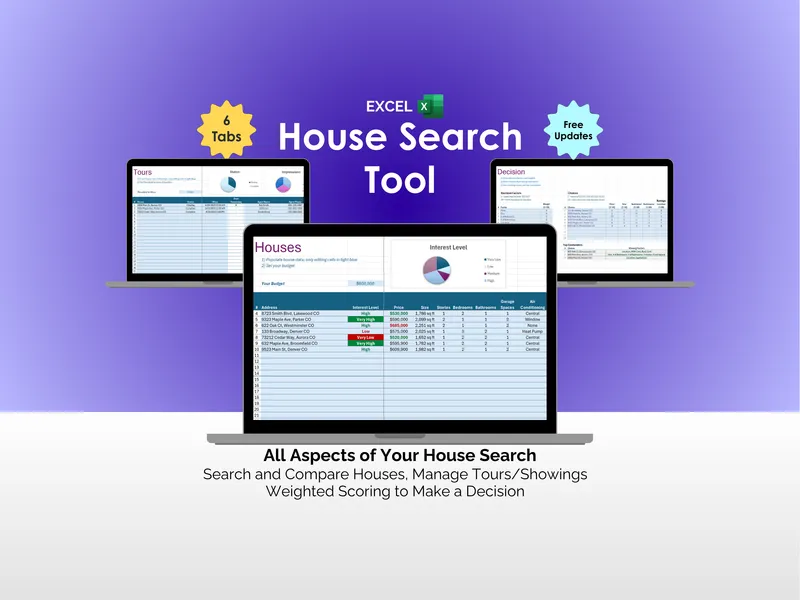
Forgetting which unit had the in-unit washer is the small detail that derails decisions. The Apartments tab gives each listing its own row across 15+ attributes — Monthly Rent, Deposit, Bedrooms, Bathrooms, square footage, AC, Heating, Stove, Dishwasher, Disposal, Microwave, High Speed Internet, Outdoor Space, Walk-In Closet, Island Kitchen, Countertops. Enter your Monthly Budget at the top of the excel apartment search tool and the Interest Level chart keeps your shortlist visible.
Trusting one star rating is how you end up next to a freeway. The Reviews tab lets you log multiple reviews per community across Google, Yelp, and Apartments.com with Rating, Max Rating, and Pros columns, then averages them for you. The Top Reviewed Communities bar chart surfaces your highest-rated options without you re-tabbing through three review sites every time you reconsider a place.
You schedule four tours and miss one because it slipped past the calendar. The Tours tab tracks Community, Status, When (date and time), Days Remaining, Address, and Notes — with a Status pie chart, a Threshold to Warn for upcoming deadlines, a “Past Due” flag, and a Next Tour indicator pinned at the top. Walk in prepared instead of explaining why you’re twenty minutes late.
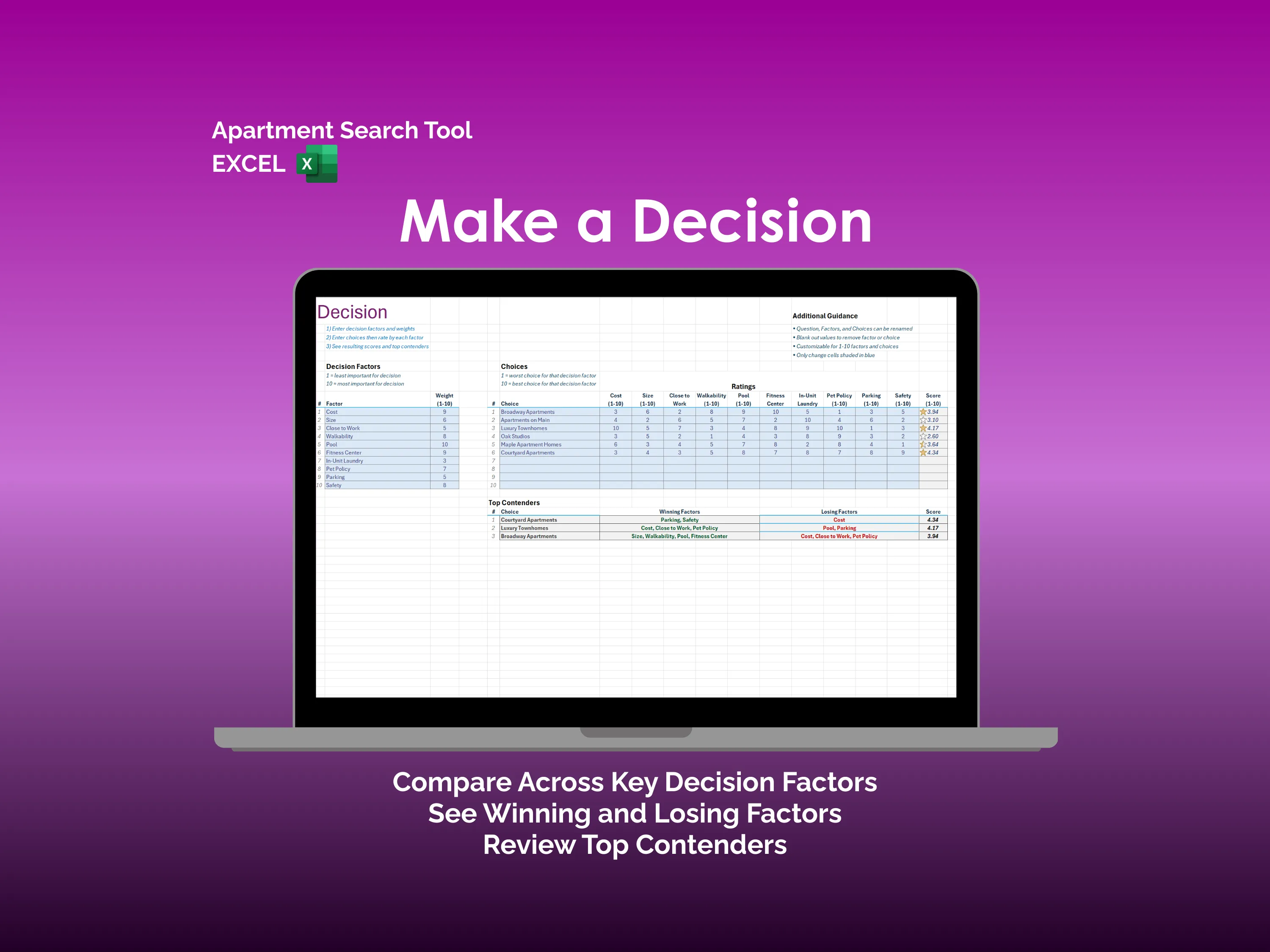
When the shortlist hits three or four, gut calls win out unless you force structure. The Decision tab is built for that moment: assign weights to Cost, Size, Close to Work, Walkability, Pool, Fitness Center, In-Unit Laundry, Pet Policy, Parking, and Safety, then rate each choice across the same factors to produce a weighted Score. A Top Contenders panel surfaces each finalist’s Winning Factors, Losing Factors, and final score so you sign a lease on logic, not late-night vibes.
This is an offline Excel file across 8 tabs — no logins, no subscription, no syncing. The apartment hunting spreadsheet lives on your machine, runs the math, and leaves the decision to you.
Example: see why one apartment ranks above another
In the Decision preview below, you first assign importance weights to factors such as cost, size, and parking, then rate each apartment against those factors. In this illustrative dataset, Courtyard Apartments ranks first with a score of 4.34, followed by Luxury Townhomes at 4.17. The Top Contenders panel shows parking and safety as Courtyard’s winning factors and cost as its losing factor.
Replace those sample choices, weights, and ratings with your own. Review the winning and losing factors alongside the score: the ranking reflects your inputs, so changing what matters to you can change the result. The names and ratings in the preview are example data, not recommendations for actual properties.
Before you buy
Does it automatically find listings or import reviews?
You log sources, listing information, and review ratings yourself. The Search tab tracks where you looked and when; the Reviews tab calculates averages from the ratings you enter. The workbook runs offline without syncing to listing sites.
Can I use this in Google Sheets?
This listing specifies Excel. Google Sheets compatibility is not promised for this file. Use Microsoft Excel, or contact Ardent Workshop before buying if you need another format.
Can I change the decision factors?
Yes. The Decision tab allows you to rename factors and choices and adjust their weights and ratings. For a walkthrough of the trade-offs, read how to choose between two apartments.
For purchase conditions and usage terms, read the Terms of Service and licensing FAQ.