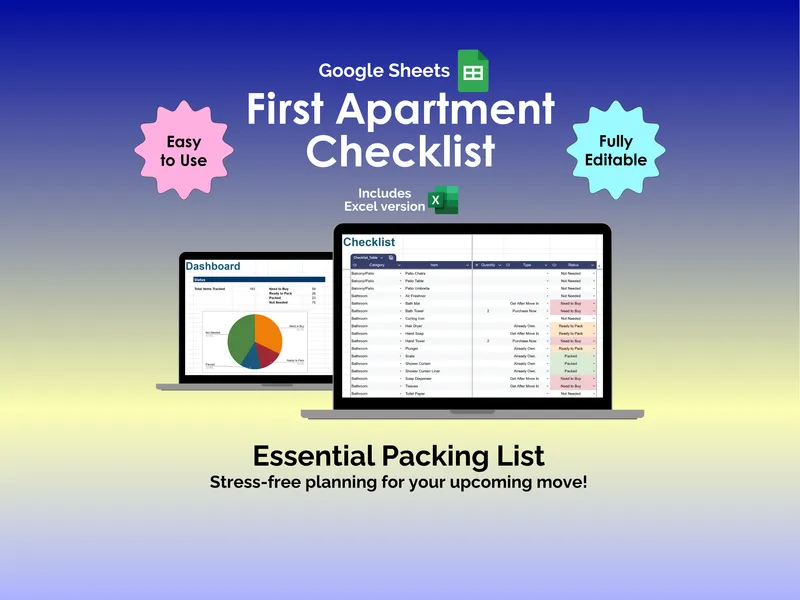
It is a Thursday after work. You signed the lease two weeks ago, you have nine browser tabs open across Target and IKEA, and you still cannot remember whether you own a can opener. This Excel first apartment checklist hands you a finished list instead of a blank one, with 180+ essentials already sorted by room so first-time renters and new graduates can stop guessing and start packing.
The point of a first apartment essentials spreadsheet is to catch the things you will only notice when you need them at 11pm on move-in day (shower curtain liner, surge protector, a single decent pan). Every preloaded item lives on the Checklist tab with columns for Category, Item, Quantity, Type, and Status, so you can see what you are buying, what you are bringing from your parents’ place, and what can wait until after the boxes are unpacked.
Twelve room categories, pre-sorted. The checklist groups items into Balcony/Patio, Bathroom, Bedroom, Cleaning, Cooking/Baking, Kitchen, Laundry, Living Room, Miscellaneous, Pantry, Pet Care, and Technology. That matters because shopping by room is how you actually shop (one Target run hits Bathroom plus Cleaning, one IKEA trip handles Bedroom plus Living Room) — not by some abstract priority order.
Type tagging for what to do with each item. Each row gets a Type label: Already Own, Purchase Now, Bring From Home, or Get After Move In. This is the column that prevents the two classic mistakes — buying things you already own and forgetting things your roommate assumed you were bringing. It also lets you defer non-urgent purchases (a second floor lamp, a nicer trash can) so your move-in budget is not blown in week one.
Color-coded Status and a live progress chart. The Status column cycles through Need to Buy, Ready to Pack, Packed, and Not Needed, with each value color-coded so the sheet reads at a glance. The dashboard chart at the top of the Checklist tab pulls those statuses into a pie chart, so you can see “I still have 26 items to buy” without scrolling or counting.
Auto-populated dropdowns and a Configuration tab. Every Category, Type, and Status cell uses a real Excel dropdown driven by the Configuration tab. That means if your apartment has a den, a craft nook, or no balcony, you edit the Configuration list once and the dropdowns update everywhere. The sheet supports up to 500 checklist rows total, which is more than enough room for the gallery wall, the houseplants, and the things you will inevitably remember at 2am.
Filter by room or status to plan one trip at a time. Excel’s built-in filters work on every column, so you can isolate just the Kitchen items still marked Need to Buy before a grocery-and-housewares run, or pull up everything tagged Bring From Home before you visit your parents this weekend. It is the same spreadsheet doing three different jobs (shopping list, packing list, “did I forget anything” audit) depending on how you filter it.
What makes this excel first apartment checklist different from a blog-post listicle is that it is a working file, not reading material — the dropdowns, the conditional formatting, and the chart all update as you check things off. Your purchase includes both the Excel version and a Google Sheets version of the same template, so you can share it with a roommate or partner without anyone needing a Microsoft 365 license.
Open the file tonight, spend twenty minutes marking what you already own, and you will walk into move-in day with a single source of truth instead of fourteen tabs and a vibes-based plan.