Skip Navigation

Spreadsheet

Long-Distance Caregiving Coordination Binder — Check-In Log, Who-Does-What Map & a Dashboard That Counts the Days Since Anyone Visited (Excel + Google Sheets)

Coordinate an aging parent's care from another city — a shared check-in log, 15 care areas with owners, and days since anyone visited.

Click to enlarge the image / Click × or press ESC to close

What you'll love

  • Days since anyone visited IN PERSON — the one number a phone call can't give you. The dashboard counts in-person visits separately from calls, names who made the last one, and colors the answer, so the gap you can't feel from another city is the first thing you read.
  • An eight-week coverage map — one row per week, calls against actual visits. A run of "Calls only" is the pattern that hides a decline — everyone spoke to her, nobody saw her. Here it reads as a pattern instead of a feeling.
  • Fifteen areas of care, pre-loaded, because the ones you haven't thought of are the ones without an owner — daily check-in, medications, appointments, groceries, bills & mail, banking, insurance & benefits, house & yard, transportation, home safety, paid help, social life, legal documents, pets, technology.
  • A computed next-due date for every area from the cadence you set, flagged Overdue, Never done, Due soon — and "Needs an owner", the count worth driving to zero before anything else.
  • Who is quietly carrying the most — owned areas AND backup duty, side by side, per person. One column to read aloud on a family call.
  • Appointments that catch the two handoffs families drop — one with nobody assigned to take her reads "No one assigned", and a past one with nothing written down about what the doctor said reads "Needs follow-up".
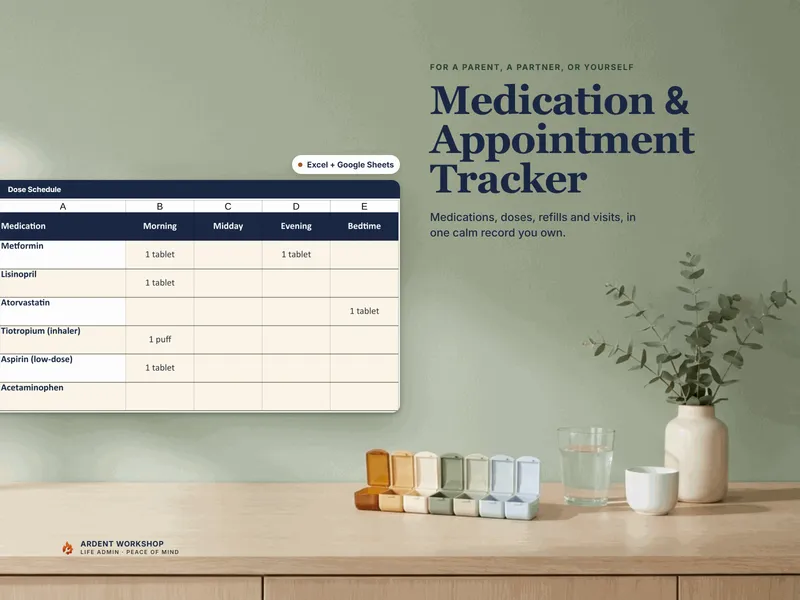
  • Medications with a refill flag — Past due once the date has gone, Order now in the week before. It catches the classic failure, where nobody ordered it because everyone assumed someone else had.
  • A Parent Snapshot one-pager for a new aide, a hospital nurse, or a sibling who's never done a visit — and a two-sided printable version for the refrigerator.
  • One safety rule throughout — it records what your parent NEEDS and WHERE things are kept, never logins, PINs, account numbers, or a Social Security number, so it's safe to share with siblings, an aide, or a neighbor.
  • An 11-tab workbook (works in Excel, Google Sheets, and LibreOffice) + 3 PDF guides · a complete worked example · evergreen · instant download · a file you own

The number a phone call can’t tell you

You call every few days. Your brother calls on Sundays. The aide sends a note. Everyone says she’s fine — and she says she’s fine, because that’s what parents say to children who live eight hundred miles away.

Then you fly in, and the fridge tells you a different story.

That gap is the whole problem of long-distance caregiving, and it is not a problem a contact list solves. This binder does something a blank spreadsheet and a free template can’t: it counts the things nobody in the family volunteers, and puts them at the top of one page.

What it computes

Days since anyone visited in person. Not phoned. Not video-called. Visited — and who it was. Plenty of families have a version of the same story: the month they all spoke to Mom weekly and nobody realized she had stopped cooking. This number is the first thing on the dashboard, colored so you can’t miss it climbing past a month.

An eight-week coverage map. One row per week, counting contacts against actual visits. A run of weeks marked Calls only is the pattern that hides a decline — and here it shows up as a pattern instead of a feeling.

Areas of care with nobody’s name on them. Fifteen areas come pre-loaded, from the daily check-in and medications through bills and mail, insurance and benefits, transportation, home safety, and the paperwork. They’re pre-loaded on purpose: the areas you haven’t thought about are exactly the ones without an owner. Long-distance care almost never fails dramatically — it fails quietly, in the areas nobody realized they’d stopped covering.

Who is quietly carrying the most. Every person in the care circle, with the areas they own and the areas they back up, side by side. That second column is the invisible second-line load nobody counts, and reading both aloud on a family call ends more sibling arguments than a year of group texts.

The handoffs it catches

  • An appointment that’s booked with nobody assigned to take her.
  • A past appointment where nothing was ever written down about what the doctor actually said — the half of the job families reliably drop.
  • A prescription past its refill date, because nobody ordered it, because everyone assumed someone else had.
  • A care area with an owner but no backup. One person deep is fine right up until they’re on vacation, ill, or on a plane.
  • A helper who has quietly stopped checking in, measured against the cadence you set for them.

Write down what you saw, not what you concluded

The Check-In Log is where the binder earns its keep, and it asks one thing of you: record the observation, not the conclusion. “Asked me what day it was three times in ten minutes” is worth keeping — six months from now, in a doctor’s office, that dated note is the useful thing and “she’s getting confused” is not. It’s also kinder: a record of specific dated moments leaves room for your parent to be having a bad week rather than a decline.

Every contact goes in the same log — yours, your sister’s, the aide’s note, the care manager’s report — and the “how they seemed” column colors itself, so a run of Off or Concerning stands out at a glance.

Not just a grid — the method comes with it

A whole tab carries the thinking: six principles for care at a distance, what each kind of contact actually tells you, an in-person visit checklist (the fridge, the pill bottles, the route from the bed to the bathroom at night, the mail pile), what to notice and what to do with it, an escalation ladder, how to run the family conversation, and six questions to ask before you hire an aging life care manager. Thirty-two more pages of it ship as PDFs, including a printable who-has-what grid you work through with your siblings until nothing is left unassigned.

One rule keeps it safe to share

This file gets shared — with siblings, an aide, sometimes a neighbor. So it records what your parent needs and where things are kept: never logins, PINs, account numbers, or a Social Security number. A record of care, not a set of keys. Real credentials belong in a password manager the family shares.

Try the free version first

Not ready for the whole binder, or need something to send a sibling today? The free Long-Distance Care Contact Sheet puts your parent’s point person, the local helpers who can be there today, who has a key, and every provider in one place you can print and share. No email, no signup — it’s just there.

Own it, don’t rent it

Take the one-click Google Sheets copy and share it with your siblings — everyone logs into the same file, and there’s no seat to buy for each of them. Or keep the Excel file in a shared folder, or print the pages and fill them in by hand; it opens in LibreOffice Calc too.

Unlike a subscription caregiving app, this file is yours. It doesn’t live on a company’s server, it doesn’t charge per person, and it won’t vanish when a service changes its plans. Buy it once, and it stays your family’s record for as long as you need it.

A record-keeping and coordination tool for a family — not medical, legal, or financial advice, not a care plan written by a professional, and not a substitute for your parent’s doctors, an attorney, or a licensed care manager. The example family, providers, medications, and appointments throughout are fictional and illustrative.

See it in action

Play

Built to last

  • Intuitive and straightforward design
  • Employs software best practices
  • Delivered as one spreadsheet that works in Microsoft Excel, Google Sheets, and LibreOffice Calc
  • Free updates — send us a message to be notified of updates when they are available
  • Completely customizable — add rows and columns, rename headings, and adjust formulas

In the download

This digital product is delivered as a zip file containing the following items:

  • 01 — The Long-Distance Caregiving Coordination Binder (.xlsx, 11 tabs): Read Me, Coordinating From Afar, Parent Snapshot, Care Circle, Check-In Log, Responsibilities, Appointments, Medications, Providers & Contacts, Where Things Live, Care Dashboard — pre-filled with a clearly fictional worked example; opens in Excel, Google Sheets, or LibreOffice
  • One-click Google Sheets copy — a ready-made native version with every formula and flag already working (no import needed), and the easiest way to share the binder with your siblings
  • 00 — Start Here Guide (PDF, 13 pages): your first hour with the binder, the check-in habit, getting an owner on every area, the conversation with your siblings, visits, and what to do when something changes
  • 02 — The Long-Distance Care Playbook (PDF, 10 pages): six principles, what each kind of contact actually tells you, the fifteen areas of care, what to notice and what to do with it, an escalation ladder, the family conversation, and six questions to ask before hiring an aging life care manager
  • 03 — Printable Visit & Coordination Sheets (PDF, 9 pages): a two-sided parent snapshot for the refrigerator, a who-has-what grid to work through with your siblings, an in-person visit checklist, and a paper check-in log
  • READ-ME-FIRST.txt

Compatibility & terms

Unless otherwise specified, this digital product is delivered as a spreadsheet (an .xlsx file) designed to work in Microsoft Excel, Google Sheets, and LibreOffice Calc . It is not guaranteed to work in any other application.

This digital product is copyrighted. It is intended for personal use only. It is strictly prohibited to reproduce, resell or share this product, in part or in full, with or without modifications. No refunds, exchanges, or cancellations. Given this is a digital product, no physical product will be delivered.

Why a workbook

Most tools force a choice between a blank spreadsheet you build from scratch and a monthly app that's overkill. Ardent Workshop is the rung in between — structure you own.

  1. Blank spreadsheet

    Free, but you build and maintain every formula, tab and layout yourself.

    • Free
    • Infinite setup
    • No structure
  2. You are here

    Ardent Workshop

    Owned, structured, connected workbooks — a one-time price, yours to keep.

    • One-time price
    • Structured & connected
    • Yours to own
  3. Generic SaaS app

    Powerful, but overkill, rented and locked-in — built for someone bigger than you.

    • Monthly rent
    • Overkill
    • Lock-in

Ready to start

Instant download · Free lifetime updates · Personal use license

$24.95 USD
Buy now

Pairs well with

From the Guides

Hand-picked reading on how to actually use a tool like this.