Your recipe is written in cups. The label has to be ordered by weight. That one mismatch is why so many home-kitchen labels are quietly wrong, and it is the first thing this pack fixes.
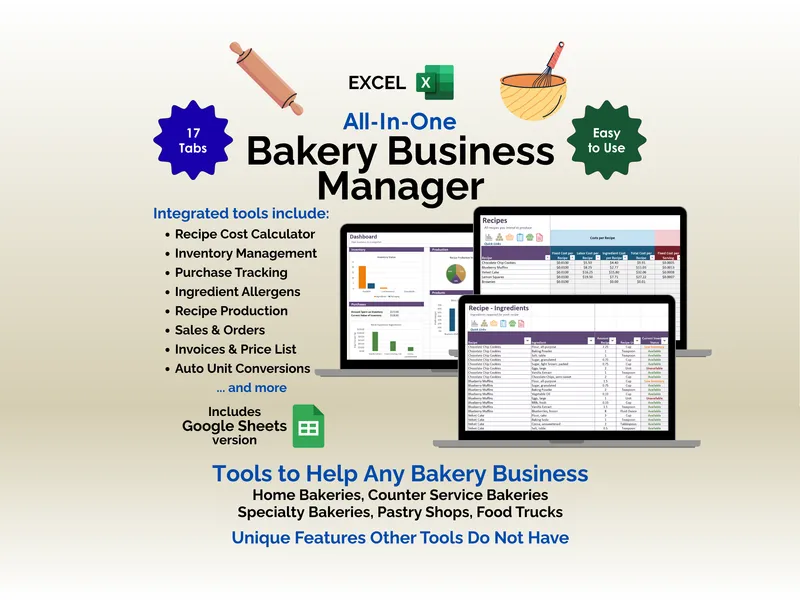
Enter a recipe the way you actually write it — cups, ounces, pounds, grams — and the workbook converts every line, ranks the ingredients heaviest first, and writes the finished ingredient statement into a single cell you copy straight onto the package. Flag an allergen once on an ingredient and it turns up on every product that uses it, so the “Contains” line cannot be right on one label and forgotten on another. Then it does the half nobody thinks about until a supplier calls: log your ingredient lots and your batches, and one supplier lot code traces forward to every batch, every unit, and every place those units went.
Why a spreadsheet gets the ingredient order wrong
Federal labeling puts ingredients in descending order of predominance by weight. Recipes are written in mixing order, in cups. The two rarely agree — a cup of flour is about 120 grams, a cup of granulated sugar about 198 — and the gap is where labels go wrong.
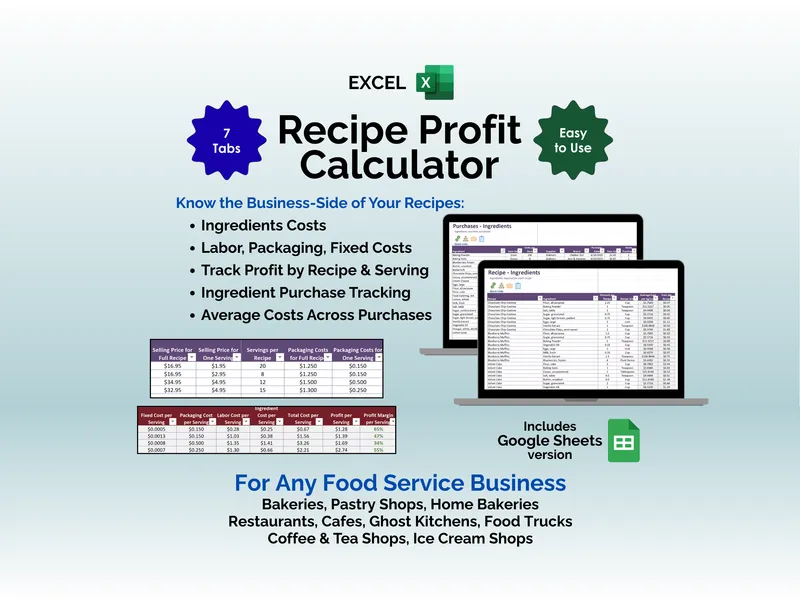
The Recipe Lines tab is the engine. It converts each amount to grams (weight units from a conversion table, cups per ingredient from a typical grams-per-cup figure you can overwrite), works out each ingredient’s share of the batch, and ranks them. Where two neighboring ingredients land within 5% of each other, a Check by weight column says Weigh these — because at that margin the order could genuinely go either way and a label is not the place to guess.
The Label Builder then pulls the ranked names back into fourteen slots and assembles the finished statement, sub-ingredient parentheticals and all. Change a recipe amount and the label rewrites itself, which is exactly what you want: on paper, a tweaked recipe and an old label drift apart silently.
The nine major allergens, computed rather than remembered
Milk, eggs, fish, crustacean shellfish, tree nuts, peanuts, wheat, soybeans and sesame — the ninth since the FASTER Act’s sesame labeling requirement took effect on January 1, 2023, which is why older labels routinely miss it.
Nothing on the Allergen Matrix is typed. Every flag is computed from the ingredient master, so an allergen declared once is declared everywhere, and the exact Contains line is written for you. The pre-loaded list of fifty ingredients comes already flagged, including the three that catch people out: coconut stopped being a tree nut for labeling when the FDA removed it in January 2025 (it still belongs in the ingredient statement, just not on the Contains line), most chocolate chips carry soy lecithin, and sesame on a seeded loaf is easy to forget because it is a topping rather than a recipe line.
Cross-contact is a separate column, because it is a separate thing. A “Contains” line declares what is in the product; a cross-contact sentence covers what your kitchen also handles — the shared mixer, the shared oven, the flour dust.
Your own state’s label rules, dated and source-linked
Pick your state on the Setup tab and the label elements that jurisdiction publishes appear at the top of your label worksheet — including the disclosure sentence most states require word for word. All 50 states and DC, 403 published elements, with each state’s entry carrying the date it was last reviewed and a link to its official source, because cottage-food rules change.
Each product’s label is then rated Ready to print, Missing elements, or Not started against the seven core elements almost every state requires. Five of those seven are computed from the rest of the workbook; the two nobody else can see — did you print your state’s disclosure sentence, and the date and batch code — are yours to tick. And because twenty-one jurisdictions publish more than seven elements, a label does not read ready until you confirm you have worked through your own state’s list as well.
The state’s elements are reference content you read and tick off — the workbook never compares your label to your state’s rules for you, and Ready to print means you accounted for the elements, not that anyone approved the label.
One code, traced both ways
A recall is usually not dramatic. A supplier emails to say a lot of flour is being pulled, and you have an evening to work out whether any of it left your kitchen and who has it.
Log every ingredient lot as it arrives and every batch with the lots that went into it, and the Recall Trace tab does the rest. Type a supplier lot and get every batch it went into, the units, where they went, and a straight answer on how many of those buyers you can actually reach — because market sales are usually anonymous and named custom orders are not, and that distinction decides whether this is six phone calls or a public notice. Type a batch code off a package a customer is holding and get every supplier lot inside it.
What this pack deliberately does not do
It does not track your revenue against your state’s cap, and it is not a guide to cottage food law. Both of those are already free: our own Ardent Seller platform publishes a free 50-state cottage food law guide (opens in new tab) and a live revenue cap tracker (opens in new tab) and keeps them current, and links to both ship inside the download.
What you are paying for is the record-keeping those guides tell you to do and do not give you: the ingredient statement, the allergen matrix, the label worksheet, and the two-way trace.
Own it, don’t rent it
This is a file you keep, not a subscription you feed. No seats, no monthly fee, no vendor holding your recipes and your customer records. Between a blank spreadsheet you have to build yourself and food-compliance software priced for a factory, this is the middle ground — structured, computed, and yours outright.
It opens in Excel, Google Sheets and LibreOffice Calc, and the Sheets version is a real native Sheet: click “Make a copy” and the whole workbook lands in your Drive with every dropdown, color and formula already working. Formulas are kept deliberately plain — no dynamic arrays — so older Excel handles them too.
When the record-keeping outgrows a file — many products, real inventory to value, wholesale accounts, more than one person entering data — Ardent Seller (opens in new tab) picks up from there. Until then, this one is yours.
Try the free version first
The free Allergen & Label Worksheet is a single-tab taste of the ingredient statement and Contains line, pre-filled with a worked example. No email required.
If you are still working out whether you need any of this, what is cottage food law? covers the exemption and the label elements, and compliance spreadsheet vs food compliance software covers when a workbook stops being enough.
A record-keeping tool, not legal advice. This pack is a record-keeping and label-drafting template — not legal, regulatory, or food-safety advice, and not a determination that any label or product complies with anything. The example business, products, suppliers and lot codes are fictional. The state label elements are reference content compiled from published state guidance, each state’s entry carrying its own review date and a link to its official source. Check your finished label against your state’s own guidance before you print a run, and treat the best-by figures as conservative starting points to test rather than shelf-life determinations.