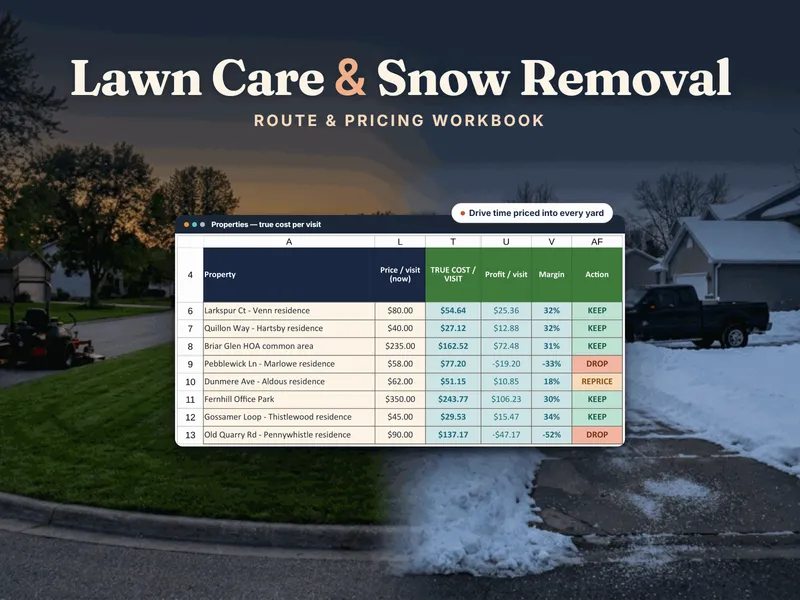
Start with the free Lawn & Snow Job Pricing Calculator. It is a one-tab file with no signup that prices one property from lot size or timed minutes, crew, equipment cost per hour, drive minutes to the stop and your target margin, plus a one-account snow push check. The full Lawn-Care & Snow-Removal Seasonal Route & Pricing Workbook carries that across your whole book of properties, routes and winters.
This is not a contest. Software and a workbook answer different questions, and for a one- or two-truck operation the workbook's question usually comes first.
What lawn-care software does well
Being fair to the apps matters, because they do real work a spreadsheet cannot.
- Dispatch. Each crew sees its day on a phone, and the office sees what is done and what is not.
- Customer messaging. Reminders and on-the-way notices go out without anyone typing them.
- Payments and invoices. Card payment, often taken in the field, and an invoice that comes straight out of a finished job.
- Route optimization by GPS. Many apps suggest a driving order and update it when a stop is added or dropped.
If you manage several crews, or you are not the one on the mower, that is the part of the business a workbook cannot touch.
Where the workbook wins
These apps are built around the job: who goes where, and whether it was billed. The workbook is built around the money in each job.
- True cost per visit. Each visit is costed from labor, mow-kit dollars for the on-site time, truck dollars for the drive and overhead, and it reports profit, margin and drive share, the portion of the visit's time spent driving. Equipment cost per hour is built from depreciation, maintenance and fuel.
- The drive is charged to the stop that causes it. You type the real drive minutes from the previous stop, in the order you actually run the route, so a yard that looks fine on paper but sits at the end of a long drive can show up as a REPRICE, or even a DROP, instead of a KEEP.
- Route-day dollars per route hour. Each route day shows day profit, dollars per route hour and stops per drive hour, graded TIGHT, FAIR or SPREAD. A route can be full and still earn less per hour than a shorter, denser one. See what route density is.
- Snow: seasonal vs per push, across three winters. Every plowing account is tested at a light, an average and a heavy winter. The workbook shows the number of pushes where the seasonal price equals per-push pricing and the number of pushes where a seasonal contract stops covering your cost. It flags a signed contract that loses money in an average winter.
- One-time ownership. No per-user fee that climbs as you add a helper, and no export step if you ever leave. It is a file on your computer, and the formulas are yours to read.
Signs you need the app
- You schedule people who are not you, and two crews' days must stay in sync.
- Customers expect automatic reminders and on-the-way messages.
- Invoicing is its own evening job, with the same numbers typed twice.
- Someone else needs to see the day's stops on a phone and see changes live.
Signs the workbook comes first
- You are on the mower or the plow yourself, with a route you know.
- You could not say what a visit to your farthest yard costs after the drive and your overhead.
- You are about to sign a seasonal snow contract and cannot say how many pushes it covers.
Use both when you grow
The two tools stack. The app moves the crew and talks to the customer; the workbook decides the price that goes into it. An app run on guessed prices only dispatches an underpriced route efficiently. If your work also runs on recurring routes inside homes, the sibling Cleaning Service Business Job & Route Manager does the same job for that trade. To price a yard by hand, follow how to price lawn mowing jobs, and find more route and pricing tools on the lawn-care and snow-removal hub. For the wider picture, see the spreadsheet vs field-service software comparison and the service-trades hub.
Frequently asked questions
- Do I need lawn-care software, or is a spreadsheet enough?
- If you are the crew, or you run one or two trucks on routes you know by heart, a priced workbook is usually enough. Its job is the arithmetic: what each visit truly costs once equipment, fuel, labor, overhead and the drive between stops are counted, and which routes and properties earn their place. Scheduling and dispatch software earns its keep when several crews have to stay in sync, customers expect automatic reminders and card payment, and the office needs to see the day live.
- What does lawn-care software do that a workbook can't?
- Dispatch crews and show each one the day's stops on a phone, message customers automatically, take payment and send invoices from a finished job, and in many cases optimize the driving order from GPS. A workbook does none of those. What it does better is tell you whether each property, route day and snow contract is priced to make money, in a file you own.
- Can a spreadsheet handle snow removal pricing?
- It can handle the part that decides whether you make money. The workbook tests every plowing account two ways, per push and seasonal, against a light, an average and a heavy winter, and returns a verdict for each, such as PER-PUSH WINS, SEASONAL WINS or SIGN SEASONAL, CAP AT n PUSHES. It will not dispatch a plow driver at 3 a.m. That coordination is what a scheduling app is for.
- Should I pay a monthly fee or buy a workbook once?
- The workbook is a one-time purchase you own and can edit. Scheduling and dispatch apps are generally a recurring monthly subscription, often priced by user or by crew, so the bill grows as you do. Prices change often, so check current pricing yourself instead of trusting a number in an article. The subscription pays for itself once the coordination it saves is worth more than the monthly fee. Before that, it is capability you are renting and not using.
- Can I use both a workbook and an app?
- Yes. The app moves the crew and the customer messages; the workbook sets the prices that go into the app. Without a trustworthy cost per visit, an app mostly makes an underpriced route run more smoothly.