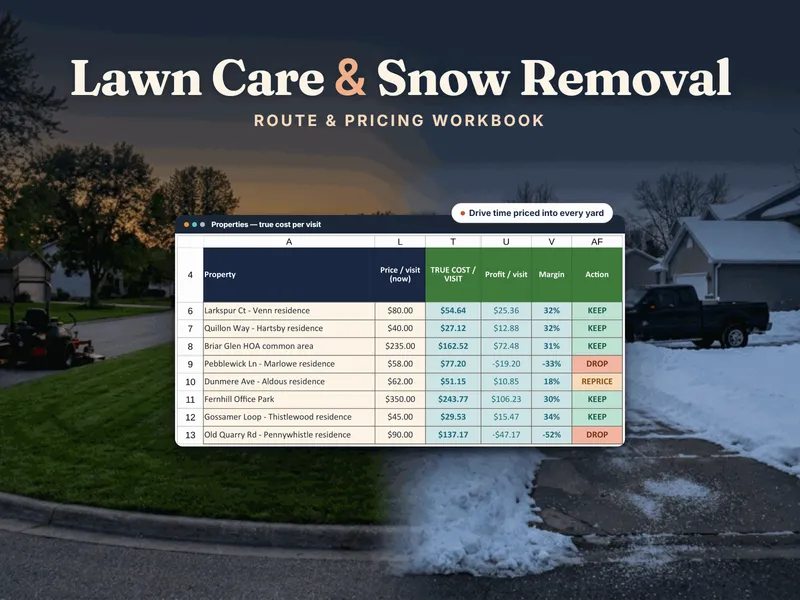
Why do mowing jobs get underpriced?
A mowing price usually starts from the mowing: how long the lawn takes and what the neighbor charges. But a yard that takes thirty minutes to mow and fifteen to reach is not a thirty-minute job. The price has to cover the whole block of time the yard takes out of your day, plus the machines, plus your share of the costs that exist whether or not you mow that yard, like insurance, software and a phone.
To price one yard right now, the free Lawn & Snow Job Pricing Calculator takes one property (a lot band or timed minutes, crew, equipment cost per hour, drive minutes to the stop and target margin) and returns a true cost and a suggested price. For a whole route, the Lawn-Care & Snow-Removal Seasonal Route & Pricing Workbook prices every property on its equipment cost and its real share of the drive, then ranks your yards by margin. The steps below show how to do it by hand first.
Step 1: How do you time the visit?
You need the minutes the work takes, and there are two honest ways to get them:
- A lot-size band. Group yards into bands (small, medium, large and so on), each with a base number of crew-minutes you set from your own experience.
- A timed yard. Walk and time the actual yard with a stopwatch and use the measured crew-minutes. This beats a band whenever you have the chance, especially for odd lots.
Then convert crew-minutes into the clock time you stand on the property: crew-minutes divided by crew size. Illustrative arithmetic: 60 crew-minutes with a crew of 2 is 30 minutes on site.
Step 2: How do you cost the crew labor?
Cost your own pay as labor, not as whatever is left over. If your pay is treated as the leftover, a route can look wonderful while paying you less than a helper earns. Cost any helper at a loaded rate: the hourly wage plus payroll burden. A helper paid $20 an hour with a 10% burden is charged at $22.
- You at a $30 pay target plus one helper at $22 is $52 per clock hour.
- On site: 0.5 hour × $52 = $26.00.
Step 3: What does a machine cost per hour?
A mower has no hourly price tag, but it has an hourly cost made of three parts:
- Depreciation per hour: purchase price minus resale value, spread over the machine’s life in hours.
- Maintenance per hour: your yearly maintenance spend divided by the hours the machine works on your jobs in a year.
- Fuel per hour: gallons per hour times the fuel price.
Add them for each machine, and add the machines that go out together into one kit rate. A mower that cost $8,000, will resell for $2,000 and is good for 2,000 hours depreciates $3 an hour before maintenance or fuel, which also shows why an idle machine is expensive: the same purchase spread over fewer hours costs more per hour.
Say the mowing kit comes to $14 an hour all in and the truck to $9 an hour. Charge the kit for on-site time and the truck for the drive (the truck is costed with the drive in Step 4):
- Mowing kit: 0.5 hour × $14 = $7.00
Step 4: How do you add the drive minutes?
Drive time is allocated to the stop that causes it. Use the minutes you actually drive from the previous stop, in the order you actually run the route, not a straight-line guess from a map. Suppose this yard is 15 minutes from the one before it:
- Drive labor: 0.25 hour × $52 = $13.00
- Truck: 0.25 hour × $9 = $2.25
The visit now takes 45 minutes of your day. The share of that time spent driving, 15 of 45 or one third, is the drive share, and it is a common reason a yard that looks fine on paper loses money. It is also why route density matters: the same yard five minutes from the previous stop costs far less to serve. If you want to cost the truck on its own, see cost per mile.
Step 5: How do you charge overhead?
Overhead is a year of costs that exist whether or not a particular yard is mowed. Divide that year by the crew-hours you have actually booked, on site and on the road, to get an overhead per crew-hour. Each visit then carries a slice in proportion to the time it takes. A low booked share is the reason the rate runs high: the same bills are spread over fewer hours, so adding yards on days you already drive brings it down.
Say overhead works out to $10 per crew-hour. This visit is 0.75 hour on the clock with a crew of 2, which is 1.5 crew-hours:
- Overhead: 1.5 × $10 = $15.00
Step 6: What is the true cost and the price?
Add the parts, then divide by one minus your target margin so that the margin is a share of the price, not a markup on cost:
| Item | Amount |
|---|---|
| On-site labor (30 min at $52/hr) | $26.00 |
| Drive labor (15 min at $52/hr) | $13.00 |
| Mowing kit (30 min at $14/hr) | $7.00 |
| Truck (15 min at $9/hr) | $2.25 |
| Overhead (1.5 crew-hours at $10) | $15.00 |
| True cost per visit | $63.25 |
| Price at a 35% target margin ($63.25 ÷ 0.65) | $97.31 |
| Rounded price | $98 |
The first thing to notice is that the drive (labor plus truck) and the overhead are $30.25 of the $63.25. Neither shows up if you price from mowing time alone.
Step 7: Is your current price earning enough?
Pricing a new yard is half the job. The other half is checking the yards you already serve. Profit is price minus true cost, and margin is profit divided by price. If you currently charge $80 for this yard:
- Profit: $80 − $63.25 = $16.75
- Margin: $16.75 ÷ $80 = about 21%
Now read it against two lines you set: a target margin (35% here) and a drop-below margin, the floor (say 15%). Then the verdict is one of three:
- KEEP: margin at or above your target. Leave it alone.
- REPRICE: below target but above the drop line. A price increase fixes it, and the suggested price ($98 here) tells you how much.
- DROP: below the drop line. Raising the price may not be enough, or the customer may leave if you do. Decide on purpose.
At about 21%, this yard is a REPRICE.
The free calculator uses three simpler labels: “PRICED RIGHT” when the margin is at or above target; “UNDER TARGET — RAISE TOWARD $X” when your current price is still profitable but short of target, where $X is the price that hits your target; and “LOSING MONEY ON EVERY VISIT” when the price is below cost. It has no drop line, so the DROP call is yours. A yard like this one, profitable but under target, gets the “UNDER TARGET” label there, with its own target price in place of $X.
Notice that the fix is sometimes the route, not the price. Run the same math with the drive at 5 minutes: true cost falls to about $49.75, the suggested price to about $76.50, and the same $80 earns a margin near 38%, a KEEP. Moving the stop next to a neighbor, or asking the customer to join a day you are already in their area, can be worth more than a price increase.
What about snow?
Snow pricing uses the same cost-first logic with one added bet on the weather: you can charge per push or for the whole winter, and the better choice depends on how many pushes the winter brings. Two numbers decide it. The seasonal price divided by the per-push price is the number of pushes where the two pay the same. The seasonal price divided by your cost per push is the number of pushes your seasonal price pays for at cost; past it, a seasonal contract loses money. The workbook tests every account against a light, an average and a heavy winter and returns a verdict such as PER-PUSH WINS, SEASONAL WINS or a push cap; see the seasonal-vs-per-push test in the workbook. The free Lawn & Snow Job Pricing Calculator includes a one-account snow push check.
How do you put this into practice?
- Pick your five yards with the longest drives and price each one by hand using the steps above.
- Compare each result to what you charge now and mark it KEEP, REPRICE or DROP.
- Time any yard you priced from a band, and swap the measured minutes in.
- Reprice at the start of the next season rather than mid-season, and consider whether any drive-heavy stop can move to a day you are already nearby.
Doing this once teaches the method. Doing it for every yard each season is a spreadsheet’s job, and a spreadsheet you own, once, is a different thing from field-service software you rent every month: the Lawn-Care & Snow-Removal Seasonal Route & Pricing Workbook is built for that middle step. For how it compares with scheduling and dispatch apps, see spreadsheet vs. lawn-care software, and for more route and pricing tools, the lawn-care and snow-removal hub. For the same cost-first logic applied to other service work, see how to price a service call.