You’re staring at the amortization statement on your lender’s portal wondering what an extra $100 a month actually buys you. Years off the loan? A vacation’s worth of interest? Nobody at the bank is going to run that number for you. This google sheets mortgage payoff calculator does it the second you type the extra payment in.
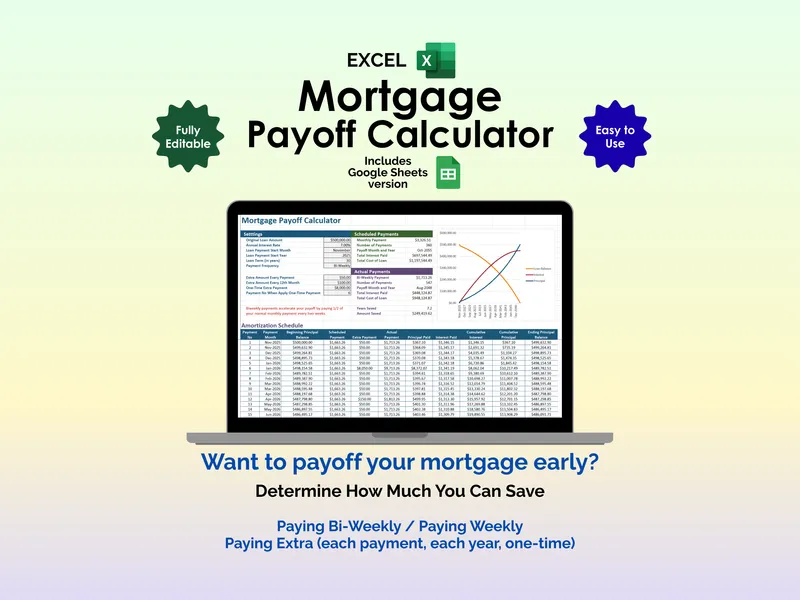
That standout is the Scheduled vs. Actual comparison. The Scheduled column locks in your baseline from the loan terms you enter — monthly payment, number of payments, payoff date, total interest paid, and total cost of the loan. The Actual column recalculates the same five numbers against any extra payments you stack on top, then surfaces the two that matter most underneath: Years Saved and Amount Saved. Two cells, side by side, no guesswork.
The mortgage amortization spreadsheet accepts three kinds of extra payments and lets you mix them freely. Add an Extra Amount Every Payment to model a permanent monthly bump. Add an Extra Amount Every 12th Month to throw the tax refund or annual bonus at principal. Drop a One-Time Extra Payment at a specific payment number to test a windfall, an inheritance, or the sale of a second car. Change one input and the saved-years figure updates instantly.
Loan inputs cover the full picture: original loan amount, annual interest rate, start month and year, loan term in years, and payment frequency set to Monthly, Bi-Weekly, or Weekly. Switching frequency alone is its own scenario — Bi-Weekly payments quietly squeeze in an extra month of principal each year.
A dynamic chart plots loan balance, cumulative principal, and cumulative interest across the life of the loan, so the interest curve visibly flattens as you stack extra payments. Below it, the full amortization schedule breaks out every payment: payment number, payment month, beginning principal balance, scheduled payment, extra payment, actual payment, principal paid, interest paid, cumulative interest, cumulative principal, and ending principal balance.
Built in Google Sheets so it opens on any device and shares cleanly with a spouse or a financial planner — and the Excel version is included in the same download for anyone who prefers working offline. No accounts, no subscriptions, no plugins. Just the Scheduled vs. Actual numbers that turn “I should probably pay extra” into a concrete payoff date and a dollar figure you can actually plan around.
Paying down a car, student or personal loan as well as the mortgage? The Loan Payoff Calculator runs the same extra-payment math on up to eight of those loans at once, and compares which order to pay them off in.