The framing here is "own it, don't rent it." That is not a claim that apps are bad. Trucking apps such as TruckLogics and Rigbooks are built for the business side of running a truck, and plenty of drivers are well served by them. The question is which job you are asking the tool to do, and what you still have if it goes away.
The positioning: a blank notebook, a printed record system, or a trucking app
Most owner-operators start with a blank notebook and a glovebox of receipts. It is free and it works, but nothing is laid out for you. You remember to write down the lumper, or you do not. The wait at the dock is a guess by the time you are invoicing. A trucking app sits at the other end: more automation, reports and sharing, for a monthly fee and on someone else's servers. A printed record system is the middle ground. Every sheet has the right boxes in the right order, you own it outright, and it works with no signal. It will not invoice for you or send a report to your accountant.
Paper trip sheets vs. a trucking app, side by side
| Consideration | Printed record set (owned) | Trucking app (hosted) |
|---|---|---|
| Cost | One-time | Usually a subscription. TruckLogics and Rigbooks each list monthly plans on their own pricing pages (checked November 2026), so confirm current plans and what each includes |
| You own it | Yes. Paper and a file on your own drive | Check the terms, because access may depend on an account |
| Works with no signal | Yes. Nothing to load or sync | Varies. Check what works offline |
| Written in the cab at the time | Yes. Pen and a clipboard, with the envelope for that load's receipts | Possible on a phone, if you will actually type it on the road |
| Automatic invoicing, reminders and reports | No | This is where apps are strongest. Check the actual features |
| Share with an accountant or dispatcher | Hand over copies or scans | Often easier, depending on the app |
| Detention and lumper claim | A claim slip that works from your rate con's terms and your own proven times into one total | Varies. Check whether it uses your rate con's terms |
| Checking a settlement | A review slip comparing the rate con with what was paid, line by line, plus deductions | Varies |
| What a load really paid per total mile | Trip sheet against your own break-even | Varies. Check how it treats deadhead and pass-through costs |
| Survives a lapsed subscription | Yes | Check the terms and whether you can export your data |
| Counts as an HOS log, ELD or DVIR | No | Only if it is sold as an ELD, HOS log or DVIR. Check with its maker |
When paper is the better answer
Paper wins where the record has to be made right now, in the cab, and still be there later. A waiting time written down as it happens, with how it is proven (a BOL stamp, a gate log, a dated photo), holds up better than a time reconstructed a week later. A time with nothing behind it is your word against the facility's. The lumper receipt goes into the envelope for that load, with its number and how you paid it written on the slip. Paper also needs no battery, no login and no signal, and nobody can lock you out of it.
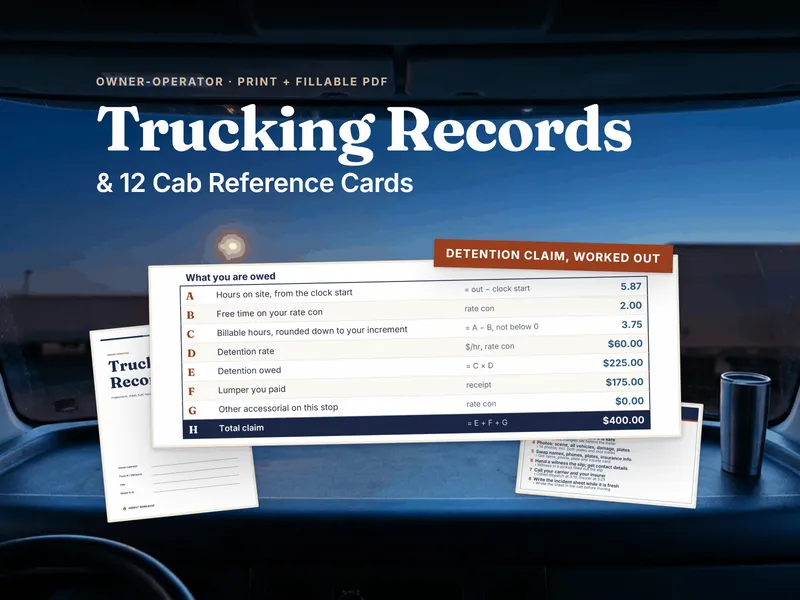
A good paper record also does arithmetic you can check by hand. A detention claim is hours on site from when the rate con says the clock starts, less free time, rounded to the increment the rate con uses, times the detention rate, plus the lumper and any other accessorials. As a fictional example: 5.87 hours on site, less 2 hours of free time from that example's rate con, is 3.87 hours. Rounded down to a 0.25-hour increment that is 3.75 hours, and at $60 an hour that is $225. Add a $175 lumper for a $400 claim. Your own numbers come from your own rate con, never from this example.
When the app is the better answer
If you want invoices generated, reports built, reminders on your phone and an accountant who can log in, an app does that and a printed sheet does not. A fleet of several trucks, or a business where a bookkeeper does the books every week, will often be better off with software. If you are already paying for an app and it fits how you work, keep using it. The paper-and-workbook approach is not meant to talk you out of one. Whichever you pick, check how you would get your data out.
The hybrid: paper in the cab, a workbook at the desk
One practical split is to keep the cab simple and do the arithmetic at the desk. In the cab, you write the trip sheet, keep receipts in the load's envelope, note waiting times and fill in an incident sheet if you need one. At the desk, you enter totals into a workbook for settlements and cost per mile. Neither half needs a subscription. If you later add an app for invoicing, the paper record still backs up the times and receipts you would need to dispute a short-paid line.
One detail matters for cost per mile. A lumper you paid and were reimbursed for is a pass-through, not revenue you earned. Keeping it out of revenue stops it from inflating your rate per mile and margin, and it still shows in the cash line. That is how the trip sheet in the printed set treats it. If you use an app, check how it handles the same thing.
What neither one can do
Neither a printed set nor an app decides what a broker owes you. That depends on your rate confirmation and carrier agreement, which you should read and, when a term is missing, ask to have confirmed in writing before you roll. The printed set is for records and organization. It is not an hours-of-service log, an electronic logging device, a driver vehicle inspection report, or legal, tax or compliance advice. The card listing papers you keep within reach is your own list, so confirm what applies to you with your carrier. Ardent Workshop is not affiliated with TruckLogics, Rigbooks, or any other app named here, which are used only as examples of the category.
Related reading
- The free printable trucking trip sheet opens on a filled-in example, so you can try paper on one load first.
- The Owner-Operator Trucking Records & Cab Reference Card Set adds the detention and lumper claim slip, the settlement review slip and the cab cards.
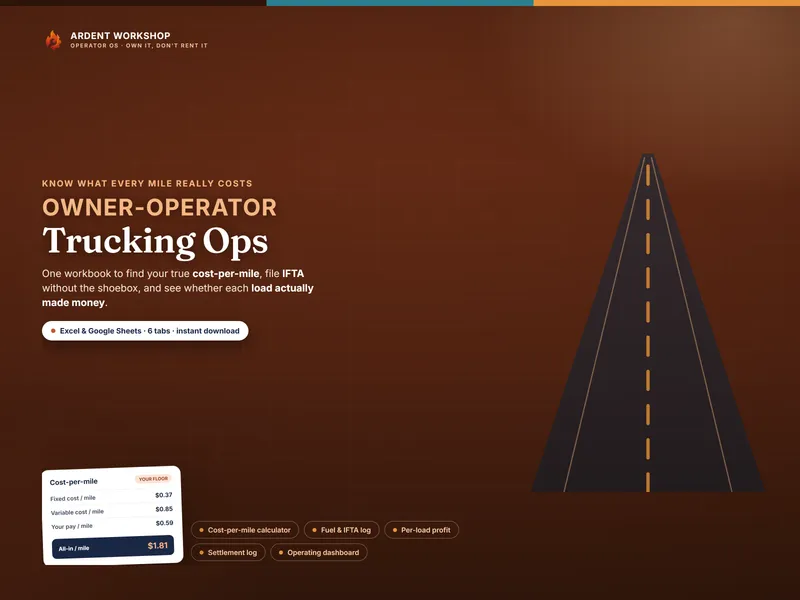
- The Owner-Operator Trucking Ops workbook is the desk-side half, for settlements and cost per mile.
- What detention pay is and what a lumper fee is, two of the lines a claim slip totals.
- What cost per mile is, the number the trip sheet compares against.
- What to keep in the truck for a roadside inspection, for organizing the cab's papers.
- The tools for owner-operators hub.
Frequently asked questions
- Are paper trip sheets or a trucking app better for an owner-operator?
- It depends on what you need the record to do. Paper written in the cab at the time works with no signal, costs nothing per month and is yours to keep. A trucking app can add automation such as invoicing, reminders, reports and sharing with an accountant. Some owner-operators use both: paper in the cab, a workbook or app at the desk.
- Does a printed record set replace an ELD or an HOS log?
- No. A printed record set is for your own business records: trips, fuel receipts, maintenance, incidents, detention and settlements. It is not an hours-of-service log, an electronic logging device, a driver vehicle inspection report, or compliance, legal or tax advice. Keep whatever your carrier and the rules that apply to you require, separately.
- What happens to my records if a trucking app subscription lapses?
- Check the terms of any app before you rely on it: ask whether you can export your data, in what format, and what happens to it if you stop paying. A printed sheet or a workbook file on your own drive is not affected by a lapsed subscription. Whatever you use, keep your own copy of anything you may need later, such as a settlement you plan to dispute.
- How do I know how much detention I can bill?
- Look at your rate confirmation. Whether you are paid for waiting depends on the terms printed there: some give free time and a detention rate, some give less, some say nothing. If a term is not written down, ask the broker or dispatcher to confirm it in an email before you roll. A paper claim slip works from those terms and your own times; an app can do the same if it lets you enter your rate con's terms.
- Can the hybrid really work, paper in the cab and a workbook at the desk?
- Yes, and it is a practical way to split the job. The cab is a bad place for a laptop: it is cramped, the signal comes and goes, and you are tired. Write the trip, receipts, waiting times and incidents on paper as they happen, then enter the totals into a desk workbook for settlements and cost per mile when you are home or at a table.