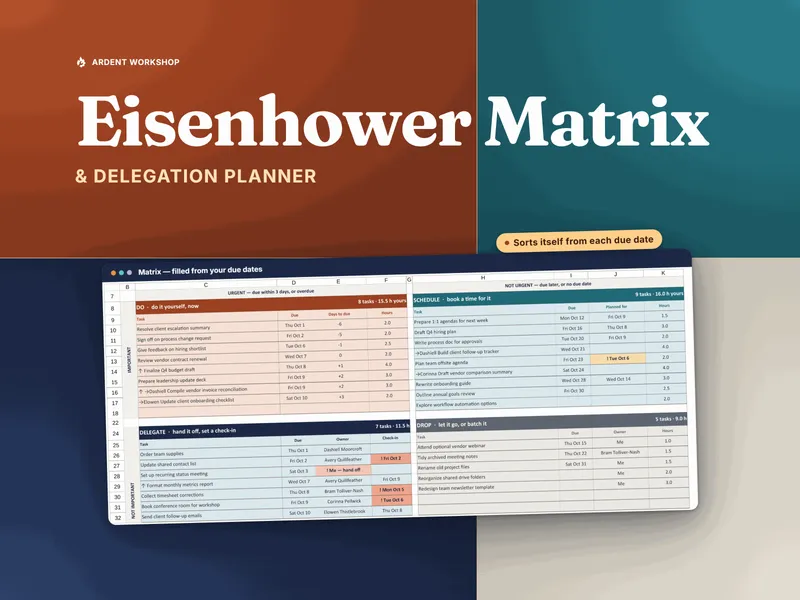
The short answer: keep a list to capture tasks, and use a matrix to decide among them. The Eisenhower Matrix & Delegation Planner is a workbook that does the sorting for you, and the free Eisenhower matrix starter sheet lets you try it on a single tab before you buy anything.
What is a to-do list?
A to-do list is a single collection of tasks, usually kept in the order they occurred to you. It is excellent at one thing: getting commitments out of your head so you stop trying to remember them. It does not, by itself, say which task matters more, which is due soonest or which should be someone else's job.
What is an Eisenhower matrix?
The Eisenhower matrix is a decision grid popularly attributed to President Dwight D. Eisenhower. You ask two questions of every task, is it important and is it urgent, and the answers put it in one of four quadrants:
- Do: important and urgent. Your own hours, this week.
- Schedule: important, not urgent yet. Give it a date before it becomes Do.
- Delegate: not important to you personally, but urgent. Hand it to someone.
- Drop: not important and not urgent. Let it go on purpose.
Where does a plain to-do list fail?
- Order means when you wrote it, not what matters. A task added on Monday sits above one added on Thursday whether or not Thursday's is due tomorrow.
- There is no urgency and importance split. A due-today chore and a quietly important project look identical, so the loud task wins and the important one slips until it becomes urgent.
- Nothing to hand off. A list has no owner and no check-in date. A task you gave away stays on your list as your problem, or disappears with no one following up.
- No sense of capacity. A list will happily hold more than one week can fit, and nothing tells you so.
- No permission to drop things. Nothing leaves a list unless you finish it, so it only ever grows.
When is a to-do list enough?
- You have a short list and you can see at a glance what comes first.
- Almost every task is yours, so there is nobody to hand things to.
- Deadlines are few and obvious.
- You are capturing, not prioritizing.
If that is you, a list is the right-sized tool and a matrix would be extra ceremony. The matrix earns its place when the list gets long, when everything starts to feel urgent, or when you manage other people and part of the job is deciding what to give away. If you are new to that, the templates for managers hub collects related tools.
Eisenhower matrix vs to-do list, side by side
| What matters | To-do list | Eisenhower matrix |
|---|---|---|
| What it does | Captures everything you have to do | Decides what to do, schedule, hand off or drop |
| Order | When you wrote it | By quadrant: importance and urgency |
| Urgent vs important | One column, no split | Two questions, four boxes |
| Delegating | No owner, no check-in | The Delegate quadrant is the hand-off pile |
| Dropping tasks | Only by finishing them | Drop is a deliberate choice |
| Setup | None, just start writing | Two questions per task; a built workbook does the sorting |
| Best for | Capture and short lists | Long lists, crowded weeks, and managing hand-offs |
How do the matrix and the to-do list work together?
Treat them as two stages. The list is where tasks arrive; the matrix is where you decide.
- Brain-dump onto the list. Write everything down without sorting.
- Give each task a due date and an importance. That is all the matrix needs from you.
- Let the quadrants form. In the planner, urgency is never typed: a task is urgent when its due date falls inside your urgency window, a number of days you set once on Setup. An overdue task counts as urgent.
- Hand off the Delegate tasks. Give each an owner and a check-in date.
- Review weekly. As dates approach, tasks move from Schedule into Do and from Drop into Delegate on their own.
The planner also totals your Do hours against the hours you actually have for task work that week, and checks whether too large a share of your open tasks sits in Do. In its fictional sample week, a team lead and six team members share 36 tasks, 29 of them open, and the lead's Do quadrant comes to 24.0 hours against the lead's 20 available, so the verdict reads “Over by 4.0 h.” A list cannot tell you that. If your hand-offs are really about developing people, the 1:1 Meeting & Goal-Tracking Workbook pairs well, and for a different kind of sorting there is the 9-box grid explainer.
Paper, spreadsheet or task app: which fits?
- Blank spreadsheet or paper. Free and flexible. You draw the four boxes, sort every task by hand and redo it as dates move.
- An owned workbook. The Ardent Workshop planner works in Excel and Google Sheets, with no subscription, and the file is yours. Urgency comes from the due dates, and each hand-off lands in a per-person log that flags overdue check-ins.
- A task app with an Eisenhower view. Rented by subscription. In this category, delegation usually means assigning a task to someone, without a check-in log of your own.
For one person or one small team, the middle rung is usually the right size. Own it, don't rent it.
Which should you start with?
Start with the list you already have. When it stops telling you what to do next, open the free Eisenhower matrix starter, which is pre-filled with the paid workbook's example week, then replace its example tasks with yours and clear its as-of date so it sorts by today. If you also need the hour-capacity check, the delegation log and the weekly review, the Eisenhower Matrix & Delegation Planner carries all of that. Newer to leading a team? The New Manager's First 90 Days Playbook covers the wider picture.
Frequently asked questions
- What is the difference between an Eisenhower matrix and a to-do list?
- A to-do list holds tasks in one column, usually in the order you wrote them. An Eisenhower matrix asks two questions of every task, is it important and is it urgent, and sorts it into one of four quadrants: Do, Schedule, Delegate or Drop. The list records what exists; the matrix decides what to do about each item and who should do it.
- Should I replace my to-do list with an Eisenhower matrix?
- Usually not. A short list is a fine place to capture tasks. The matrix is what you put the list through when it gets long enough that you cannot tell what matters this week. A common setup is both: a brain-dump list for capture, and a matrix for deciding.
- What are the four quadrants of the Eisenhower matrix?
- Do is important and urgent: your own hours, this week. Schedule is important but not urgent yet: give it a date before it becomes Do. Delegate is not important to you personally but urgent: hand it to someone. Drop is not important and not urgent: let it go on purpose. The method is popularly attributed to President Dwight D. Eisenhower.
- Can I build an Eisenhower matrix in a spreadsheet?
- Yes. A blank sheet with four boxes works for a handful of tasks. The weak spot is upkeep: urgency changes every day as due dates approach, so a hand-sorted matrix goes stale. A built workbook computes urgency from each due date, so tasks move between quadrants on their own. The free Eisenhower matrix starter sheet shows how that works on a single tab.
- How does a matrix help with delegating?
- A plain list has no field for who holds a task or when you will check on it. In the matrix, the Delegate quadrant is the hand-off pile: each task there gets an owner and a check-in date, so you can see per person what they hold and which check-ins are overdue.