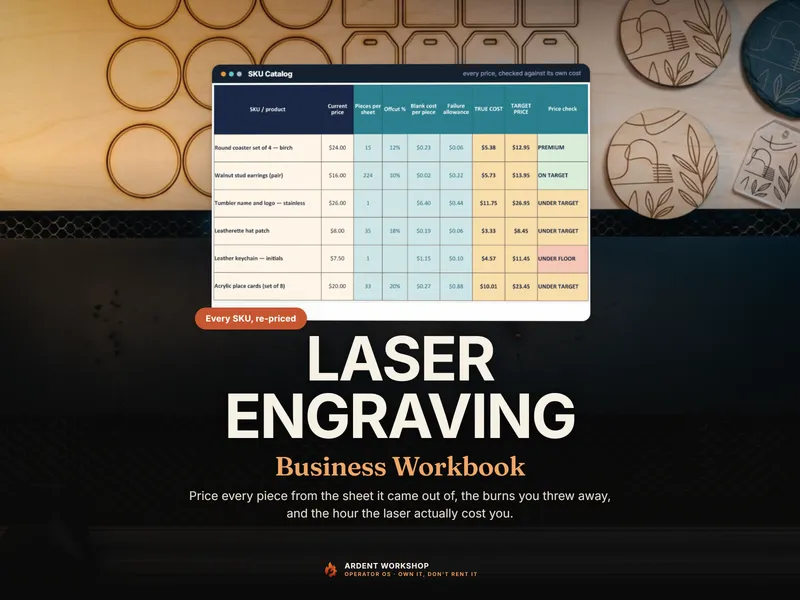
The short version. A laser price is five numbers stacked in order. First the blank, costed from how the piece actually nests on the sheet — not from dividing the sheet price by a hopeful count. Then the burn, at the machine’s own computed hourly rate. Then your hands: setup, masking, weeding, finishing, packing, and any proof rounds a personalized order takes. Then a waste allowance built from your own failed-burn log, not a flat percentage. Then packaging and fees. Add them, divide by one minus your target margin, and you have a real price — with a floor and a premium tier beside it.
Every figure below is drawn from the fictional shop inside the Laser Engraving Business Workbook, shown to demonstrate the method — not a price list for your shop. Where a number below is a hypothetical rather than one of that shop’s, it says so. Your sheet prices, machine costs, electricity rate and failure rate will all differ, which is exactly why a file that recomputes beats a number you looked up once.
A laser sheet is not divided, it’s nested
The instinct with a blank material cost is to divide: sheet price by (sheet area ÷ piece area). That number is always too generous, because it assumes a piece can be sliced from anywhere on the sheet, including corners and slivers no real cut path can use.
Real yield is two whole-number counts — pieces across, pieces down — multiplied together, after kerf (the material the beam actually removes) and an edge margin are subtracted from the sheet. Try the grid both ways, standard and rotated 90 degrees, and keep whichever orientation fits more pieces.
In the workbook’s sample shop, a 3.75-inch round coaster cut from a $3.40, 20 × 12 inch sheet of 3 mm birch plywood fits 15 pieces to the sheet, which puts the blank at 23 cents a piece — that sheet price divided by the real count, with no separate offcut surcharge on top. The material the nest never touches is reported as an offcut percentage, so you can see at a glance whether a design uses a sheet well; it is already paid for the moment you cost against the count the sheet genuinely yields instead of the count its area suggests.
The gap between the grid and the guess widens whenever a piece’s dimensions divide the sheet awkwardly — the grid only ever works from the width and height you type in, so it is those two numbers, not the outline you cut, that decide how much of the sheet is reachable. The same shop’s acrylic place cards fit 33 to a sheet by grid math — across-by-down, kerf and margin subtracted, both orientations checked. Dividing sheet area by piece area on the same blank says 41. Quoting off the naive number prices eight place cards that were never going to come off that sheet.
| Method | Pieces from the sheet |
|---|---|
| Sheet area divided by piece area (naive) | 41 |
| Grid math — both orientations, kerf and margin subtracted | 33 |
A nesting layout that interlocks irregular shapes can beat even the grid count — so treat the grid figure as an honest floor for your cost, one you can overwrite if your cut file proves you can fit more.
Cost the burn at the machine’s own hourly rate
A laser’s running cost — its machine-hour cost — is three numbers, added:
- Depreciation — the machine’s purchase price divided by the hours you expect it to work.
- Consumable wear — the CO2 tube’s or diode module’s replacement cost divided by its rated hours.
- Electricity — what the whole machine draws from the wall in watts (not its rated laser wattage; a 20 W diode machine can pull a few hundred watts with its fans and chiller), divided by 1,000, then multiplied by your electricity rate per kilowatt-hour.
In the sample shop’s three machine profiles, those three components add up to a real $/hour for each laser. The components are shown to three decimals so that each row adds to the rate beside it once rounded; the rate itself is what you price with. (Those electricity lines come from the sample shop’s wall-draw figures — 1,450 W for the CO2, 320 W for the diode, 600 W for the fiber — not from the rated laser wattage.)
| Machine | Depreciation $/hr | Tube / module wear $/hr | Electricity $/hr | Total $/machine-hour |
|---|---|---|---|---|
| CO2 | $0.420 | $0.320 | $0.246 | $0.99 |
| Diode | $0.183 | $0.033 | $0.054 | $0.27 |
| Fiber | $0.180 | $0.035 | $0.102 | $0.32 |
Multiply that rate by the burn time a setting actually takes — if your laser software estimates a job time before the run, use that; otherwise time one run and keep the figure — and you have the second line of the piece’s cost. A tube or diode module doesn’t wear by the calendar; it wears by the hour it runs, which is exactly why this is a rate per machine-hour rather than a flat number you set once and forget. For how that rate differs between a CO2 machine and a diode one, see Glowforge vs xTool cost per job.
The settings behind that burn time are worth writing down as you find them; the free Laser Settings & Material Test Log is a place to keep them, material by material and machine by machine.
If you only want to price one job right now rather than build the whole cost stack, the free Laser & CNC Job Cost Calculator (opens in new tab) on our own Ardent Seller platform does that — material, machine time and labor for a single quote, in your browser, no signup. Its machine-hour figure covers depreciation and electricity, so add the tube or module wear from the table above yourself.
Add the hands-on labor a burn-only price skips
The blank and the burn are the two costs a spreadsheet remembers on its own. The minutes around them are the ones that quietly disappear:
- Setup — loading and aligning the sheet, homing the head, running a focus check.
- Masking — applying transfer tape or masking film before the burn on wood or acrylic, so smoke doesn’t scorch the surface around the design.
- Weeding and finishing — peeling backing film, sanding a cut edge, buffing a corner, applying a food-safe finish on something like a coaster.
- Packing — wrapping and boxing the finished piece.
- Proof rounds — for a personalized order, the digital proof you send before you ever load the machine, and any revision the customer asks for after seeing it.
None of that is machine time, so charging only the burn rate for it prices your own attention at zero. Price those minutes at a loaded rate — your hourly pay plus your shop overhead spread across the hours you actually work — so rent and insurance ride along with the labor instead of disappearing. A price built from blank plus burn alone looks lean right up until the order queue fills with proof revisions on names and dates that were never going to be right the first time.
Build a waste allowance from your own failed-burn log
A flat waste percentage is a guess dressed up as a number. What actually costs you is the failed-burn log you keep as you work: a cause, a material, a machine, and how many blanks it took with it.
Divide pieces ruined by pieces ruined-plus-made, per material, and that ratio — not a flat percentage you picked — is what belongs in every good piece’s true cost. A cut that fails is not free just because the customer never sees it; the blank, the machine minutes and the time you spent watching it fail are all real costs that the surviving pieces have to carry.
One caution on that number: a rate isn’t trustworthy from three pieces. A material can show an alarming measured rate early — say, two failures out of three attempts — purely from a small sample, long before you’ve burned enough of it to know whether that’s really how it behaves. Treat an early rate that’s wildly above your usual default as unproven, not as the new truth, until the count behind it is large enough to mean something.
Add packaging, platform and payment fees
Add what actually goes in the box or the mailer — insert, sleeve, tissue, tape — then take out what the sale channel keeps: its percentage of the order plus any flat per-order fee, and your payment processor’s cut on top. None of these are things you made; they’re the cost of the sale itself, and they’re easy to leave out of a “cost” that only ever counted material and machine time.
Set a floor, target and premium price — and re-check what you already charge
Add the blank, the burn, your labor, the waste allowance and the fees, and you have the true cost of one piece. From there, divide by one minus your margin at three tiers:
- Floor — the margin below which you should not sell, even to move stock.
- Target — your normal, everyday price.
- Premium — for a rush turnaround, a one-off custom design, or a limited run.
That’s the price for today. The step that is easiest to skip is going back to it: the moment a blank gets more expensive, a tube gets replaced, or your electricity rate changes, every price built from the old numbers is quietly wrong until you re-run it — and a catalog of dozens of SKUs is not something anyone re-checks by hand on a Tuesday.
Where a spreadsheet stops being enough
Pricing one piece is arithmetic you can do by hand. Running a laser shop is the same arithmetic across a whole material catalog, several machine profiles, a settings library that ages with the tube, and a personalization queue with proof rounds attached to real dollars.
The Laser Engraving Business Workbook does that end to end — a one-time purchase you keep. It turns your own failed-burn log into a per-material failure rate, fits each piece onto its sheet with kerf and edge margin for a true cost per piece, and re-prices your whole SKU catalog against your floor, target and premium margins, flagging the ones now under target the moment a blank, a tube or the electricity rate changes. A single-job calculator prices the piece in front of you; this is the difference between that and knowing your whole catalog is still priced right.
If you just want to write down the settings that worked — power, speed, passes, focus and the result you got, material by material and machine by machine — before you commit to pricing a whole catalog, the free Laser Settings & Material Test Log does that piece on its own, no signup. It records settings; the failure rate is computed in the paid workbook.
A note on the numbers
Every figure in this guide is illustrative, drawn from the fictional sample shop built into the workbook to demonstrate the method. Your sheet prices, machine purchase cost, tube or diode replacement cost, electricity rate and labor rate will all differ — and your measured failure rate is only ever as good as your own log. This is a costing method, not tax, accounting or safety advice; confirm anything material-safety related against your machine’s own guidance and the material supplier’s data sheet.