This isn't really TNA-versus-LMS. A learning platform and a needs analysis do different jobs, and larger teams run both. The mistake is reading last quarter's course-completion report as if it told you what to train next — or paying per seat for a platform when the question you actually need answered — where are we short, and what's worth training first? — is a workbook you can own outright.
What each one is for
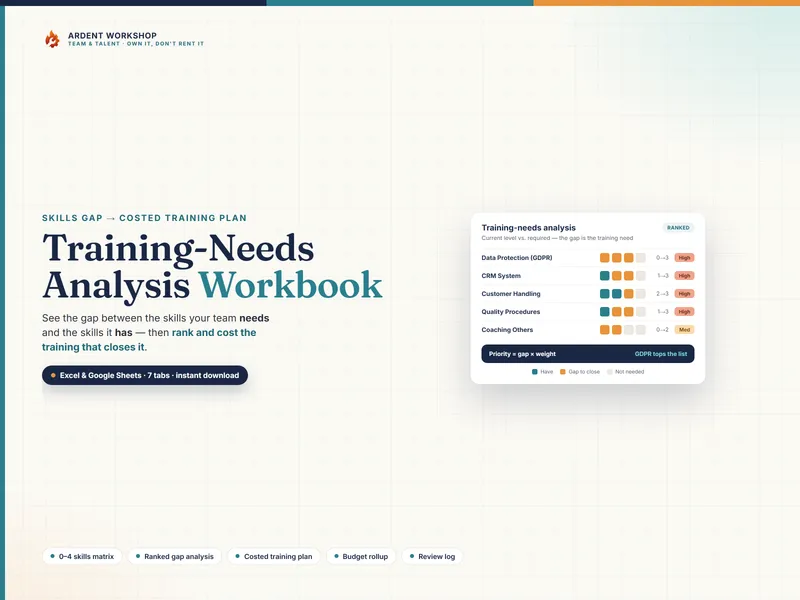
- A training-needs analysis finds and ranks gaps. It starts from the level each role requires, rates what people can do now, and ranks the shortfall by priority (gap × weight — the size of the gap times how critical the skill is). It answers "what should we train, and in what order."
- LMS reporting records completions. Enrollments, course completions, quiz scores, certificates, and renewal dates. It answers "who took which course, and when."
Completing the assigned courses and having no skill gaps are not the same thing — which is exactly why a needs analysis and an LMS report can both be "training data" and still not replace each other. A full explanation of how a TNA works is in the glossary.
When a training-needs analysis is exactly right
- You need to decide where next year's training budget should go.
- You want to rank skill gaps by how much they actually matter, not just their size.
- You're mapping a new hire's gaps, or a whole team's, against the level each role needs.
- Some of the skills you care about aren't covered by any course in a catalogue.
- You'd rather own the analysis file than rent a platform per seat to produce it.
At this stage a TNA beats an LMS report outright for the "what should we train" question. The free TNA starter board is a no-signup taste of the 0–4 gap method, and the templates for HR & team leads hub collects the rest.
The signals you also want LMS reporting
- You deliver real course content at scale. Modules, videos, assessments — hosted and tracked for a whole workforce.
- Compliance hinges on completion certificates. You must prove specific courses were taken, with timestamps and scores.
- You need automated enrollment and renewal chasing. Assignments and reminders across many people, handled by the system.
- Learners are remote and self-serve. People take training on their own time, and you need a record that they did.
Even then, the LMS records what was completed while the analysis decides what should be assigned next — so the TNA keeps earning its place upstream of it.
Side by side
| What matters | Training-needs analysis | LMS reporting |
|---|---|---|
| Direction | Forward — what to train next | Backward — what was completed |
| Starts from | The level each role requires | The courses you assigned |
| Finds unknown gaps | Yes — including skills no course covers | No — only tracks assigned courses |
| Prioritizes | Ranks gaps by gap × weight | Not its job — reports status |
| Cost | One-time, low — you own the file | Ongoing subscription, often per user |
| Course delivery | None — it's the plan, not the classroom | Full — modules, quizzes, certificates |
| Data ownership | The file is yours, offline | Hosted in the vendor's platform |
| Best for | Deciding and costing what to train | Delivering and tracking courses at scale |
The honest middle ground
Most teams don't choose one. They keep the LMS for the course catalogue they're required to deliver and track, and run a training-needs analysis to decide what those courses should be and where the gaps still are. The mistake is the reverse: reading completion dashboards as a needs analysis, or buying per-seat learning software to answer a question — what should we train first? — that an owned workbook answers better and costs once.
Work out what to train, either way
Whichever stack you run, you still need a fast, defensible way to see where you're short and what to train first. The Training-Needs Analysis Workbook rates the team on a 0–4 scale, ranks every skill gap by priority, and turns the top ones into a costed plan with a budget rollup — one owned file for Excel, Google Sheets, and LibreOffice. Own the analysis; add a learning platform only when delivering courses at scale becomes the job.
Frequently asked questions
- What's the difference between a training-needs analysis and LMS reporting?
- They face opposite directions. A training-needs analysis (TNA) is forward-looking: it compares the skills your team needs against the skills it has and ranks the gaps, so you know what training to buy next. LMS reporting is backward-looking: it tells you which courses people have already completed. One decides what training should happen; the other records what training did happen. You often want both — but the analysis has to come first, because completion data can't tell you what's still missing.
- Can LMS completion reports replace a training-needs analysis?
- No — they answer a different question. A completion report shows that people took the courses they were assigned; it can't tell you whether the right courses were assigned, or where a skill gap still sits that no course has ever covered. A TNA starts from the required level for each skill and works out the shortfall, including skills your course catalogue doesn't touch. Reading completion reports as if they were a needs analysis is how teams end up fully 'compliant' on training and still short on the skills that matter.
- Do I need an LMS to run a training-needs analysis?
- No. A TNA needs three things: a list of skills with a required level, an honest current rating for each person, and a way to rank the gaps. A spreadsheet workbook does all three — you rate the team 0–4, it computes the gap and a weighted priority, and it ranks what to train first. An LMS is only needed when you're delivering and tracking course content at scale; the analysis that decides what those courses should be is a separate, cheaper tool you can own outright.
- How much does a TNA workbook cost vs an LMS?
- An owned training-needs-analysis workbook is a single low one-time cost — you keep the file, edit it offline, and pay nothing monthly. An LMS is typically a recurring per-seat subscription that earns its keep when you're hosting and tracking real course content across a workforce. Paying per seat purely to work out and prioritize your skill gaps is renting far more platform than the job needs; the analysis is a workbook, not a subscription.