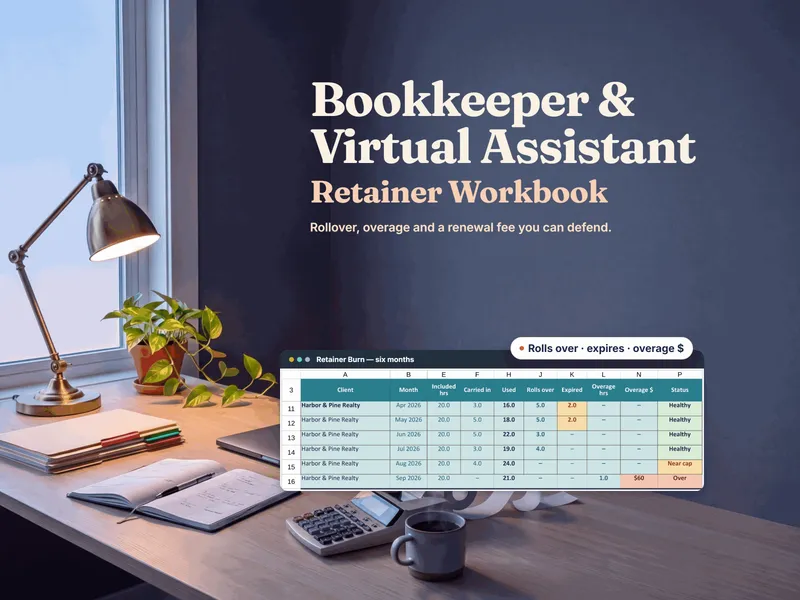
This isn't a contest with a single winner. Practice-management software and a retainer workbook solve different problems. Software runs the workflow of serving clients. A workbook answers the pricing question underneath every retainer: given what this client's month actually took, was the fee right, and what should it be at renewal? The Bookkeeping & VA Retainer Workbook answers that for every client, and the free Retainer Rate Calculator checks one client for one month.
What does practice-management software do better than a spreadsheet?
Be honest about this first, because it is where a workbook stops. Software in this category typically handles the following, and a spreadsheet cannot:
- Billing and payment. Recurring invoices, card or bank payments through a built-in processor, and automatic reminders for overdue balances.
- A client portal. One place where clients send requests, upload documents, and see status, instead of a thread of emails.
- E-signatures and engagement letters. Terms signed and stored in the same system as the client.
- Team workflow. Task assignment, due dates, and recurring work across several people on one client list.
- Live time tracking. A timer that captures hours as you work rather than a number you enter afterward.
- Integrations. Connections to accounting and calendar tools so data moves without retyping.
If two or three of those are costing you hours every week, that is the work telling you a workbook has hit its ceiling as an operations tool.
What does an owned retainer workbook do better?
A retainer workbook is built around one question: is each retainer profitable? The Bookkeeping & VA Retainer Workbook works from each client's fee, included hours, and hours worked, and keeps three things separate that a time-and-billing tool tends to blur:
- Per-client rollover. It tracks each client's unused and overrun hours month to month under that client's own rollover rule: None, Next month only, or Carry with cap (the cap is a percentage of included hours). Overrun is priced in dollars.
- An honest effective rate. The fee is divided by all the retainer work (out-of-scope requests included) plus unbilled admin in the effective hourly rate, so a client who feels fine can still show up as underpriced.
- Scope creep in dollars. Out-of-scope hours not already counted as overage that month, multiplied by your target rate. That is the number to bring to a conversation about scope creep.
- Renewals from evidence. It turns recent real usage (the last 3 months by default, a Setup setting) into a renewal fee and included hours you can defend, so a renewal never cuts what an included hour costs.
It is also yours: a plain file on your own drive, no account, no subscription, and every formula open to change.
Side by side
| What matters | Owned retainer workbook | Practice-management software |
|---|---|---|
| Cost | One-time; no subscription | Typically recurring, often by seat or client volume |
| Ownership | You own the file; it works with no account | Access ends when the subscription does |
| Your data | An Excel or Google Sheets file you hold | Lives in the vendor's system; export on their terms |
| Unused-hour rollover and overrun as overage | Per client: None, Next month only, or Carry with cap | Varies by tool; check for per-client rollover rules |
| Effective hourly rate per client | Built in; fee ÷ (retainer work, out-of-scope included, + unbilled admin) | Varies by tool; billed-hour reports do not show what a flat fee really paid |
| Renewal pricing from usage | Fee and included hours built from recent real usage | Varies by tool; check whether it models renewals |
| Invoicing & collecting payment | You invoice and collect yourself | Recurring invoices, online payment, auto-reminders |
| Client portal & e-signatures | No; you share what you choose | Offered by some tools; check the plan |
| Team workflow | Built for one owner-operator's numbers | Task assignment and due dates across a team |
| Flexibility | Change any formula or column | Structured around how the tool models a client |
| Best for | Pricing and renewing retainers with confidence | Running client operations at volume or with a team |
Which one fits my practice?
A workbook is the right first tool if you are solo or nearly so, serve a roster that fits the workbook (20 client rows as built), and mainly need to know where the money is going. Software is the right tool once collecting payments, chasing documents, or coordinating a team is the bottleneck. The signal is time: when the hours you spend on those tasks exceed what the software costs, subscribe.
You can also run both. The software handles the operations; the workbook handles the pricing. That split matters because the operational tool will happily bill every hour you log without telling you that the client's fee stopped covering the work three months ago.
Try the math on one client first
The free Retainer Rate Calculator takes one client and one month: the fee, the included hours, and the hours worked split into retainer work in scope, retainer work out of scope, and unbilled admin. It returns an effective hourly rate against your target and a Healthy, Watch, or Reprice verdict. It has no rollover, no roster, and no renewal planner; those are what the paid workbook adds.
When you are ready to run every client together, the Bookkeeping & VA Retainer Workbook carries each client's rollover, prices overrun, and builds renewals you can defend. Own the numbers; rent the operations only when the volume demands it.
Frequently asked questions
- Do I need practice-management software to run a bookkeeping or virtual assistant business?
- Not at the start. Practice-management software earns its keep when you have enough clients that scheduling, document collection, task assignment, e-signed engagement letters, and automatic billing take real time every week, or when you have a team working the same client list. A solo bookkeeper or VA with a handful of retainer clients can usually keep the numbers in an owned workbook: each client's fee, included hours, hours worked, rollover, and effective hourly rate.
- What can practice-management software do that a retainer workbook can't?
- Software can send recurring invoices, take card and bank payments, run a client portal for requests and document uploads, collect e-signatures, assign tasks across a team, and track time as you work. A workbook can't do any of that for you. What it can do is hold your retainer economics in a form you control: unused and overrun hours under each client's own rollover rule, unbilled admin and out-of-scope hours counted against the fee, and a renewal proposal built from recent real usage.
- Can a spreadsheet track retainer hours and rollover?
- Yes, if it is built for it. The Bookkeeping & VA Retainer Workbook tracks each client's unused and overrun hours month to month under that client's own rollover rule (None, Next month only, or Carry with cap, where the cap is a percentage of included hours), and prices the overrun in dollars. Before relying on any other tool for this, check whether it lets each client carry a different rollover rule, because a rule applied the same to every client is where rollover disputes start.
- How is a one-time workbook different from a monthly practice-management subscription?
- You buy the workbook once and keep it, with no account and no renewal. Practice-management software is typically a recurring subscription, often priced by seat or client volume, and your access ends when the subscription does. The subscription is worth it when the time it saves exceeds what it costs; before you have the volume to feel that saving, it mostly adds a bill. You can also run both: software for the operational work, a workbook for the pricing and renewal math.
- Can I use a workbook alongside practice-management software?
- Yes. Let the software handle invoicing, payments, the client portal, and team tasks. Keep the retainer math in a workbook you own: is each client still profitable at the effective hourly rate, is the rollover rule doing what you intended, and what renewal fee and included hours does recent usage support. Billing every logged hour does not by itself tell you whether the retainer was priced correctly.