This isn't really paper-versus-software. Running a good one-on-one is two jobs — deciding what to ask, and keeping hold of what you heard — and the two products are each strong at one of them. The mistake is buying a per-seat platform to solve a problem that is entirely upstream of it: a shared agenda doesn't help a manager who has nothing to put on it.
What each one is for
- A question deck is a preparation tool. Two minutes before the one-on-one, you name what you actually noticed this week, find that line on a routing card, and pull the three question cards it sends you to, in order. Every card carries the question, the moment to use it, the follow-up that makes the first question count, and the specific move for when the answer is “fine.” It answers “what do I ask, and what do I ask next?”
- A 1:1 app is a coordination tool. A shared agenda both people add to before the meeting, question and talking-point suggestions, action items with owners and due dates, notes synced to a calendar invite, reminders, and often chat and HRIS integrations — with question prompts one feature inside it. It answers “run the meeting and keep the record, for everyone, in one place.”
When a printed deck is exactly right
- Your one-on-ones happen reliably and have quietly turned into status.
- You'd rather not ask your reports to adopt another login.
- You want the notes out of a vendor's system and in your own hands.
- You're a first-time manager and the honest problem is that you don't know what to ask.
- You want something on the desk, not another tab — a deck you can hand to the person you promote.
Twelve of the questions, each with its follow-up, are free and ungated on the twelve 1:1 questions card sheet — print it, cut it, and see whether the habit sticks before you buy anything.
When an app is the better buy
- Your reports want to shape the agenda too. A genuinely shared agenda that both people edit ahead of time is the one thing paper can't do.
- Action items keep dying between meetings. An app with reminders and assignees closes that loop automatically; on paper it is a discipline you have to keep.
- You manage managers and want visibility. Roll-ups across several teams — who is meeting whom, and how often — need a system, not a card box.
- Your company already pays for one. If the platform is bought and adopted, use it. A deck beside the keyboard is then a cheap improvement to the input, not a replacement.
What an app genuinely does better
To be fair to the platforms: a shared agenda that both people can add to, action items that chase themselves, notes attached to the calendar entry, and roll-ups across a whole management line are real capabilities a printed deck doesn't try to replicate. A deck has no reminders, no shared state, and no search — by design. What it has instead is the part a suggested-prompts feature usually stops short of: a question bank where every entry carries its own follow-up and its own failure mode, and a routing table that picks for you. If the coordination is your bottleneck, buy the coordination. If the conversation is, the coordination won't fix it.
Side by side
| What matters | Question deck (printed, owned) | A typical 1:1 app |
|---|---|---|
| What it improves | The two minutes before the meeting | The meeting's agenda, actions, and record |
| Cost | One-time, low — print as many as you like | Usually an ongoing per-seat subscription |
| Question depth | Every question carries its follow-up and its non-answer move | Usually suggested prompts, the question alone |
| Choosing which to ask | A routing table: what you noticed becomes three cards, in order | Browse or shuffle a library |
| Shared agenda | No — it sits on your side of the desk | Usually — both people edit before the meeting |
| Action-item follow-through | A printable tracker you keep by hand | Commonly assignees, due dates and reminders |
| Adoption needed | Just you | Your reports, and usually your company |
| Where the notes live | Your notebook — though the notes are still an employee record | The vendor's platform |
| Best for | A manager whose problem is what to ask | A team whose problem is keeping the thread together |
The honest middle ground
When a one-on-one has gone flat, the cause is often upstream of tooling. It is a preparation problem, and that is the cheap half to fix. There is a full walkthrough of that half in what to ask in a one-on-one. Start with the questions; if action items are still evaporating a month later, that is a different problem and a running record — or a platform, if your company is big enough to need one — is the right answer to it.
Ask better either way
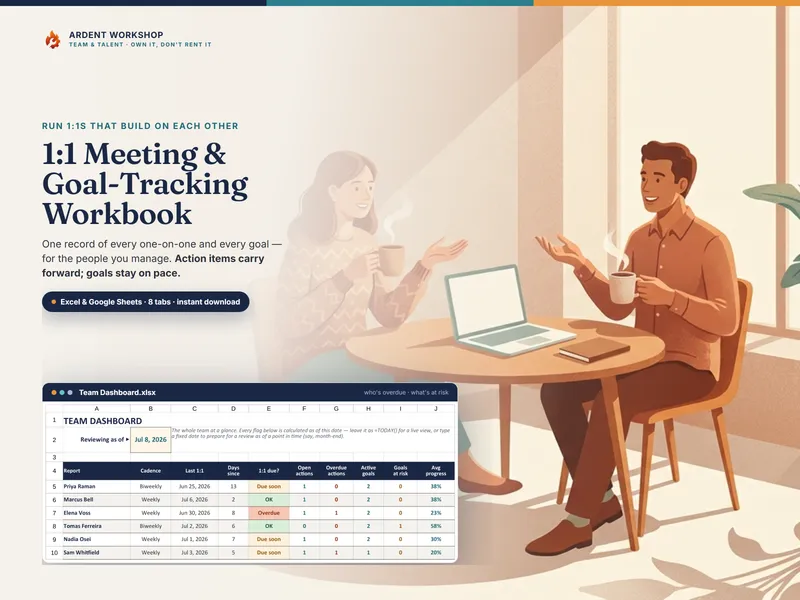
Whichever stack you end up on, the meeting still comes down to what you ask and whether you follow it up. The 1:1 & Coaching Question Deck is 108 questions across twelve situations, a 22-signal Router, twelve pre-sequenced trios for the meetings you already run, and a rotation log so career and feedback don't quietly go a quarter unasked — printed, cut, and yours. Pair it with the 1:1 Meeting & Goal-Tracking Workbook if you want the answers somewhere you can look them up, and add a platform only when coordinating other people's one-on-ones genuinely becomes the job.
Frequently asked questions
- What's the difference between a 1:1 question deck and a 1:1 app?
- A question deck is a physical artifact: printed cards you draw from before the meeting, each carrying a question, the moment to use it, the follow-up that makes it count, and a move for when you get a non-answer. Tools in the 1:1-app category are typically a hosted workspace — usually a shared agenda both people edit, question suggestions, talking points synced from a calendar, action items, and often integrations with chat and an HRIS — and are usually priced per seat per month. The feature mix varies by vendor, so check the specific product's own pages. One improves the two minutes before the meeting and needs nothing from anybody else; the other coordinates the meeting itself and needs your reports, and usually your company, to adopt it too.
- Aren't 1:1 questions free on the internet?
- The questions are, and there is no shortage of them. What a list doesn't give you is the two things that decide whether asking one changes anything: the follow-up, and the routing. A question you don't follow up on is small talk with a clipboard — "what took most of your time since we last talked?" only earns its place because the next question is "what would you have spent it on instead?" And a list of a hundred questions doesn't tell you which three to ask the week you noticed messages arriving at eleven at night. That is what a routing table does, and it is the part a free question list rarely includes.
- Do I need my team to use the same tool?
- With a deck, no. It sits on your side of the desk, your reports never have to install or log into anything, and nothing about your team's conversations leaves your notebook. Most 1:1 apps assume a shared agenda both people edit, which is genuinely useful when a team has adopted it and dead weight when only the manager has. If you can't get adoption — or don't want your one-on-one notes in a vendor's system — the paper version has no adoption problem. Paper isn't a loophole, though: notes about a named person are an employee record wherever you keep them, so follow your organization's rules on records either way.
- How much does a question deck cost compared to a 1:1 app?
- A printed deck is a single low one-time cost — you own the PDF, print as many copies as you need, and pay nothing monthly. A 1:1 or continuous-performance app is typically a recurring per-seat subscription, which scales with headcount and keeps charging whether or not the questions get asked. For a manager whose actual problem is arriving at the meeting without a question, that is a lot of platform for a two-minute job.
- Can I use both?
- Yes, and plenty of managers should. They solve different halves. The deck fixes what you ask; an app (or a workbook) fixes what happens to the answer — the action items, the carry-forward, and the record you'll want at review time. If your company already runs a 1:1 platform, a deck beside the keyboard costs nothing to add and improves the input. If it doesn't, a deck plus a running log covers the same ground for a one-time price.