The disaster is the part everybody prepares for. What nobody prepares for is the six months afterward: the adjuster who does not call back, an inventory of every object you owned, receipts you were too shocked to keep, and a set of deadlines nobody explains until one has passed.
You cannot undo the fire, the flood, or the storm. What you can control is whether the loss was documented, whether the dates were written down, and whether the money you were owed was actually claimed. The Disaster-Recovery Claims & Rebuild Binder is that record — and it does the two calculations that decide most of it.
The two numbers that decide what you get paid
Almost every argument in a claim comes down to one of these two, and almost nobody is told how either one works before it is used on them.
Actual cash value, and the money held back. Insurers usually pay a first check based on what your things were worth at the moment they were destroyed — replacement cost, reduced for age and wear. On a replacement-cost policy the difference is not lost, it is held back, and released as you actually replace each item and send in the receipt. That second payment is the one that is easiest to forget, because nothing prompts you to claim it.
Give each item on the loss inventory a category and an age. The tab looks up a depreciation rate and a floor, computes the actual cash value and the recoverable depreciation for every line, and totals the holdback — so you can see exactly how much is still sitting there waiting to be claimed.
Living expenses pay the increase, not the bill. This is the rule that catches everyone. Additional Living Expenses cover the increase over what you were already spending. If food was $780 a month before and you are spending $1,105 out of a hotel room, the claimable part is $325 — not $1,105. Some costs are new in full — a hotel, a kennel, a storage unit — so all of those count.
Enter your normal figure beside each actual and the tab computes the claimable share on every line, runs a cumulative total, and measures it against your policy’s ALE limit, including how much is claimable but not yet submitted.
A clock that runs off your own letters
Proof of loss. The contents inventory the adjuster asks for. A flood policy’s separate and stricter clock. The FEMA application and appeal periods. The recoverable-depreciation window nobody warns you about. The supplemental-claim window.
Pick the kind of deadline and the tab fills in what starts that clock and a typical window. Type the number off your letter, and it works out the due date, the days left, and a status in plain words — Open, Due soon — act now, Past due — call today, or Done — filed. Color backs the words up, so it still reads correctly in black and white.
The typical windows are starting points, never your deadlines. Your policy, your state, and your disaster declaration set the real ones — which is exactly why the column that computes is the one you fill in from the letter in your hand.
Thirteen tabs
- Read Me — how the tabs fit together
- Start Here Checklist — the whole recovery in finishable pieces, with a done-count
- Loss Summary — the one page to print and take to every call, meeting, and inspection
- Claims & Adjusters — homeowners, flood, auto, FEMA and SBA, from claimed to paid to outstanding
- Deadlines & Clock — every window, counting down and flagging itself
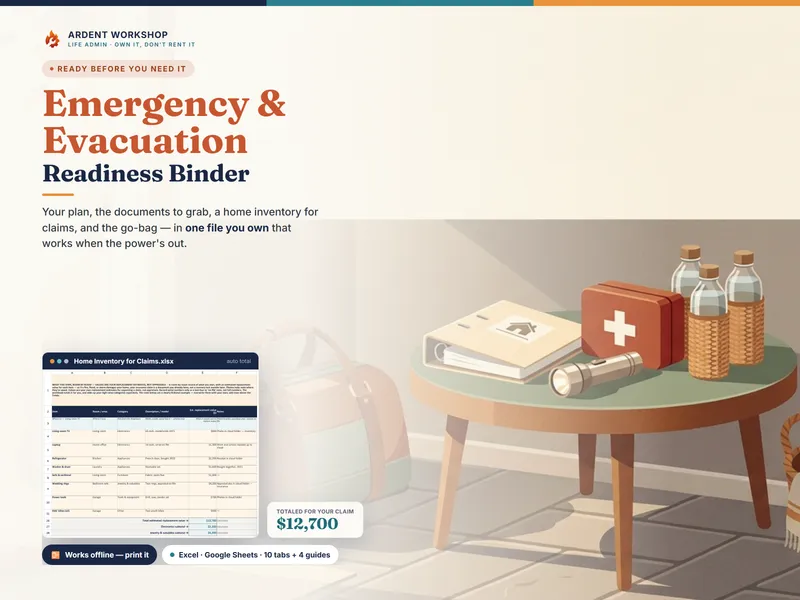
- Damage & Loss Inventory — room by room, with actual cash value and held-back depreciation per item
- Living Expenses (ALE) — the claimable increase over normal, against your policy’s limit
- Contractors & Estimates — bids against the insurer’s own estimate, license and insurance checks, contract balances, lien waivers
- Rebuild Receipts — every dollar out, which coverage it should come back under, and what is unreimbursed
- Documentation Index — what you sent, to whom, when, and the confirmation number that proves it
- Correspondence Log — every call and letter, so you never argue from memory
- Contacts — the adjuster, the agent, the mortgage servicer whose name is on the check, your state insurance department
- Dashboard — what needs action and what is owed, pulled live from every other tab
Why not just a blank spreadsheet?
A blank sheet gives you columns. It will not depreciate an item by its category and age, does not know that living expenses pay only the increase, carries no table of the deadlines a disaster creates, and cannot tell you how much depreciation is still being held back. Those four things are the product.
Own it, don’t rent it
A rebuild outlasts most apps, and a claim can run longer than a subscription you forgot you had. Buy it once and keep it — no seats, no monthly fee, and no company holding the record of what you lost that can change its terms while your claim is still open. Works in Excel, Google Sheets (a one-click “Make a copy” link is included), and LibreOffice Calc.
Privacy — the one rule
This file records what you have and where it lives, never the keys to it. No policy logins, no passwords, no full account numbers — which is exactly what makes it safe to keep, to back up off-site, and to hand to someone helping you. It is also the file you will not be able to reach if it only exists on a device in the damaged house.
An organizer — not insurance, legal, tax, or public-adjusting advice
Ardent Workshop is not affiliated with, endorsed by, or connected to FEMA, the Small Business Administration, any insurance company, or any government agency. This binder helps you sort and track your own records, losses, dates, and spending. It does not file anything, does not value your loss, does not adjust your claim, and guarantees no result.
What is covered, how it is valued, and when anything is due are set by your policy, by your state, and by the letters your insurer, FEMA, or the SBA send you. Every window and every depreciation rate in it is an editable starting point for your own planning — not your deadline and not your carrier’s schedule. The example household, addresses, companies, claim numbers, and figures are fictional and illustrative, including the policy limits shown. Casualty-loss tax treatment is narrow and differs in a federally declared disaster — this binder keeps the records; ask a tax preparer.
Just starting? The free After-the-Disaster First Steps Checklist is the one-page list of the calls to make, the claims to open, and what to photograph before anything moves — no signup.