The honest framing is "own it, don't rent it," and for renters it has an unusually sharp edge. A portal is not a bad product; it is somebody else's product. It holds the landlord's version of your tenancy, arranged for the landlord's purposes, and your access to it commonly ends the day the tenancy does — which is usually before a deposit statement arrives. How long before is set by your state.
They are not competing for the same job
It helps to separate the two jobs that get bundled together under "managing a rental."
- Running the tenancy while it happens — paying rent, raising a maintenance ticket, signing an addendum, messaging the manager. A portal is good at this, and if your landlord uses one you should use it.
- Keeping the record of what happened — what the place looked like before you lived in it, what you reported and when they answered, what you paid, and what you can prove. Almost nothing in the first category is designed to serve the second, because the second is mostly useful to you.
That is why the comparison below is not feature-by-feature. It is about who the record belongs to.
What each side is actually good at
| What matters | Rental-management app / tenant portal | A renter's binder you own |
|---|---|---|
| Built for | The landlord or property manager; the tenant gets an account | The tenant |
| Where it lives | The vendor's servers, under the landlord's account | A file you control — an .xlsx on your own drive, or a Sheet in your own account |
| Access after move-out | Commonly ends with the tenancy | Permanent; moves with you to the next lease |
| Rent payment and ticketing | Yes — this is what it is for | No; keep using the portal for these |
| Day-one condition record | Sometimes, as the manager's inspection; export is not guaranteed to you | Yes — the core of it, photo flags included |
| Move-in vs. move-out comparison | Sometimes — the manager's inspection, on the manager's terms | Yes — a verdict per row, with a money total |
| Notice-to-vacate deadline | Sometimes a reminder | Both edges computed from your lease end and your notice period |
| Answering a deduction statement | Not what it is built for | Line by line, with the disputed gap calculated |
| Cost | The landlord's; you get an account | One-time purchase, yours to keep |
The comparison nobody else runs on your behalf
Compare two ends of a tenancy. Nobody at move-out is really arguing about what condition something is in — they are arguing about what changed, and whose it is. Answering that needs both ends of the record in the same place, and something to compare them with.
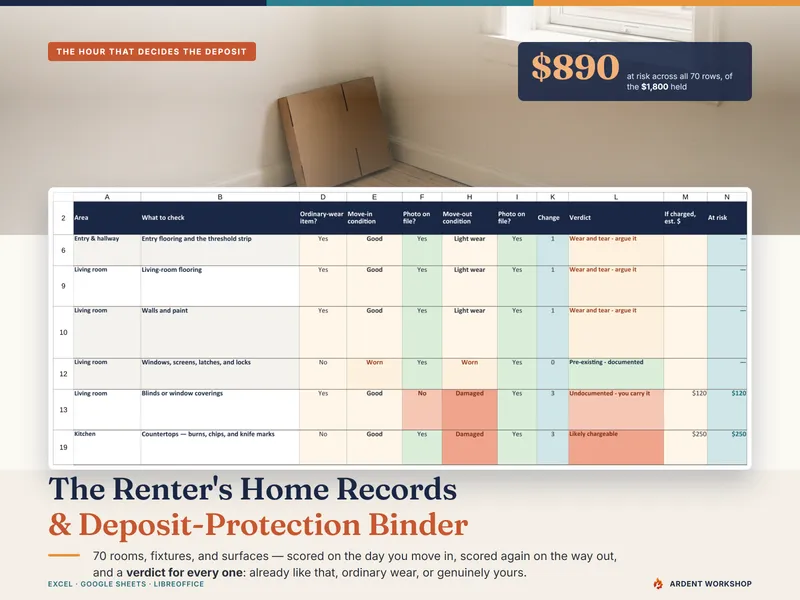
The Renter's Home Records & Deposit-Protection Binder scores 70 rooms, fixtures, and surfaces on the day you move in, records whether a dated photograph exists for each, and scores the same rows again on the way out. It then returns a verdict for every row — "pre-existing and documented", "pre-existing but with no photograph", "no change", "ordinary wear worth arguing", "undocumented", or "likely chargeable" — deciding by how far the item declined, whether you photographed it, whether the item wears with normal use, and how long you actually lived there. That third verdict is the normal wear and tear line, drawn against your own record. Only the rows your evidence cannot defend reach the money total, which is then set against the security deposit being held.
Where to draw the line for yourself
Use the portal for what it is for. Then keep your own copy of anything you might need after it closes: the photographs, the sent repair requests, the payment confirmations, and the dated record of what the place looked like before you lived in it. If you take nothing else from this comparison, take that — the format matters far less than the fact that it is yours.
Two habits make that copy safe to use. Keep it to conditions, dates, and photo references — no account numbers, no policy numbers, no logins, no door or alarm codes — because it is a file you may end up emailing to a landlord, a mediator, or a small-claims clerk. And if you keep it in a Sheet, share it with named people rather than by open link. For the walk that fills it in, see how to document a rental to protect your deposit.
The free Move-In Condition Checklist is a good place to start: the day-one walk on paper, pre-filled with a worked example. No email, no signup. More records and letters for tenants are on the templates for renters page.
Neither the binder nor this page is legal advice. Security-deposit limits, permitted deductions, itemization requirements, and return deadlines are set by your state — sometimes your city — and by your lease. They differ enormously and they change, so look yours up rather than relying on a general page: USAGov's tenant-rights and landlord-complaint page (opens in new tab) is a reasonable place to find the agency that covers your state. Where real money is at stake, a tenants' rights organization or a legal-aid organization near you (opens in new tab) is the next call.
Frequently asked questions
- Is a renter's binder or a rental-management app better for protecting a security deposit?
- They are built for different people, and that is the whole answer. Rental-management apps and tenant portals are made for the landlord or the property manager — rent collection, maintenance ticketing, lease documents, messaging — and hosted on the vendor's servers. A renter's binder is a workbook you keep on your own drive, recording the condition of the unit at both ends of the tenancy, every repair you asked for and when, every payment, and where the photographs live. For deposit protection the owned file wins for one structural reason: your access to the landlord's portal commonly ends when the tenancy does, which is usually before the deposit statement arrives — how long before is set by your state. Keep using the portal for what it is for, then keep your own copy of anything you might need to produce later.
- Can't I just use the landlord's tenant portal as my record?
- You can while you live there, and you should use it for whatever your lease requires. The problem is what it is for and how long it lasts. A tenant portal records the landlord's view of the tenancy — tickets raised and closed, payments received — and export is not something you should assume you will have. It is not built to hold your day-one photograph of the bathroom caulk, and where an inspection module exists it belongs to the manager rather than to you. Access commonly ends with the lease. Use it, then keep your own copy: a dated email to yourself, or a file you own.
- What does a renter's binder do that an app doesn't?
- It compares two ends of the tenancy, and it does it for you rather than for the landlord. The Renter's Home Records & Deposit-Protection Binder scores 70 rooms, fixtures, and surfaces on move-in day, records whether a dated photograph exists for each one, and scores the same rows again on the way out — then returns a verdict per row and totals only the rows your evidence cannot defend against the deposit being held. Alongside that it works your notice-to-vacate deadline backward from your lease end, judges repair requests against response windows that vary by urgency, and answers a landlord's itemization line by line. Where an app does run move-in and move-out inspections, it runs them for the landlord — the record, the photographs, and the access are theirs.
- Is there anything a rental app does that the binder cannot?
- Yes, and it is worth being straight about it. Apps and portals collect and schedule rent payments, run maintenance ticketing with the landlord on the other end, hold the executed lease, and give both sides one messaging thread — real conveniences a spreadsheet does not replace. If your landlord uses a portal, keep using it. The binder is not a substitute for paying rent or filing a ticket; it is the record of what happened, in your hands, in a form you still have when the portal is gone.
- Is a spreadsheet enough for a deposit dispute?
- The spreadsheet is not the evidence — the photographs are. What the workbook does is make the photographs usable: it tells you what to shoot and why, records which rows you actually have a dated photo for, compares day one against move-out row by row, and turns the result into a line-by-line answer to a landlord's itemization with a figure attached. That is what a demand letter or a small-claims filing needs. It is a records aid, not legal advice, and it deliberately states no jurisdiction's deposit rule: deadlines, permitted deductions, and the wear-and-tear standard are set by your state and your lease, and it asks you to type in your own.