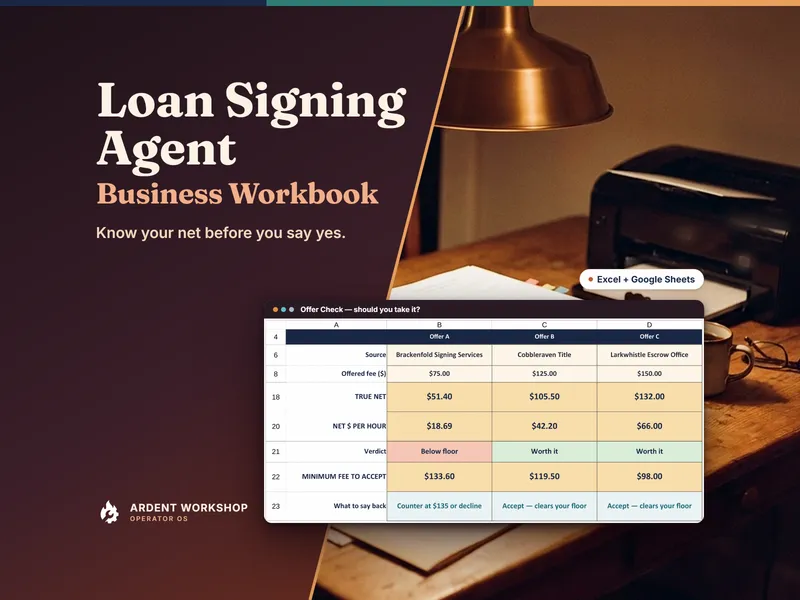
The honest framing is "own it, don't rent it." A notary scheduling app can be genuinely useful for the front of the job: getting orders in front of you, keeping the calendar straight, reminding you where to be. But the numbers that decide whether a signing was worth taking, such as what it netted after paper, toner, gas and your afternoon, which title company pays slowly, and how much of your year's fees are notarial, are something you want to own, not lease.
The positioning: blank spreadsheet → loan-signing workbook → notary software
A common starting point is a blank spreadsheet or a notes app and a pile of invoices, with no clear picture of what a package actually left behind. The two ways to get organized sit at opposite ends. A loan-signing workbook is the structured middle ground: real per-signing math, on a file you keep. Notary software is the heavier, rented option: intake and calendar features, and in some apps invoicing, payment, expense and mileage tracking too, but usually on someone else's server and behind a recurring bill, with your history inside it.
Spreadsheet vs notary scheduling app, side by side
| Consideration | Loan-signing workbook (owned) | Notary scheduling app (rented) |
|---|---|---|
| You own it | Yes: a file on your own drive or Google account | Depends on the app's terms; records are usually hosted |
| Cost | One-time purchase, no subscription | Typically a recurring monthly fee |
| Order intake & calendar sync | No: it's a workbook, not a scheduler | Yes: the thing it does best |
| Electronic journal | No: the printable acts record doesn't replace a state-required journal | Often available, depending on the app and your state |
| Net profit per signing | The core feature: fee minus printing, mileage and platform cut, plus net dollars per hour against your floor | Varies by app: check whether it nets printing, miles and time on each signing |
| Minimum fee to accept | Yes: the Offer Check tab prices an offer before you reply | Varies by app |
| Ranking sources by net dollars per hour and days to pay | Yes: the Sources tab | Varies by app: check whether it reports net per hour, not just fees |
| Receivables aging | Yes: 0 to 30, 31 to 60, 61 to 90 and 90+ day buckets with an overdue flag | Varies by app; some send invoices and track payments, so check whether unpaid ones are aged by days overdue |
| Notarial vs signing-agent fee split for the year-end summary | Yes: cap-checked, with a conservative self-employment tax estimate | Varies by app; some offer notarial-fee tax reports, so check how the split is figured |
| If you stop paying | You still have the file | Access can be lost |
When a notary scheduling app makes sense
If your main challenge is intake, with orders coming from several places, a calendar that needs to stay in sync, reminders so you never miss an appointment, or an electronic journal your state accepts, an app's features can be worth the subscription. Many signing agents could run an app for the front of the job and a loan-signing workbook for the money behind it. The two aren't mutually exclusive; just don't let a rented app be the only place your per-signing profit, your receivables and your tax records live.
When the workbook is the better fit
For knowing whether a signing was worth taking, the workbook wins. It nets every signing after the cost of printing the package, the miles driven, your all-in time and any platform cut. It tells you the minimum fee to accept, and the counter to send, before you say yes. It ranks your title companies and signing services by net dollars per hour and days to pay, ages what you are owed, and keeps cap-checked notarial-act fees apart from your signing-agent fee so the year-end summary gives a conservative estimate of the self-employment tax that actually applies. It has no subscription to keep it readable, works in Excel, Google Sheets or LibreOffice, and can't be taken away.
What the workbook does not do
It does not take orders, sync a calendar, or send reminders. It does not replace the journal your state requires: many states prescribe their own format, and the printable Notarial acts record is a business record of the acts behind each fee, not a substitute. And its tax figures are planning estimates, not a return. Fees for notarial acts are excluded from self-employment tax under section 1402(c) of the Internal Revenue Code, and Treasury Regulation 1.1402(c)-2 names a notary public among the public offices it covers; the Schedule SE instructions (2025) have you check box 3 and enter Exempt—Notary on Schedule 2 (Form 1040), line 4 when notary fees are your only self-employment income, or, with $400 or more of other self-employment earnings, enter it with your notary net profit on the dotted line to the left of Schedule SE line 3 and subtract it there. Signing-agent, travel and printing fees are not excluded, and how your expenses are shared between the two is a call for your tax preparer.
If you also drive for a living
Signing agents spend a lot of time behind the wheel. The workbook's Mileage tab pulls in the miles from every signing and adds your other business trips, and you enter the IRS standard mileage rate for your tax year yourself, since the IRS sets it each year. If you also run delivery or rideshare work, the Gig Driver Earnings & Mileage Workbook covers that side of the ledger.
Where to start
Try the free Loan-Signing Profit Calculator to net one signing, then run the whole business with the Notary & Loan-Signing Agent Business Workbook. New to the work? Read what a loan signing agent is, or browse the notary hub. This is a business reference, not tax, accounting, or legal advice. Not affiliated with or endorsed by any notary-software, scheduling or signing service, or by the National Notary Association or the IRS.
Frequently asked questions
- Do I need a notary scheduling app, or is a spreadsheet enough for loan signings?
- They do different jobs. A scheduling or notary-management app is built around the front of the job: taking orders, putting appointments on a calendar and sending reminders, and some also keep an electronic journal, send invoices, and track payments, expenses and mileage. A loan-signing workbook is an owned file for the money behind the job: it nets each signing after printing, mileage, your time and any platform cut, tells you the minimum fee to accept before you say yes, ranks the companies you work for, and ages what you are owed. You can use an app for scheduling and an owned workbook for the money.
- Does the workbook replace my state's notary journal?
- No. Many states prescribe their own journal format, and some require a bound paper journal or an approved electronic journal with specific entries. The workbook's printables include a Notarial acts record, but it is a business record of the acts behind each fee. It does not replace a state-required journal. Keep the journal your state requires exactly as your state says, and check what your scheduling or e-journal app does and does not cover.
- Can a spreadsheet help with the self-employment tax on notary fees?
- It can separate the numbers, which is the part that is easy to get wrong. Fees for notarial acts are excluded from self-employment tax under section 1402(c) of the Internal Revenue Code; signing-agent, travel, printing and courier fees are not. The workbook keeps the notarial portion apart from the signing-agent portion on every signing, checks the per-act fee against the state maximum you enter, and the Tax Summary gives a conservative estimate for planning a set-aside. It is an estimate to confirm with a tax preparer, not a return and not tax advice.
- What happens to my signing history if I stop paying for an app?
- That depends on the app, so check its terms before you rely on it. Hosted tools typically keep your records on the company's servers, so day-to-day access may depend on an active subscription, and what you can export varies. A workbook is a file you own: your signing log, receivables and expenses live in your own Excel file or Google Sheet, on your drive, with no monthly fee to keep them readable.