This isn't really spreadsheet-versus-software. It's "the right tool for where your studio is today." Most photographers should start on a workbook and stay there longer than the software companies would like — pricing from cost and tracking bookings is a solved problem in a spreadsheet. The skill is recognizing the day the work flips from the math being hard to the client back-and-forth being what eats your evenings.
When a workbook is exactly right
- You need to price packages from real cost, not guess down from a competitor.
- You want your cost of doing business and effective hourly handled correctly.
- You're tracking a manageable number of bookings, deposits, and balances.
- You — and maybe one other person — touch the numbers.
- You want something private, cheap, and bent exactly to how you sell.
At this stage a good workbook beats software outright. It costs once, it's yours, and there's no subscription or onboarding. The photographer and videographer hub collects the tools built for exactly this phase, and the free session & package pricing calculator is a no-signup taste of the math.
The signals you've outgrown it
You don't decide to switch — the inquiries tell you. The tells:
- Inquiries pile up faster than you can answer them. A lead form and automated first reply would save real hours every week.
- Contracts and questionnaires go out one by one. You're copying, pasting, and chasing signatures by hand.
- Clients expect to book and pay online. You're sending manual invoices when a portal would close the loop.
- Your calendar is busy enough to risk a double-booking. Scheduling, not pricing, is where mistakes now happen.
- Email reminders depend on you remembering. Balance-due and shoot-prep nudges should fire on their own.
One or two of these is normal. All of them, every week, is the work telling you a CRM would pay for itself.
Side by side
| What matters | Pricing & booking workbook | Studio-management software |
|---|---|---|
| Cost | One-time, low | Ongoing subscription, monthly or yearly |
| Pricing from cost | Full — cost of doing business, margin, effective hourly | Varies; many price-list, not cost-up |
| Bookings, deposits & balances | Tracked in the workbook, you update it | Tracked, with client-facing portals |
| Contracts & e-signature | Not included — handle separately | Built in, sent and signed online |
| Online payments | Not included | Client portal takes the card |
| Email automation | Manual | Sequences and reminders fire on their own |
| Per-shoot profitability | Full — revenue vs your real cost per hour | Varies; often revenue-only |
| Best for | Pricing and the money side; a manageable booking volume | High inquiry volume where client communication is the bottleneck |
The honest middle ground
Plenty of photographers run on workbooks far longer than they "should" — and that's fine, because the workbook is free of subscriptions and bent exactly to how they price and book. The hidden cost only becomes real when the hours you spend on client back-and-forth exceed what a CRM would cost. Track that honestly and the decision makes itself.
Price from cost either way
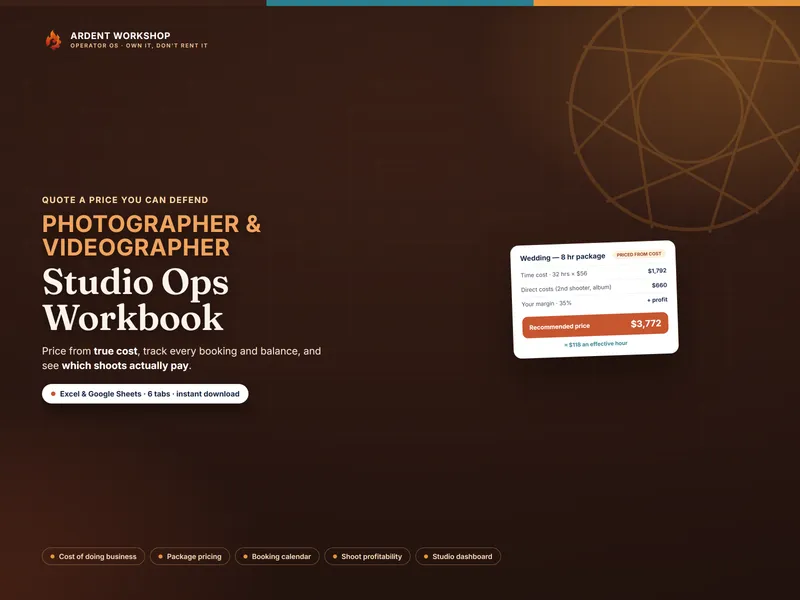
Here's the part the software pitch skips: even photographers who run a studio CRM still need a fast, defensible way to set the price. The Photographer / Videographer Studio Ops Workbook builds your cost of doing business once, prices every package up from it, and shows the effective hourly and per-shoot profit a price-list CRM often hides — so you charge a number you can defend whether or not you've added software for the client workflow. Own the pricing; rent the client tooling only when the inquiries demand it.
See the method end to end in how to price a photography package, learn what cost of doing business is, or browse every tool on the photographer & videographer hub.
Frequently asked questions
- When should a photographer move from a spreadsheet to studio-management software?
- When client communication and scheduling — not pricing — become the bottleneck. The tells: a steady volume of inquiries you're answering by hand, contracts and questionnaires you send and chase one by one, online booking and payment links clients expect, and a calendar busy enough that double-bookings are a real risk. Until then, a pricing-and-booking workbook usually does the job for a one-time cost instead of a monthly one.
- What can studio-management software do that a spreadsheet can't?
- Studio CRMs connect the client-facing workflow: lead forms, automated email sequences, online contracts and e-signatures, client-facing booking and payment portals, and questionnaire and gallery delivery in one place. A spreadsheet prices your packages, tracks your bookings and balances, and tells you which shoots paid — but it can't send a client a contract, take a card online, or trigger a reminder email on its own.
- Is a spreadsheet good enough for photography pricing and booking?
- For pricing and the money side, yes — often for years. A well-built workbook handles your cost of doing business, prices every package from real cost, tracks deposits and balances, and shows per-shoot profit and your effective hourly. Where a spreadsheet stops is the client-facing automation — online contracts, payment portals, and email workflows. Price and track in the workbook; add a CRM when the client communication volume, not the math, is what's eating your time.
- How much does photography studio software cost vs a workbook?
- A one-time pricing-and-booking workbook is a single low cost you own forever; a studio-management CRM is typically a recurring monthly or yearly subscription. The subscription earns its keep once the hours it saves on client communication exceed what it costs — but paying monthly before you have the booking volume to automate usually buys capability you're not using yet.