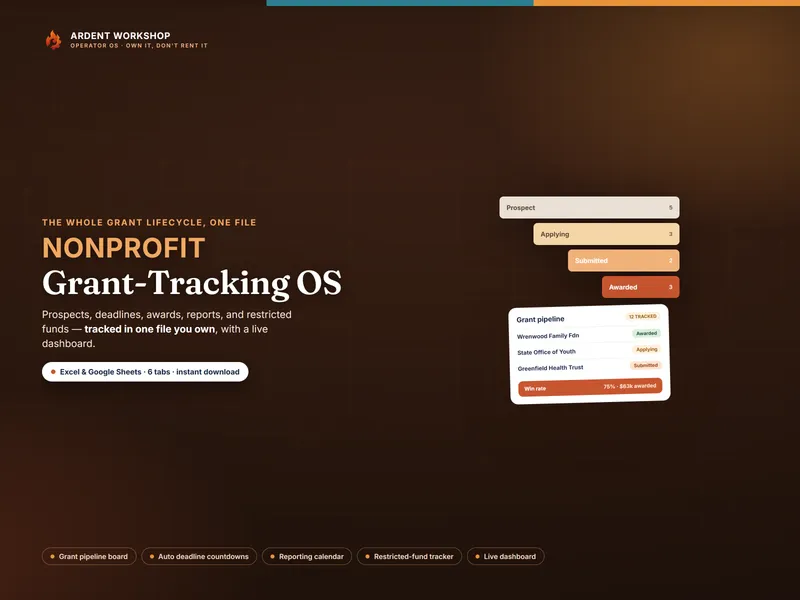
This isn't really spreadsheet-versus-platform. Tracking grants is one job that grants-management software happens to wrap in a subscription. The mistake is buying the whole per-year platform when the part you'll actually use — the pipeline, the deadlines, the reports, the fund balances — is something you can own outright in a file.
What each one is for
- A grant-tracking spreadsheet is a focused tool. Your pipeline from prospect to award, application deadlines that count down, the reports you owe, and your restricted-fund balances — in one connected file you keep. It answers “where do our grants stand, and what's due?”
- Grant management software is a platform. Automated reminders, multi-user editing, document and funder databases, an audit trail, and reporting workflows — sold as an annual subscription. It answers “run our whole grants operation for a team,” at a price to match.
New to the vocabulary? See what restricted fund accounting is in the glossary.
When a spreadsheet is exactly right
- One or two people run the grants, not a multi-person development team.
- You track a manageable number of grants — a dozen-plus a year, not hundreds.
- You want deadlines, a pipeline, reports, and fund balances in one place.
- You'd rather own the file once than pay a platform every year.
- You want your grants data in your own hands, in your own storage.
At this stage a workbook beats a platform outright for the grant-tracking job. The free grant deadline tracker is a no-signup taste. The one thing a grant tracker cannot do alone is tell you what is left to spend across the whole organization — that needs the giving side too, which is what the Nonprofit & Congregation Operations Kit joins up, turning it into months of runway on unrestricted cash only and a computed indirect cost rate with its basis. The free Nonprofit Operating-Reserve Check is ungated too, and computes that runway figure. The templates for nonprofits hub collects the rest.
The signals you may want a full platform
- Several people edit at once. A development team that needs real-time multi-user access and roles.
- You need automated reminders and workflows. The system emailing the team about deadlines, not a person checking the file.
- Grant volume is large. Hundreds of grants, document storage, and a built-in audit trail across the whole portfolio.
- You have someone to administer it. A platform needs an owner; a spreadsheet needs a development lead and a weekly check-in.
Even then, the tracking still comes down to a pipeline, deadlines, reports, and fund balances — the platform just hosts them for more people. The spreadsheet is the thinking; the platform is the plumbing.
Side by side
| What matters | Grant-tracking spreadsheet (owned) | Grant management software |
|---|---|---|
| What it is | A focused grant-tracking file | A broad grants-operations platform |
| Cost | One-time, low — you own the file | Annual subscription, often with setup |
| Pipeline, deadlines & reports | The whole point — one connected file | Full, with automation on top |
| Restricted-fund tracking | Award, spend, remaining, with a warning status | Often integrated with accounting |
| Automated reminders | You check the dashboard weekly | The system emails the team |
| Multi-user & audit trail | Share the file; you control access | Real-time multi-user, built-in trail |
| Setup | Open it and enter your grants — an afternoon | Implementation, config, training |
| Data ownership | The file is yours, in your storage | Hosted in the vendor's platform |
| Best for | A small team tracking a manageable grant load | A development team running grants at scale |
The honest middle ground
Plenty of nonprofits grow into a grants platform eventually, and that's the right move when automated workflows across a large portfolio and a multi-person team become the job. The mistake is the reverse: paying a yearly subscription to track a dozen grants, when an owned workbook does that part better and costs once.
Track your grants either way
Whichever you end up on, the tracking itself is a pipeline, deadlines, reports, and fund balances. The Nonprofit Grant-Tracking OS runs all of it from one owned file — a grant pipeline with win rate, an automatic deadline countdown, a reporting calendar, a restricted-fund tracker, and a live dashboard, in Excel, Google Sheets, or LibreOffice. Own the workbook; add a platform only when running grants at scale for a team becomes the job.
Frequently asked questions
- What's the difference between a grant-tracking spreadsheet and grant management software?
- A grant-tracking spreadsheet is a file you own that holds your pipeline, deadlines, reports, and restricted-fund balances in one place. Grant management software (a GMS) is a hosted platform that adds things like automated reminders, multi-user editing, document storage, and funder databases — usually sold as an annual subscription. One is a focused tool you keep; the other is a broad system you rent. For most small development teams, a well-built spreadsheet does the job a GMS is bought for, without the cost or the setup.
- Can a spreadsheet replace grant management software?
- For the work most small nonprofits actually do — tracking which grants are in the pipeline, what's due when, what was awarded, what reports are owed, and how much restricted money is left — an owned grant-tracking workbook does it completely. What a spreadsheet doesn't do is send automated email reminders, let several people edit at once in real time, store every funder document, or produce a full audit trail. If a multi-person development team needs those, a GMS earns its cost; if one or two people run the grants, the spreadsheet is the right size of tool.
- How much does grant management software cost vs a spreadsheet?
- An owned grant-tracking spreadsheet is a single low one-time cost — you keep the file and pay nothing monthly. Grant management platforms are typically annual subscriptions that can run from hundreds to several thousand dollars a year, often with setup and training. The subscription pays off when you need the full platform; paying every year just to track a dozen grants is renting far more system than the job needs.
- Is a grant-tracking spreadsheet secure and auditable?
- A spreadsheet you own is as private as the file controls you put around it, and the data never leaves your hands. It is a tracking and planning tool, not your accounting system — for a clean audit you still reconcile it against your books, and your auditor and each grant agreement define how funds are classified and reported. A GMS adds a built-in audit trail and permissions, which matter more as a team and grant volume grow; a small team gets most of the benefit from a tidy, current workbook kept in their own controlled storage.