Skip Navigation

Spreadsheet

Blood-Sugar / Diabetes Log — Glucose Tracker with Auto In-Range Flags, A1C Trend & Doctor Summary (Excel + Google Sheets)

A blood-sugar log that flags each glucose reading against your target range, tracks A1C, and makes a doctor-ready summary. Excel & Google Sheets.

Click to enlarge the image / Click × or press ESC to close

What you'll love

  • A Glucose Log that flags every reading for you — type the number and the context (fasting, before or after a meal, bedtime) and it marks it In range, High, or Low automatically
  • Flagged against YOUR targets, not a generic rule — you set your before-meal, after-meal, and bedtime ranges with your care team, and every flag reads from them
  • A Dashboard that counts a month of readings for you — your average, percent in range, highs and lows, an estimated A1C, and the before- vs after-meal breakdown, all live
  • An A1C & Trend tab — log each lab result and it estimates the average glucose it reflects and tracks the trend toward your goal
  • A one-page Appointment Summary computed from your log — recent averages, percent in range, highs and lows, and latest A1C, with room for the questions you want to ask
  • A Care Team tab — your doctor, endocrinologist, diabetes educator, and pharmacy with direct numbers (a record you keep, never a portal login)
  • Works in mg/dL or mmol/L, and one safety rule throughout — log the readings, never your patient-portal passwords or member numbers, so it's safe to share
  • An 8-tab workbook (Excel, Google Sheets & LibreOffice) + a Start Here guide, an Understanding Your Numbers guide, and printable pages · evergreen · instant download · a file you own

A meter shows you today. It can’t show you that your mornings have been creeping up for two weeks, that one particular meal spikes you every time, or that your after-meal numbers are fine while your fasting numbers drift. Those are the patterns that change what you and your care team decide to do — and they only appear when your readings are logged in context and read together.

The Blood-Sugar / Diabetes Log is a workbook that does exactly that. You log each reading with its context — fasting, before or after a meal, bedtime — and the log flags it In range, High, or Low against the targets you set. A dashboard counts a month of readings for you. An A1C tab keeps the lab history and estimates the trend. And a one-page summary turns it all into a page you can bring to your next appointment.

It flags every reading — against your targets, not a generic rule

There is no universal “normal” blood-sugar target. What’s right for you depends on your type of diabetes, your age, other conditions, and whether you’re pregnant. So this log never hard-codes a target. You set your before-meal, after-meal, and bedtime ranges and your A1C goal on one tab, and every flag — and the dashboard’s percent in range — reads from them. Change your targets and every reading re-reads itself.

A dashboard that does the counting for you

  • Your average, percent in range, and estimated A1C — computed live from your log
  • Highs and lows, counted against your targets
  • A before- vs after-meal breakdown that separates your readings by context, so a fine fasting average alongside high after-meal numbers is a pattern you can raise with your doctor

Nothing to update by hand — log a reading and every number moves.

Walk into your appointment ready

Before a visit, the Appointment Summary recaps your recent averages, your percent in range, your highs and lows, and your latest A1C — computed from what you logged — with space to write the questions you want to ask. Print it, or share the file. It’s the difference between “my sugars have been okay” and a page you can both talk through.

Own it, don’t rent it

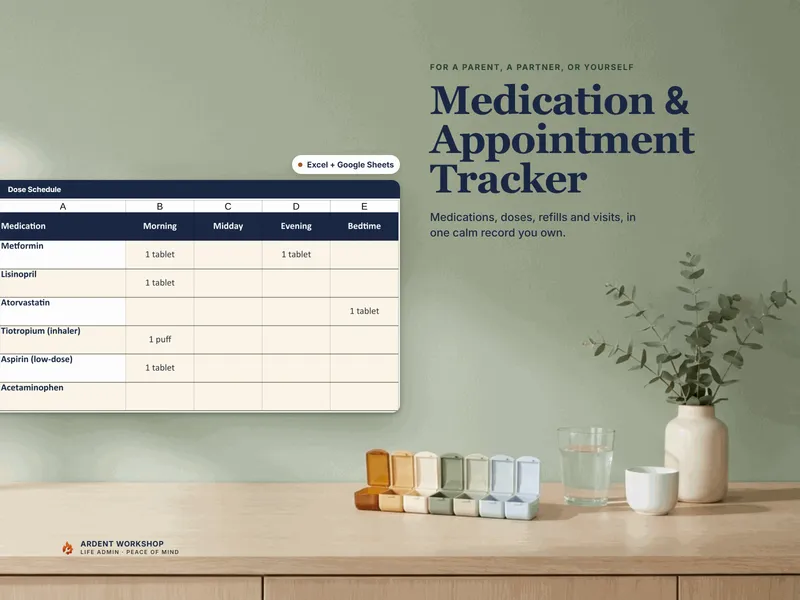
Unlike a subscription diabetes app holding your most sensitive records on a company’s server, this file is yours. It won’t lock behind a lapsed payment or vanish if a service shuts down. You decide where it’s stored and who can see it — and it works in Excel, Google Sheets, and LibreOffice, in mg/dL or mmol/L. Pair it with the Medication & Appointment Tracker to keep the whole routine in one place.

Try the free version first

Not ready for the full log? The free Glucose Log starter is a one-page printable — date, reading, and context — for the fridge or a bag. It’s a real taste of what the full diabetes tracker flags and charts for you.

An honest note

This is a record-organizing workbook for logging your own readings and A1C history to review with your care team. It is not medical advice, a diagnosis, a treatment plan, or dosing guidance, and it does not set or change any dose or insulin amount — it flags readings only against the targets you set, and always defer to your doctor and diabetes educator. The workbook ships pre-filled with a clearly fictional example you overwrite with your own. Not affiliated with or endorsed by any clinic, lab, device maker, or marketplace.
See it in action

Play

Built to last

  • Intuitive and straightforward design
  • Employs software best practices
  • Delivered as one spreadsheet that works in Microsoft Excel, Google Sheets, and LibreOffice Calc
  • Free updates — send us a message to be notified of updates when they are available
  • Completely customizable — add rows and columns, rename headings, and adjust formulas

In the download

This digital product is delivered as a zip file containing the following items:

  • 00 — Start Here Guide (PDF): why a blood-sugar log, setting your own targets, the one rule that keeps it safe to share, and how to read patterns
  • 01 — The Blood-Sugar / Diabetes Log (.xlsx, 8 tabs): Read Me, Start Here Checklist, Target Ranges, Glucose Log, Dashboard, A1C & Trend, Appointment Summary, Care Team — pre-filled with a clearly fictional example; opens in Excel, Google Sheets, or LibreOffice
  • 02 — Understanding Your Numbers Guide (PDF): logging in context, setting your ranges with your care team, reading patterns instead of single readings, and keeping the A1C history
  • 03 — Printable Pages (PDF): a target-ranges sheet, a blood-sugar log grid, an A1C history, and an appointment-prep page with questions to ask
  • One-click Google Sheets copy — open the included link, choose Make a copy, and get a ready-made native version in your Drive (no import)
  • READ-ME-FIRST.txt — orientation, the license, and the not-medical-advice note

Compatibility & terms

Unless otherwise specified, this digital product is delivered as a spreadsheet (an .xlsx file) designed to work in Microsoft Excel, Google Sheets, and LibreOffice Calc . It is not guaranteed to work in any other application.

This digital product is copyrighted. It is intended for personal use only. It is strictly prohibited to reproduce, resell or share this product, in part or in full, with or without modifications. No refunds, exchanges, or cancellations. Given this is a digital product, no physical product will be delivered.

Why a workbook

Most tools force a choice between a blank spreadsheet you build from scratch and a monthly app that's overkill. Ardent Workshop is the rung in between — structure you own.

  1. Blank spreadsheet

    Free, but you build and maintain every formula, tab and layout yourself.

    • Free
    • Infinite setup
    • No structure
  2. You are here

    Ardent Workshop

    Owned, structured, connected workbooks — a one-time price, yours to keep.

    • One-time price
    • Structured & connected
    • Yours to own
  3. Generic SaaS app

    Powerful, but overkill, rented and locked-in — built for someone bigger than you.

    • Monthly rent
    • Overkill
    • Lock-in

Ready to start

Instant download · Free lifetime updates · Personal use license

$12.95 USD
Buy now

Pairs well with

From the Guides

Hand-picked reading on how to actually use a tool like this.