Product facts
- Best suited to: independent hairstylists and barbers renting a chair and tracking their own service income and costs.
- Software: Excel, Google Sheets, and LibreOffice Calc. A native Google Sheets copy is included.
- Download: a seven-tab workbook, five PDF guides, a Google Sheets access PDF, and setup and license text.
- Scope: service pricing, income and tips, retail margins, booth costs, client rebooking, and a take-home summary.
- Purchase: one-time digital download. You enter your own appointments, costs, and chosen tax set-aside; the workbook does not calculate or file your taxes.
Know your real take-home behind the chair
When you rent a chair, the income is all yours — and so is the rent, the product, the no-shows, and the tax nobody withholds for you. It’s a good trade, but only if you can see the whole picture. The Booth-Renter Income & Client Workbook is the one connected file that shows it: what each service really earns, what the chair costs to keep, and what’s actually left at the end of the week.
Built for chair-renting hairstylists and barbers. It works in Excel, Google Sheets, and LibreOffice — and the Google Sheets version comes as a one-click “Make a copy” link, so there’s no importing and nothing to rebuild.
Price every service on purpose — not off the chair next to you
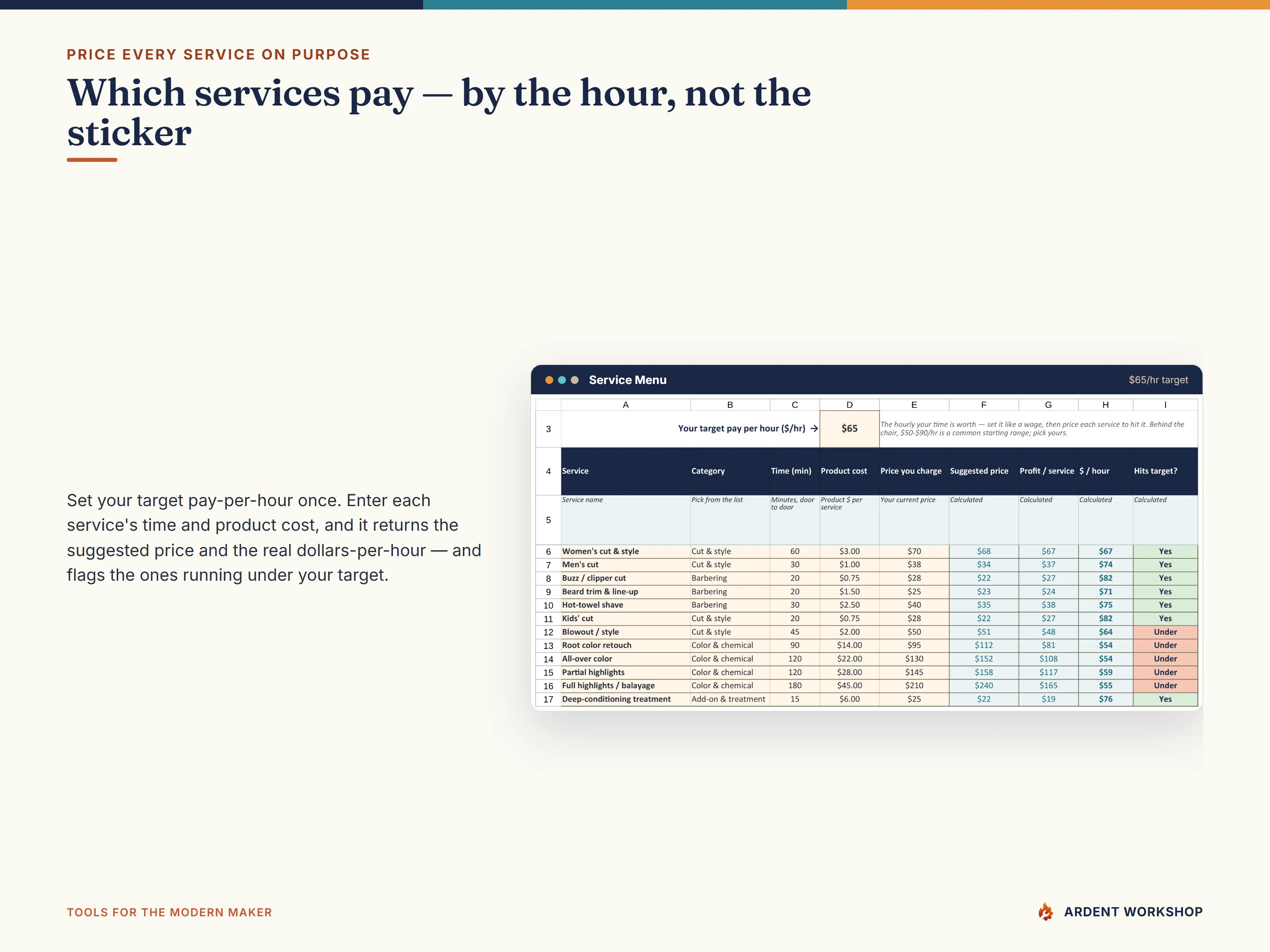
Behind the chair you sell time and product, so every price has to do two jobs: pay back the product the service burns, and pay you a real hourly for the chair time. Set your target pay-per-hour once, enter each service’s time and product cost, and the Service Menu returns a suggested price and the real dollars-per-hour each service earns — and flags the ones running under your target. A fast clipper cut can quietly out-earn a long, product-heavy color, and now you’ll see it.
See your true take-home, not the gross that rang through the drawer
The Take-Home Summary pulls every tab together: service income, tips, and retail profit in; booth rent and your costs out; then the slice you set aside for taxes. What’s left is the number that’s actually yours. It even checks your average ticket and rebooking rate, so you can tell a full week from a paid one.
The pieces, and how they connect
- A 7-tab workbook — Service Menu, Income & Tips Log, Retail, Booth Rent & Costs, Client & Rebooking, and a Take-Home Summary, tied together by a Read Me. Pre-loaded with a worked example you clear and replace.
- A one-click Google Sheets copy — the same workbook as a native Sheet, no import.
- Five PDF guides — Start Here, Pricing Your Services, Take-Home/Booth Rent & Taxes, Clients/Rebooking & Retail, and printable behind-the-chair sheets for the station.
Fill next month from this one
A chair full this week and empty next week isn’t a schedule — it’s a guessing game, and guessing is expensive when the rent doesn’t care how busy you were. The Client & Rebooking log keeps one line per regular, works out their next-due date, and flags — by color and a plain “No” — who left without booking again. Work that flagged list once a week, and you stop leaving next month’s chair to chance.
A note on taxes
Renting a chair makes you self-employed. This workbook helps you set aside for taxes by moving a slice of every dollar into a separate account — but it is a business reference, not tax, accounting, or legal advice, and it does not file or calculate your taxes. Every figure in the examples is illustrative; confirm your tax set-aside, quarterly estimates, and your license and insurance obligations with a qualified professional for your state.
Own it, don’t rent it
This is a file you own, not a monthly app you rent. Buy once, keep it forever, and run the chair your way — no per-client fees, no subscription, and your client list stays yours. It sits right between a blank spreadsheet (free, but you build it all yourself) and pricey salon software (overkill, locked-in, with your book inside someone else’s system).
Outgrowing the spreadsheet? When one chair becomes two, or you bring on an assistant, the same workshop builds Ardent Seller (opens in new tab) — inventory, sales, and client tracking in one connected place, on the same own-it ethic, with a free plan to start. The workbook is the entry point; Seller is the graduation step.
Try it free first: the Booth-Renter Take-Home Calculator is a free, no-signup taste of the take-home math in this workbook.
Example: check whether a service meets your hourly target
The Service Menu preview uses an illustrative $65 hourly target. A 60-minute cut and style with $3 in product cost has a suggested price of $68: $65 for the hour plus $3 for the product. At the example’s actual charge of $70, the service leaves $67 after product cost, or $67 per hour, and is marked as meeting the target.
That service figure is before booth rent, other overhead, and your tax set-aside. Enter those separately in the workbook to see the wider take-home picture. Replace the example target, time, product cost, and price with your own figures.
Before you buy
How do I open the Google Sheets version?
Open the included Google Sheets access PDF and follow its link, then choose Make a copy to save the native workbook to your own Drive. You do not need to import the Excel file.
Will this calculate how much tax I owe?
No. You choose a tax set-aside, and the workbook includes that amount in its take-home planning. It does not determine your tax liability or file a return. The included tax guide explains the role of the set-aside.
Does the rebooking log book appointments for me?
It records client visits and frequency, calculates next-due dates, and flags clients who left without rebooking. You use that list to follow up and arrange the next appointment.
What can I try before buying?
The free Booth-Renter Take-Home Calculator demonstrates the take-home calculation. The full workbook also connects the service menu, appointment income and tips, retail, booth costs, and client records.
For usage permissions, including team use and completed client documents, see the Digital Product License. For setup help, contact Ardent Workshop.