Click Make a copy and you have your own bill tracker spreadsheet in Google Drive: a native Google Sheet with every formula already working, nothing to import or convert. Enter each bill and payday once. It assigns every bill paid from your forecast account (the account your bills come out of, set on Setup) to the paycheck that has to cover it, shows what is left after each check, walks your balance forward 90 days to its lowest point, catches late payments from your log, and turns annual bills into a monthly set-aside.
New to bill tracking? Try the free bill tracker — a single Bills tab that works out each next due date, in Excel or imported into Google Sheets — then come back here for the paycheck planner, the 90-day balance forecast and the late-payment check.
Your own copy in Google Drive, in one click
The download includes an Open in Google Sheets PDF with a Make a copy link. One click puts the whole workbook in your Drive, with no upload and no import step. The Excel file is in the same download if you ever want it offline.
The copy opens on a worked example: a fictional household with 23 sample bills, so you can watch each tab calculate before you touch anything. When you are ready, follow the clear-the-sample steps in the Start Here guide and type your own bills and paydays. The Setup tab has an as-of date override that pins the sample “today” to October 5, 2026; clear it and the sheet uses the real date.
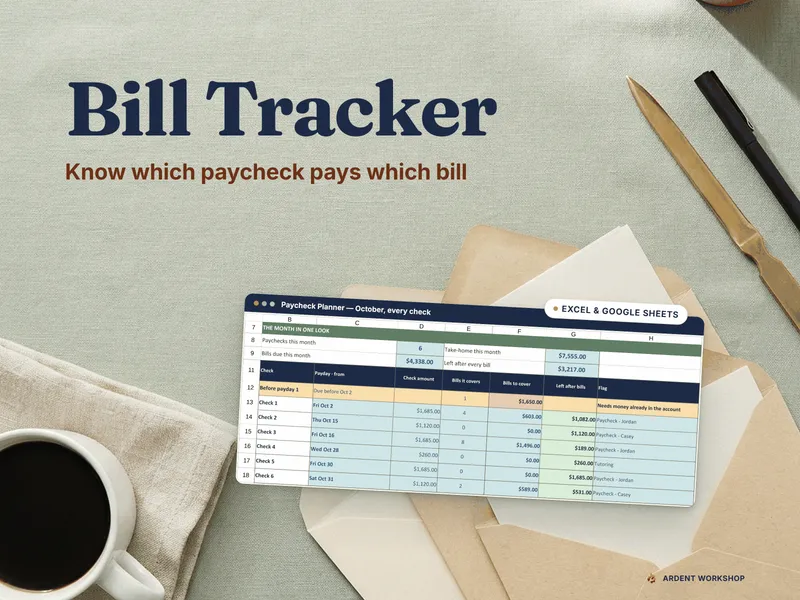
Which paycheck pays which bill?
Pick a month on the Paycheck Planner and every bill due date is assigned to the latest payday on or before it. For each check you see the bills it covers, the total to cover and what is left after bills. Bills that fall due before the month’s first payday are flagged Needs money already in the account, which is the rent-on-the-1st problem. An itemized list below has one row per due date and names the check that pays it.
The planner counts bills paid from the forecast account you set on Setup. A bill charged to a card is covered by that card’s own bill, so it does not double-count.
Will my balance dip before payday?
The Cash-flow Forecast starts from your account balance and walks 90 days, day by day: paydays in, bills and everyday spending out. It reports your lowest projected balance and its date, the days below your cushion, the first day below it and the balance on day 90, with a line chart of balance against your cushion. In the example household, the low point is $297 on October 14, three days under a $400 cushion, just before the October 15 payday. Those are sample numbers, there to show the engine working.
If the forecast account on Setup matches no bill or income, a CHECK SETUP line tells you so rather than quietly showing a flat line.
Enter each bill once
On the Bills tab, give each bill an amount, a frequency, a due day from 1 to 31, autopay yes or no, the account it is paid from, the payee or website, a category and a status. The sheet works out the next due date, days until, a due status (Overdue, Due soon, Autopay, Upcoming or Paid), monthly and annual equivalents, the last date paid and a flag for duplicate names. It holds up to 60 bills and 12 income sources.
The frequency engine handles 8 billing frequencies: weekly, every 2 weeks, twice a month, monthly, every 2 months, quarterly, twice a year and annual. Every-2-weeks paydays run on true 14-day cycles, and a bill due on the 31st lands on the last day of shorter months, such as February 28 or 29 and April 30. Categories are editable, with up to 20 for bills and 20 for income.
Which bills did I pay late?
Log each payment on the Payment Log: date paid, bill, amount, any late fee and a confirmation number. The sheet works out which due date each payment covers, how many days late it was, and whether it was On time or Late. The log holds 400 rows. Year at a Glance shows every bill by month as Paid, Late, Unpaid, Auto or Not due, with months paid, late count, unpaid count and late fees for each bill.
What do I need to act on today?
The Dashboard opens with an ACT NOW list of the manual bills that are overdue or due within your window, soonest first. Autopay bills stay off it, so the list holds only what you have to do by hand. Below it are the monthly picture (take-home, bills, everyday spending and what is left over), due, paid and late counts, late fees this year, the next-90-days low point, the sinking-fund set-aside, bills by category, your five biggest bills, the biggest price increases and income by category.
Annual bills without the surprise
Sinking Funds takes your non-monthly bills and turns each into a steady monthly set-aside: annual cost divided by 12, what you have saved so far, what is still needed and the monthly amount to be ready on time. Each one gets a status of Ready, On track, Behind or Short (Short shows the gap and the days until it is due). It tracks up to 15 funds. Price Watch ranks the bills whose amount changed by their annual impact, so the quiet increase on a renewal shows up.
The Calendar tab shows paydays and bills on their days for the month you pick, with month totals that match the Paycheck Planner.
What is included
- A one-click Google Sheets copy (the Make a copy link PDF) of the 12-tab workbook
- The Excel workbook (.xlsx), pre-filled with the sample household
- A 13-page Start Here guide: setup in about 15 minutes, the paycheck method, the forecast, late detection, sinking funds, autopay hygiene and auditing bills
- Printable sheets, Letter and A4: a monthly bill checklist, a paycheck plan, a year-at-a-glance grid and a sinking-funds sheet
- READ-ME-FIRST.txt
Prefer Excel?
The same download carries the Excel file, for desktop Excel 2016 or later, 365 and Excel for Mac. It uses cross-app formulas only, with no macros, so it also opens in LibreOffice Calc. The Excel listing is the same product: Bill Tracker for Excel.
Own it, don’t rent it
This is a one-time purchase. The Sheet is your own copy in your Drive, with no other app account to create (you need a free Google account to make the copy). It has no bank login, no account to link and no subscription. You pay once, keep the file and change it however you like.
This tracker does not sync with your bank or send reminders, and it does not plan debt payoff. It is a bills-and-paydays tool, and what you enter is what it calculates from.