It’s a Tuesday night. You’re staring at three job offers (or four colleges, or six mattresses), and every time you talk yourself into one option, a different one starts looking better an hour later. This excel decision helper is a weighted decision matrix template built for anyone who keeps flip-flopping on a high-stakes choice and wants a real way to settle it.
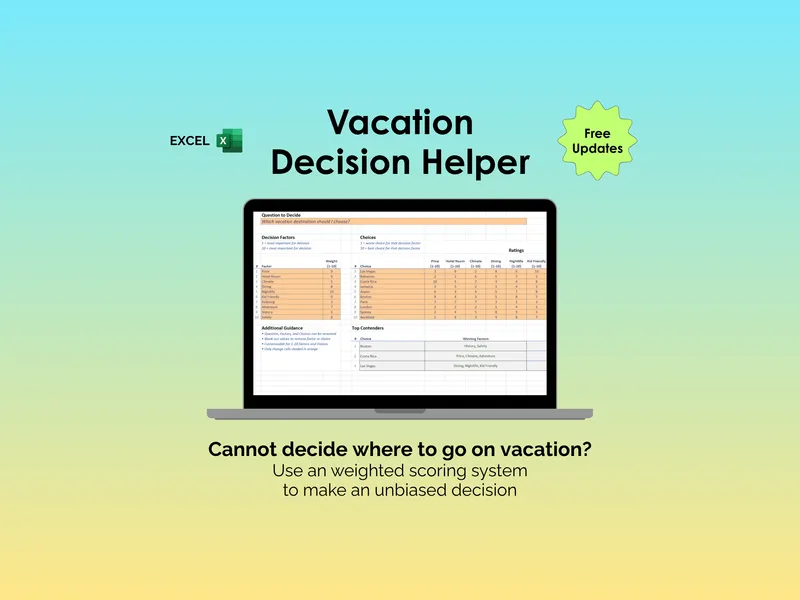
The trouble with most big decisions is that your gut keeps reweighting things in the moment. The weighted factor system fixes that by letting you list up to 10 decision factors and lock in a weight from 1 to 10 for each (so “salary” can quietly count more than “office view” without you re-arguing it every round). Once your weights are set, they stay set, and every choice gets scored against the same yardstick.
The other trap is comparing apples to apples across a long list. With room for up to 10 choices rated against your factors, the excel decision helper does the math for you and produces a single weighted score per option, so a Honda, a Toyota, and a used Subaru end up on the same scoreboard instead of in three separate browser tabs. You rate, it ranks. That’s the whole deal.
Knowing which option won is helpful, but knowing why it won is what makes you confident in the call. The Top Contenders view surfaces your top three choices along with the specific winning factors and losing factors driving each score, so you can see, for example, that your favorite house is winning on commute but losing on price (and decide whether you can live with that tradeoff). There’s also an Additional Guidance section to capture context the numbers can’t.
What makes this weighted decision matrix template different is that it ships as a fully blank, fully customizable file with a bonus tab of pre-built examples (job offers, a new house, a new car, comparing colleges) so you have a working starting point instead of a scary empty grid. It’s two tabs of Excel, free updates, and yours forever after one download. Open it the next time you can’t decide, and let the weights do the arguing.