Glancing at a 401k balance is not the same as projecting retirement — and most people have not done the second thing in a while. Most people answer that question with a number that means almost nothing on its own, because the real math involves decades of compounding, inflation, salary changes, Social Security timing, and what your spending actually looks like once paychecks stop. This Google Sheets retirement planner pulls all of that into one workbook and tells you whether your current trajectory holds up, and where to adjust if it does not.
The failure mode here is familiar: you assume “probably enough,” then keep contributing the same percentage for years without testing the assumption. The Google Sheets retirement planner closes that gap by turning your real numbers — income, savings, contribution rate, return expectations, retirement budget — into a year-by-year projection you can stress-test in minutes. Open the file, work through four sheets, and you stop guessing.
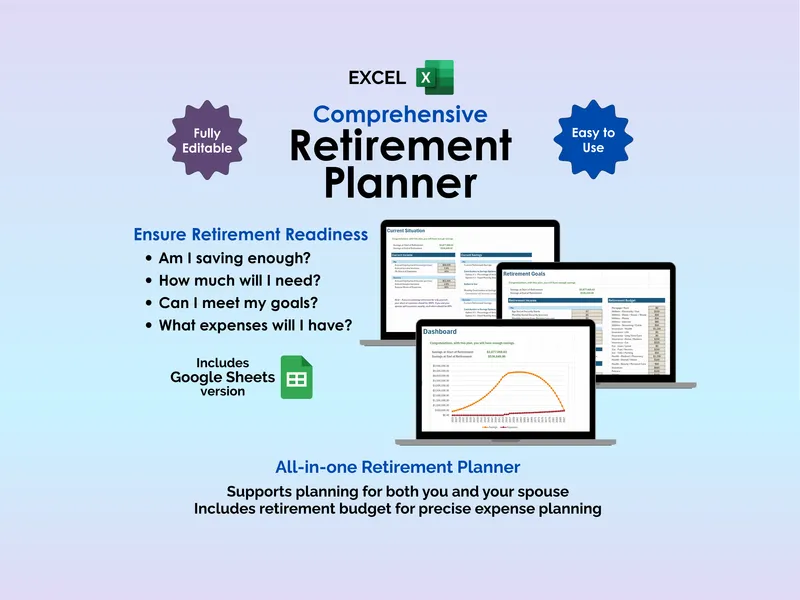
Start on the Setup sheet, which holds the assumptions most retirement projections quietly hide. Configure retirement age, life expectancy, inflation rate, and separate return rates for your working years and retirement years, with suggested defaults pre-filled so you have a starting point. Run an aggressive scenario, then a conservative one, and watch how the outcome shifts when you change a single cell.
Move to the Current Situation sheet to log where you actually are today. Enter income, existing savings, and contribution amounts for both you and your spouse on separate profiles, then choose whether contributions are a percentage of income or a fixed dollar amount. The planner factors in annual salary increases and inflation automatically, so you are projecting from real growth rates rather than a frozen snapshot.
Plan the spending side on the Retirement Goals sheet, where you enter expected income from Social Security, pensions, and any other source, then build a detailed retirement budget by category — housing, healthcare, travel, and the rest. The sheet gives you multiple options for calculating retirement expenses, so you can start from a single ballpark figure or itemize line by line. If you have been avoiding the line-item view because it feels heavy, start with the ballpark and refine later — that is how the planner is built.
The Dashboard brings the projection together: savings at the start of retirement, savings at the end, and a chart plotting savings against expenses across every year of the plan. Change any input upstream and the chart refreshes immediately, so you can see exactly when funds peak, when they start drawing down, and whether the curve clears your life expectancy. The Detail tab then shows the full year-by-year calculations behind that chart, so nothing in the projection is a black box.
Most retirement tools either lock your data behind a login or charge an advisor fee for a one-time projection. This Google Sheets retirement planner runs in your own Drive, includes the Excel version for offline work, and shares cleanly with a spouse for joint planning — no subscriptions, no data handed to a third party, no sign-up gate between you and the math.
Stop deferring the question. Open the planner, enter your numbers, and find out what your current trajectory actually produces.