This isn't really spreadsheet-versus-app. It's “the right tool for where your shop is today.” Most sellers should start on a workbook and stay there longer than the app companies would like — netting POD profit is a solved problem in a spreadsheet. The skill is recognizing the day the file flips from saving you time to quietly costing you time — and not subscribing a moment before.
When an owned workbook is exactly right
- You need to net each listing after base cost, fees, and shipping — on both integrated (Etsy) and royalty (Merch, Redbubble) platforms.
- You want profit ranked per design, so you know which art to make more of and which to retire.
- You sell a handful to a few hundred listings and update your log monthly, not hourly.
- You — and maybe one helper — touch the numbers.
- You want something private, cheap, and bent exactly to how you sell.
At this stage a good workbook beats an app outright. It costs once, it's yours, and there's no subscription. The print-on-demand seller hub collects the tools built for exactly this phase, and the free POD Profit Calculator is a no-signup taste of the math.
The signals you've outgrown it
You don't decide to switch — the catalog tells you. The tells:
- Logging sales is an all-day job. You're re-keying hundreds of orders across several platforms by hand every month.
- Fees change and your numbers don't. You'd rather the tool pull live sales and fees than re-enter them.
- Your sales live in five dashboards at once. Reconciling Etsy, Merch, Redbubble and more manually is the bottleneck.
- The catalog is too big to eyeball. You can't tell your winners from your dead designs without automation.
One or two of these is normal. All of them, every week, is the work telling you the file is done — and that's the moment to look at a connected system, not before.
Side by side
| What matters | Profit workbook | POD analytics tool |
|---|---|---|
| Cost | One-time, low ($19.95) — yours forever | Ongoing subscription, sometimes tiered by volume |
| Net profit per sale | Full — both integrated and royalty models, one formula | Full, pulled from connected platforms |
| Fees & sales | You enter them from a fee reference; nothing to sync | Pulled and synced live from each platform |
| Large multi-platform catalogs | Logged and rolled up by hand | Recalculated across every listing automatically |
| Where your data lives | In a file you keep (Excel, Google Sheets, LibreOffice) | In the app's system, behind the subscription |
| Profit per design | Built in — ranked, with best-seller and dead-design flags | Varies by app |
| Works offline | Yes — the Excel and LibreOffice files (Sheets has an offline mode) | No — needs the account and connection |
| Best for | Netting a shop from a handful to a few hundred listings | Large catalogs and high volume where live syncing is the bottleneck |
The honest middle ground
Plenty of POD shops run on a profit workbook far longer than they “should” — and that's fine, because the workbook is free of subscriptions and bent exactly to how they sell. An app genuinely wins on live sales syncing and automation across a big multi-platform catalog; the hidden cost of the workbook only becomes real when the hours you spend logging by hand exceed what an app would cost. Track that honestly and the decision makes itself.
Net your profit either way
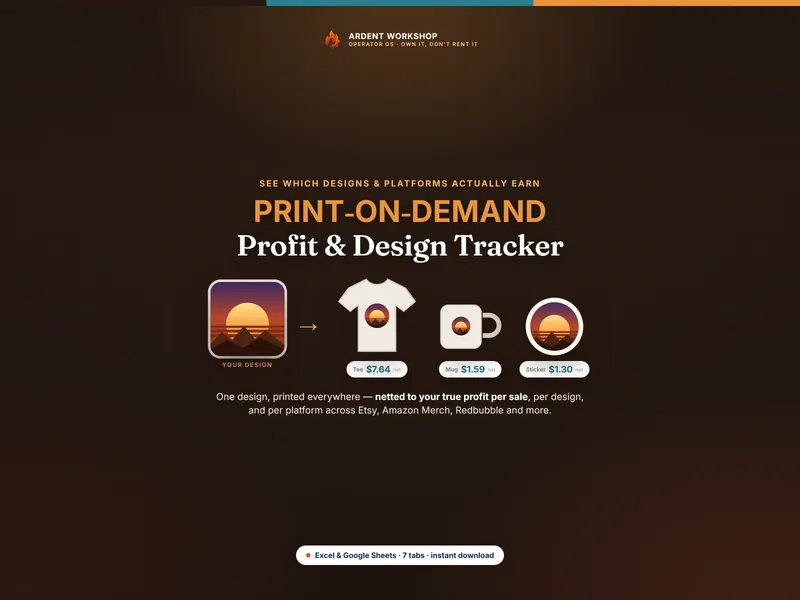
Here's the part the app pitch skips: whatever tool tracks your sales, you still need a fast, defensible way to net the profit and set the price. The Print-on-Demand Profit & Design Tracker nets every listing across seven linked tabs — in the worked example a $28 tee nets $7.64 (a 27% margin) while an $18 mug nets just $1.59, one design carries the catalog at ~$554, and the Pricing Planner back-solves the price you must charge to hit your target. Own the profit math; rent the analytics only when the catalog demands it.
Not ready to buy? Try the free POD Profit Calculator first — no signup — to net one listing right in your browser, then track your whole catalog with the workbook.
New to the math? Start with what print-on-demand margin is and what profit margin is, or browse every tool on the print-on-demand seller hub.
Frequently asked questions
- Do I need a POD analytics app to track my profit?
- Almost never to start. Print-on-demand profit is a solved problem in a spreadsheet: net each listing after base cost, fees, and shipping, log your sales, and roll it up by design to see which art earns. An owned workbook does all of that for a one-time cost. A monthly analytics app earns its keep only once live sales syncing across many platforms and a large catalog saves you more time than it costs.
- What can a POD analytics tool do that a spreadsheet can't?
- A dedicated app can pull your sales and fees automatically from each platform, recalculate profit across hundreds of listings without you touching a file, and show real-time dashboards across Etsy, Amazon Merch, Redbubble and more at once. A spreadsheet models any of that, but it won't sync sales on its own or update itself. The trade is the recurring monthly fee, and your numbers living in the app's system rather than a file you keep.
- Is a spreadsheet good enough to track print-on-demand profit?
- For the math itself, yes — usually for as long as you sell. A well-built workbook nets every listing on both platform models (integrated and royalty), ranks profit per design with best-seller and dead-design flags, compares platforms side by side, and back-solves your price from a target margin. Where a spreadsheet lags is automatic sales syncing and recalculating a very large multi-platform catalog on its own. Track profit in the workbook; consider an app only when manual updates become the bottleneck.
- How much does a POD analytics app cost vs a profit workbook?
- A profit workbook is a single low one-time cost you own forever (this one is $19.95). A POD analytics or profit-tracking app is typically a recurring monthly subscription, sometimes tiered by sales volume or connected shops. The subscription is worth it once the time it saves clearly exceeds what it costs — but paying every month before you have the catalog size or volume to use that automation usually buys capability you aren't using yet.