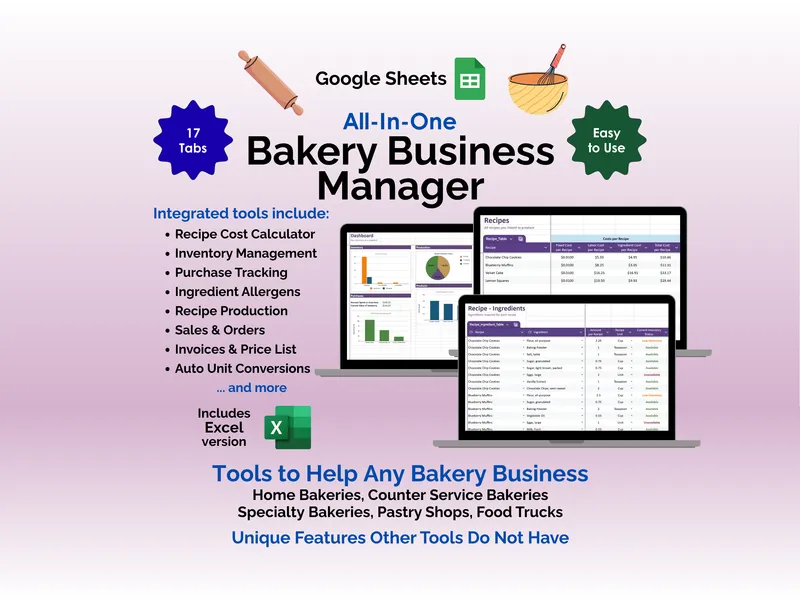
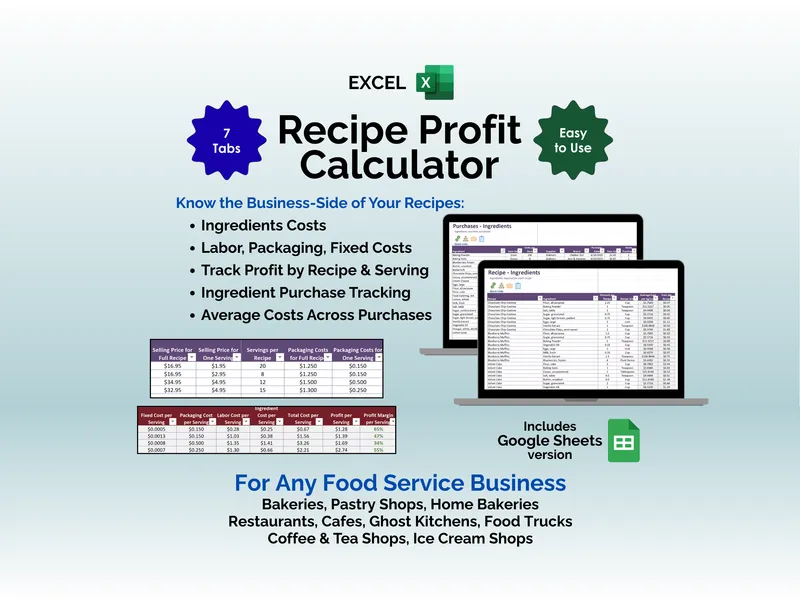
Food businesses don’t fail at costing. They fail at margin. The google sheets recipe profit calculator fixes that by computing profit on every recipe you make, every time you change a price, automatically.
Enter your ingredients, labor, packaging, and fixed costs once. The recipe cost spreadsheet then returns per-recipe and per-serving profit margins the moment you type a selling price. Conditional formatting flags margins in red, yellow, or green so you can see at a glance which menu items earn their place and which need a price bump.
This is the engine that makes the rest work. Because the per-recipe margin calculation pulls from live ingredient costs, raising the price of butter at Costco ripples through every cookie, cake, and scone in your book. No spreadsheet rebuilds. No stale numbers.
The Purchases tab tracks every ingredient buy with supplier, brand, date, and unit price, then averages costs across purchases so your margins reflect what you actually pay over time. Add a new batch of vanilla from Sam’s Club at a different price and the recipe cost spreadsheet folds it into the average automatically.
Unit conversions are automatic too. Buy flour by the pound, use it in recipes by the cup, and the tool handles mass-to-volume math by ingredient density. Imperial, metric, or mixed — pick what fits your kitchen.
The Inventory tab ships pre-filled with common ingredients to shorten setup. Every table filters and sorts. Drop-downs are wired up. Currency is configurable. Both Google Sheets and Excel versions are included in the download.
Built for bakeries, cafés, ghost kitchens, food trucks, ice cream shops, and home-based food sellers. Free updates and free support included. Stop guessing at pricing — let the per-recipe margin calculation tell you what each menu item is actually worth.