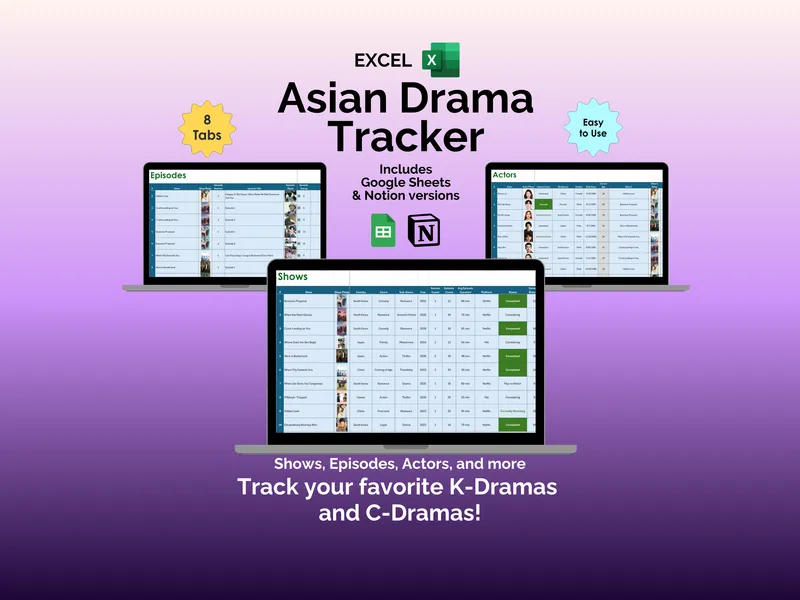
Try naming, without opening MyDramaList, which K-Drama that one actor was in. The half-finished Notes app entry doesn’t count. This Notion asian drama tracker is built for fans who watch across Korean, Chinese, Japanese, and Thai dramas and want a real home for it. The whole template revolves around one thing: five linked databases (Shows, Episodes, Actors, Critic Ratings, Journal) that talk to each other, so one entry in the Shows database pulls related episodes, performers, and reviews into a single place.
That linking is the part that makes the Notion kdrama tracker actually useful. When you add Business Proposal to the Shows database, every episode you log connects back to it automatically, every actor you save shows their appearances, and the critic ratings you record from IMDB, Google, or Rotten Tomatoes attach to the right title (no copy-pasting between databases, no orphaned rows). Every database page also has a built-in navigation section at the top, so you can jump between the five databases without hunting through the Notion sidebar — a small touch that adds up when you are deep in a watchlist rabbit hole.
The Shows database itself has 15 properties and three views (gallery, table, and list), covering title, cover art, genres, streaming platform like Netflix, air dates, and status. The gallery view is the one you will probably use most — it turns your watchlist into a wall of cover art for titles like First Frost, When Life Gives You Tangerines, or Alice in Borderland.
The Episodes database lets you give each episode a personal star rating and write down the favorite part, which sounds small until you try to remember which Business Proposal scene actually made you cry six months later. The Actors database brings 11 properties and four views, with photos, show appearances, and an Interest Level field so you can sort Park Bo-gum, Zhang Ruonan, and Kento Yamazaki by how invested you are. The Critic Ratings database logs scores side by side with rating, max rating, and percentage, which is genuinely helpful when you are deciding whether to commit to a 50-episode drama. The Journal database rounds it out with a daily log and calendar view that captures date, show, duration in minutes, mood, and notes (so future-you can see exactly how a Tuesday night turned into a four-hour binge).
The template works with a free Notion account on laptop, tablet, or phone, and your purchase also includes Excel and Google Sheets versions of the Asian Drama Tracker if you prefer spreadsheets. What makes the Notion asian drama tracker stick, though, is that the five linked databases keep working together as your watchlist grows — your favorite scenes, favorite actors, and favorite shows stay connected instead of scattered across notes you will never reopen.